The OneStream Community is temporarily frozen until June 29th due to the ongoing maintenance. Please read the blog post here to learn more.
Forum Discussion

Jerry
4 years agoNew Contributor
Variance Explanation Cube View
Hello,
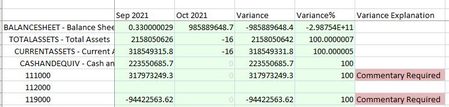
Is there a way to format a cube view column for variance explanation to be a certain color/have text in the cell based on the variance column? The attached/below is what we want it to look ...
 4 years ago
How are you populating the Variance Explanation in your screenshot above? You'll likely need a Dynamic Calc for that which will read the amount and then return a string of text to one of our Annotation View members. You won't be able to use a Dynamic Calc for the formatting portion. You'll have to use a BRString which is entered to the cell formatting property of the column.

Jerry
4 years agoNew Contributor
Hi EricOsmanski,
Do you know if there is a way to not highlight the data cells? But rather reference it in the Variance explanation section? We first had the highlighting similar to how you show, but the client doesn't like the look of that.
EricOsmanski OneStream Employee
4 years agoOneStream EmployeeSorry, I misread. Do you have a Dynamic Calc written which populates "Commentary Required"? If so, you can write a BRString to conditionally format the cell color based on the text. Something like the below.
Related Content
- 2 years ago
- 4 years ago