Forum Discussion

SRAI
4 years agoNew Contributor III
Cell Details Export via Business Rule
Hello Experts,
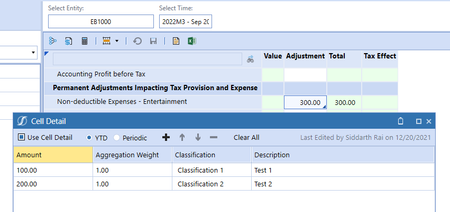
I am trying to export Cell Details to a CSV using a business rule function as shown below:
If args.CustomCalculateArgs.FunctionName.XFEqualsIgnoreCase("Export_CellDetails_...
 4 years ago
The E# (and the S#) is only needed, if it says filter in the parameter name, I like to correct my previous statement. In the help it says:
Dim sValue As String = BRApi.Finance.Data.ExportCellDetailToCsv(si, serverFilePath, entityDimensionName, entityMemberFilter, scenarioName, timeMemberFilter)
This means, your code should be like this:
Dim sValue As String = BRApi.Finance.Data.ExportCellDetailToCsv(si, csvFilePath, "
E#T_Entities", "E#EB1000", "S#ACTUAL", "T#2022M3")=
Dim sValue As String = BRApi.Finance.Data.ExportCellDetailToCsv(si, csvFilePath, "T_Entities", "E#EB1000", "ACTUAL", "T#2022M3")
Is it working?
ChristianW OneStream Employee
4 years agoOneStream EmployeeI only get this error message, if the old document is still open in excel. Close excel and it will work.
This is the code I used for testing.
Dim configSettings As AppServerConfigSettings = AppServerConfig.GetSettings(si)
Dim xfolderPath As String = FileShareFolderHelper.GetDataManagementExportUsernameFolderForApp(si,True, configsettings.fileShareRootFolder,si.AppToken.AppName)
Dim csvFilePath As String = xfolderPath & "\" & "Cell_Details.csv"

'  If File.Exists(csvFilePath) Then
'    File.Delete(csvFilePath)
'  End If

Dim sValue As String = BRApi.Finance.Data.ExportCellDetailToCsv(si, csvFilePath, "HoustonEntities", "E#[South Houston]", "Actual", "T#2022M3")
 SRAI4 years agoNew Contributor III
Hi Christian,
Cell_Details.csv was closed when I was getting the error. Based on your reply I closed all other excel instances and restarted my machine to make sure there is no hung instance but still same error. As you can see below there are only 2 programs opened.
- ChristianW4 years ago
It is a network drive, is it possible, that other processes are blocking the file? Like a virus checker or a backup tool?
I don't think it is necessary a Onestream server problem, because I can't replicate the problems, but I work locally.
Some things you might like to test:
- Can you delete the file manually using the file manager? Is it then working?
- Can you remove the delete section from your script (i don't think it is needed).
- If you add a timestamp to the file name, you will always create a new file. Is it still creating this problem?
I hope some of this helps.
- SRAI4 years agoNew Contributor III
Hi Christian,
There might be some process blocking my export and causing error. I will ask the admin to check this. I will also add a time stamp to see if the problem goes away.
Thanks for the suggestions.
Related Content
- 7 months ago
- 4 months ago