The OneStream Community is temporarily frozen until June 29th due to the ongoing maintenance. Please read the blog post here to learn more.
Forum Discussion

AndreaF
2 years agoContributor III
Interactive prompt
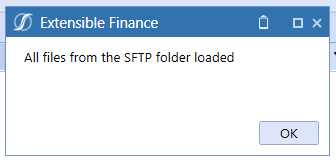
Hi all, it is pretty straight forward in an dashboard extender rule to return a message box to be displayed to the user in the dashboard (like the picture below). The question I have is: is i...
 2 years ago
Yes, its possible but will require building out a custom dashboard that displays when triggered. Many marketplace solutions have examples of this (example is in People Planning, Thing Planning, Capital planning, etc). When you click on any of the buttons on the top of those solutions tool bars, such as the delete register 'X' button, you will see a dashboard display. This allows you to entirely customize the look and feel of the prompt.

AndreaF
2 years agoContributor III
What about using the MsgBox function? Has somebody tried to use it in an dashboard extender rule?
Private Sub PromptYesNo(ByVal si As SessionInfo, ByVal globals As BRGlobals, ByVal api As Object, ByVal args As DashboardExtenderArgs)
Dim Msg As String = "Do you want to continue?" ' Define message.
Dim Style As MsgBoxStyle = MsgBoxStyle.OkCancel ' Define style.
Dim Title As String = "MsgBox Demonstration" ' Define title.
Dim Response As MsgBoxResult = MsgBox(Msg, Style, Title)
If Response = vbYes Then 'User chose Yes.
'Perform some action.
Else 'User chose No.
'Perform some action.
End If
End Sub
When trying to run the above Sub via a dashboard button I receive the following error message:
"Showing a modal dialog box or form when the application is not running in UserInteractive mode is not a valid operation. Specify the ServiceNotification or DefaultDesktopOnly style to display a notification from a service application."
Related Content
- 3 years ago