The OneStream Community is temporarily frozen until June 29th due to the ongoing maintenance. Please read the blog post here to learn more.
Forum Discussion

AndreaF
2 years agoContributor III
Interactive prompt
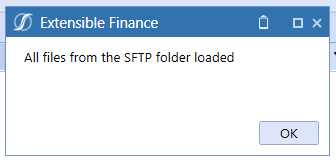
Hi all, it is pretty straight forward in an dashboard extender rule to return a message box to be displayed to the user in the dashboard (like the picture below). The question I have is: is i...
 2 years ago
Yes, its possible but will require building out a custom dashboard that displays when triggered. Many marketplace solutions have examples of this (example is in People Planning, Thing Planning, Capital planning, etc). When you click on any of the buttons on the top of those solutions tool bars, such as the delete register 'X' button, you will see a dashboard display. This allows you to entirely customize the look and feel of the prompt.

ChrisLoran OneStream Employee
2 years agoOneStream EmployeeYou need to remember your business rule will run on the server, in the cloud.
Not on your laptop/PC.
So MsgBox statement running on a server machine in an Azure cloud, isn't going to present a popop on the client laptop.
The MsgBox would work in Excel because the process actually runs on the client laptop/PC.
As per Rick's response, many Marketplace solutions do indeed prompt for confirmation Yes/No questions by using a simple Dialog popup in the form of a dashboard which is configured to show when a button is clicked.
Related Content
- 3 years ago