The OneStream Community is temporarily frozen until June 29th due to the ongoing maintenance. Please read the blog post here to learn more.
Forum Discussion

aricgresko
9 months agoContributor III
Call Assembly Business Rule from another Workspace in a Data Management Step
I'm looking to call a business rule that is located in a different workspace within Assemblies but am unsuccessful. The first screenshot below shows my DM step configuration. The business rule I'm ...
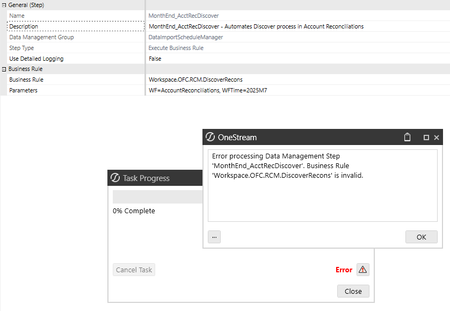
- 9 months ago
Have a look here:
How to Run Workspace Assembly from a Data Management Step In 6 Easy Steps | OneStream Communityin particular, this may help your situation:


JackLacava OneStream Employee
9 months agoOneStream EmployeeIt's not that simple, and I don't have the necessary knowledge of the RCM package structure to be able to help. You might have to talk to Support - if this is a recurring need, it should be surfaced in the solution in a simple way...

aricgresko
9 months agoContributor III
Thank you for the confirmation. I ended up going a different, simpler route, by calling this method (BRApi.Utilities.ExecuteDataMgmtSequence) which executes an out-of-the-box DM sequence I found within RCM. I should have went the simple route out of the gate, but learned a few good things within this post, so thank you guys!
- RobbSalzmann9 months agoValued Contributor II
for future reference,
"I was thinking that line 29 (Workspace.OFC.RCM.Legacy.SolutionHelper) would replace line 17 (OneStream.BusinessRule.DashboardExtender.RCM_SolutionHelper), for example. Any guidance on how to solve this issue I am running into?"Those two lines refer to different parts of the solution You might need them both.
Workspace.OFC.RCM.Legacy.SolutionHelper- Refers to the classes in the RCM Assembly of the Reconciliation Manager maintenance Unit, in the Legacy/SolutionHelper folder.
OneStream.BusinessRule.DashboardExtender.RCM_SolutionHelper - Refers to the RCM_SolutionHelper business rule which features an 11,000 line Main Class and a few smaller classes at the bottom.