Losing Dynamic Parameters on Dashboard Refresh


 OneStream Employee
Hi BenEppel
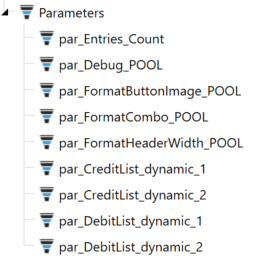
If your issue is that you want to duplicate a parameter and give it unique names per instance (option 1), then you need to set the bound parameter of the dynamic component to be the dynamic parameter name e.g. "par_CreditList_dynamic_1" and then set your logic for that parameter in the GetDynamicParametersForDynamicComponent method of the service e.g. something like this.... where you actually define the parameter and what it does in the method.
	 // Retrieve wsDynamicParamCollection
	 WsDynamicParameterCollection parameterCollection = api.GetDynamicParametersForDynamicComponent(si, workspace, dynamicComponentEx, string.Empty, repeatArgs.NextLevelTemplateSubstVarsToAdd, TriStateBool.TrueValue, WsDynamicItemStateType.MinimalWithTemplateParameters);

	 // check objects exist
	 if ((parameterCollection.Parameters != null) && (customSubstVarsAlreadyResolved != null))
	 {
		 // Create dynamic parameter from stored parameter prm_SelectCubeName
         WsDynamicCompParamMemberEx newParameter = parameterCollection.GetParameterUsingBasedOnName("prm_SelectCubeName");

		 // Check parameter is not null using null-conditional operator
         if (newParameter?.DynamicParameterEx?.DynamicParameter?.Parameter != null)
         {
			 // Change prm_SelectCubeName from a bound list to a delimited list
             newParameter.DynamicParameterEx.DynamicParameter.Parameter.ParameterType = DashboardParamType.DelimitedList;
			 // Update Display and Value items for new parameter
             newParameter.DynamicParameterEx.DynamicParameter.Parameter.DisplayItems = "These,Are,New,Values";
             newParameter.DynamicParameterEx.DynamicParameter.Parameter.ValueItems = "These,Are,New,Values";
         }
    }
Otherwise you have a conflict e.g. you are spawning new dynamic parameter names that are no longer related to your base parameter(s) or the bound parameters set on your component. I believe this explains the behaviour you are seeing where your parameters do not appear to be bound.
If you take an approach like above, you can use 1 stored parameter to create all of your dynamic parameters for Debit and Credit. The key is that you (a) define the dynamic parameters and (b) set the dynamic parameter name(s) you are expecting to return on your dynamic component(s) consistently
Hope this helps
Sam
OneStream EmployeeHi BenEppel
Were you able to resolve your issue?
One of the best ways to approach dynamic dashboards is to use the RepeatArgsList to do the heavy lifting. This can significantly reduce the amount of code required for each method and maintains consistency between methods...
There are some Tech Talks that talk through Dynamic Dashboards setup and content, that you might also find useful, on this subject. I also wrote a very simple example blog post here that shows how to construct repeat arguments using List<WsDynamicComponentRepeatArgs>.
Dynamic Dashboards – Passing Parameters with Repeat Arguments. | OneStream Community
Hope this helps
Sam