The OneStream Community is temporarily frozen until June 29th due to the ongoing maintenance. Please read the blog post here to learn more.
Forum Discussion

andreeaG
1 year agoNew Contributor II
Report paper orientation changed through an extender rule
Hello community,
Has anyone used a cube view extender rule to change between the portrait/landscape paper orientation on a PDF report? In our example, we are trying to use a parameter that allows ...
- 1 year ago
Yes, we used a cube view extender BR and based upon the forecast scenario name it would change the orientation from portrait to landscape. Here is our code:
Namespace OneStream.BusinessRule.CubeViewExtender.CUSTOMER_PageOrientation
	Public Class MainClass
		Public Function Main(ByVal si As SessionInfo, ByVal globals As BRGlobals, ByVal api As Object, ByVal args As CVExtenderArgs) As Object
			Try
				Select Case args.FunctionType
					Case Is = CVExtenderFunctionType.GetReportOptions

                    	Dim cvER As CVExtenderReport = args.Report.CurrentUIItem.Report
						Dim uiItem As CVExtenderReportUIItem = args.Report.CurrentUIItem

						If uiItem.UIItemType = XFReportUIItemType.PageFooterPageNumber Then
							uiitem.SetPageNumberDisplayInfo (True,"Page {0} of {1}")
						End If

						' --- Option 1: Using native DevExpress report classes , but requires Referenced Assembly to correct version of DevExpress.XtraReports.<version>.dll
						' Dim xtraReport As DevExpress.XtraReports.UI.XtraReport = cver.XRReport
						' xtraReport.Landscape = True
						' --- Option 2: Using System.Reflection to query the DevExpress class through generic objects. Slower to execute, but doesn't require hard-configured Referenced Assembly to the exact server path + version of DevExpress

                       Dim cvERProperty As System.Reflection.PropertyInfo = cvER.GetType().GetProperty("XRReport")
					   Dim currScenario As String = ScenarioDimHelper.GetNameFromID(si, si.WorkflowClusterPk.ScenarioKey)

                       If cvERProperty IsNot Nothing Then
						   If CurrScenario.XFContainsIgnoreCase("01") Or CurrScenario.XFContainsIgnoreCase("04") Or CurrScenario.XFContainsIgnoreCase("07") Or CurrScenario.XFContainsIgnoreCase("10") Then
'				            Return "IsColumnVisible = True,Bold=True"
							Dim xtraReport As Object = cvERProperty.GetValue(cvER)
                            xtraReport.Landscape = True
						Else
							Dim xtraReport As Object = cvERProperty.GetValue(cvER)
                            xtraReport.Landscape = False
						End If
                       End If

                   End Select

'                     XFBR(CUSTOMER_XFBRStrings, QTRFcst, CurrScenario = |WFScenario|)

'                       Dim CurrScenario As String = args.NameValuePairs.XFGetValue("CurrScenario")

'                       If CurrScenario.XFContainsIgnoreCase("01") Or CurrScenario.XFContainsIgnoreCase("04") Or CurrScenario.XFContainsIgnoreCase("07") Or CurrScenario.XFContainsIgnoreCase("10") Then
'				            Return "IsColumnVisible = True,Bold=True"
'		                   'qtr end is extra columns and landscape
'                       Else
'                           Return "IsColumnVisible = False,Bold=False"
'                           'non qtr end are less columns and potrait
'                       End If
				Return Nothing
		Catch ex As Exception
			Throw ErrorHandler.LogWrite(si, New XFException(si, ex))
        End Try
        End Function
	End Class
End Namespace
Then in all the cube views where this applied, we added the rule here:

T_Kress OneStream Employee
1 year agoOneStream EmployeeYes, we used a cube view extender BR and based upon the forecast scenario name it would change the orientation from portrait to landscape. Here is our code:
Namespace OneStream.BusinessRule.CubeViewExtender.CUSTOMER_PageOrientation
	Public Class MainClass
		Public Function Main(ByVal si As SessionInfo, ByVal globals As BRGlobals, ByVal api As Object, ByVal args As CVExtenderArgs) As Object
			Try
				Select Case args.FunctionType
					Case Is = CVExtenderFunctionType.GetReportOptions

                    	Dim cvER As CVExtenderReport = args.Report.CurrentUIItem.Report
						Dim uiItem As CVExtenderReportUIItem = args.Report.CurrentUIItem

						If uiItem.UIItemType = XFReportUIItemType.PageFooterPageNumber Then
							uiitem.SetPageNumberDisplayInfo (True,"Page {0} of {1}")
						End If

						' --- Option 1: Using native DevExpress report classes , but requires Referenced Assembly to correct version of DevExpress.XtraReports.<version>.dll
						' Dim xtraReport As DevExpress.XtraReports.UI.XtraReport = cver.XRReport
						' xtraReport.Landscape = True
						' --- Option 2: Using System.Reflection to query the DevExpress class through generic objects. Slower to execute, but doesn't require hard-configured Referenced Assembly to the exact server path + version of DevExpress

                       Dim cvERProperty As System.Reflection.PropertyInfo = cvER.GetType().GetProperty("XRReport")
					   Dim currScenario As String = ScenarioDimHelper.GetNameFromID(si, si.WorkflowClusterPk.ScenarioKey)

                       If cvERProperty IsNot Nothing Then
						   If CurrScenario.XFContainsIgnoreCase("01") Or CurrScenario.XFContainsIgnoreCase("04") Or CurrScenario.XFContainsIgnoreCase("07") Or CurrScenario.XFContainsIgnoreCase("10") Then
'				            Return "IsColumnVisible = True,Bold=True"
							Dim xtraReport As Object = cvERProperty.GetValue(cvER)
                            xtraReport.Landscape = True
						Else
							Dim xtraReport As Object = cvERProperty.GetValue(cvER)
                            xtraReport.Landscape = False
						End If
                       End If

                   End Select

'                     XFBR(CUSTOMER_XFBRStrings, QTRFcst, CurrScenario = |WFScenario|)

'                       Dim CurrScenario As String = args.NameValuePairs.XFGetValue("CurrScenario")

'                       If CurrScenario.XFContainsIgnoreCase("01") Or CurrScenario.XFContainsIgnoreCase("04") Or CurrScenario.XFContainsIgnoreCase("07") Or CurrScenario.XFContainsIgnoreCase("10") Then
'				            Return "IsColumnVisible = True,Bold=True"
'		                   'qtr end is extra columns and landscape
'                       Else
'                           Return "IsColumnVisible = False,Bold=False"
'                           'non qtr end are less columns and potrait
'                       End If
				Return Nothing
		Catch ex As Exception
			Throw ErrorHandler.LogWrite(si, New XFException(si, ex))
        End Try
        End Function
	End Class
End Namespace
Then in all the cube views where this applied, we added the rule here:
 andreeaG1 year agoNew Contributor II
Hi Teresa! Thank you for replying and providing us with the code you used. We were able to modify it to fit the reporting needs. Adding the code here for other users looking for this in the future.
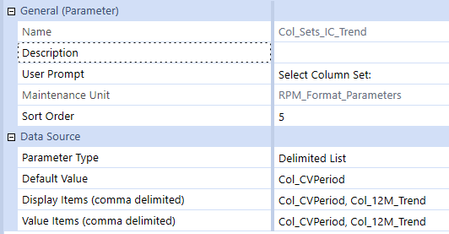
The client wanted the cube view PDF report to change orientation to landscape when they selected a specific column template on their prompt.
If "Col_CVPeriod" was selected, the orientation defaulted to landscape = false (portrait)
If "Col_12M_Trend" was selected, the orientation changed to landscape = true
	Public Class MainClass
		Public Function Main(ByVal si As SessionInfo, ByVal globals As BRGlobals, ByVal api As Object, ByVal args As CVExtenderArgs) As Object
			Try
				Select Case args.FunctionType
					Case Is = CVExtenderFunctionType.GetReportOptions

						'change to landscape if certain column set is selected
                    	Dim cvER As CVExtenderReport = args.Report.CurrentUIItem.Report
						Dim cvERProperty As System.Reflection.PropertyInfo = cvER.GetType().GetProperty("XRReport")
						Dim sValue As String = args.CubeView.CubeViewNameForSharingAllCols

						If sValue.XFEqualsIgnoreCase("Col_12M_Trend")
							Dim xtraReport As Object = cvERProperty.GetValue(cvER)
                            xtraReport.Landscape = True
						End If

				End Select

				Return Nothing
			Catch ex As Exception
				Throw ErrorHandler.LogWrite(si, New XFException(si, ex))
			End Try
		End Function
	End Class
Related Content
- 4 years ago