The OneStream Community is temporarily frozen until June 29th due to the ongoing maintenance. Please read the blog post here to learn more.
Forum Discussion

YanSavinsky
2 years agoNew Contributor III
Running DM package from the BR and completing the workflow step
I would like to give my users the ability to launch the DM sequence from the workflow step. I have the dashboard with the button that passes the parameters to the DM package and launches the package....
- 2 years ago
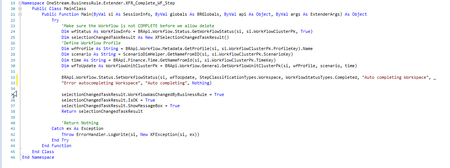
Create 1 Dashboard Extender rule with 2 functions - one to Complete and one to Revert. Do not do this by way of a DM Sequence. There is no API for Refresh Application. Take 1 step back to take 2 steps forward.
Hope this helps!
 2 years ago
Hi YanSavinsky,
I believe the following solution will give you what you are looking for with minimal changes to your existing logic:
- Remove the last step from your DM Sequence - EPU_Complete_WF
- Create a Dashboard Extender Rule that triggers the DM Sequence and updates the WF Status in case of success (see snippet below)
- Update the button to trigger this dashboard Extender Rule instead
Case Is = DashboardExtenderFunctionType.ComponentSelectionChanged
  If args.FunctionName.XFEqualsIgnoreCase("ProcessDMSequenceAndUpdateWFStatus") Then
    '{REP_SolutionHelper}{ProcessDMSequenceAndUpdateWFStatus}{}
    Dim selectionChangedTaskResult As New XFSelectionChangedTaskResult()
    selectionChangedTaskResult.IsOK = False
    selectionChangedTaskResult.ShowMessageBox = True

    'Launch data management sequence
    Dim customSubstVars As New Dictionary(Of String, String) 'You can use this dictionary to pass on parameters to your DM Sequence
    Dim objTaskActivityItem As TaskActivityItem = BRApi.Utilities.ExecuteDataMgmtSequence(si, "Workflow EPU Process IFRS", customSubstVars)
    objTaskActivityItem = BRApi.TaskActivity.GetTaskActivityItem(si, objTaskActivityItem.UniqueID)
    If (objTaskActivityItem.HasError) Then ' -- If there were errors
      selectionChangedTaskResult.Message = "Process completed with errors."
      Return selectionChangedTaskResult
    Else ' -- If DM sequence runs ok
      selectionChangedTaskResult.IsOK = True
      selectionChangedTaskResult.Message = "Process has completed successfully."
      ' You can paste and adapt your existing WF Status Update code here

      Return selectionChangedTaskResult
    End If
  End If
I hope this helps.
Thanks,
Fred


sameburn OneStream Employee
2 years agoOneStream EmployeeHi YanSavinsky
Try either setting a Refresh of the Main dashboard via your button. Or you can do the same with the XFSelectionChangedTaskResult object in a Dashboard Extender Business Rule. See example below
' Usage: {WF_SolutionHelper}{CompleteWorkflow}{WFProfile = [|WFProfile|], Scenario = [|WFScenario|], Time = [|WFTime|]}
If args.FunctionName.XFEqualsIgnoreCase("CompleteWorkflow") Then
	' Pass in variables
	Dim profileName As String = args.NameValuePairs.XFGetValue("WFProfile")
	Dim scenario As String = args.NameValuePairs.XFGetValue("Scenario")
	Dim time As String = args.NameValuePairs.XFGetValue("Time")

	' Create WorkflowUnitClusterPk from variables passed in from dashboard
	Dim wfClusterPK As WorkflowUnitClusterPk = BRApi.Workflow.General.GetWorkflowUnitClusterPk(si, profileName, scenario, time)
	' BRApi used to complete a workspace
	BRApi.Workflow.Status.SetWorkflowStatus(si, wfClusterPK, StepClassificationTypes.Workspace, WorkflowStatusTypes.Completed, "Workspace Completed", String.Empty, "Admin clicked complete workflow", Guid.Empty)

	' Declare XFSelectionChangedTaskResult
	Dim selectionChangedTaskResult As New XFSelectionChangedTaskResult()
	' Use to update the wfstatus automatically
	selectionChangedTaskResult.WorkflowWasChangedByBusinessRule = True
	selectionChangedTaskResult.IsOK = True
	' Used to refresh a named dashboard e.g. 0_Frame_XXX -> Update string below with your dashboard name
	selectionChangedTaskResult.ChangeSelectionChangedUIActionInDashboard = True
	selectionChangedTaskResult.ModifiedSelectionChangedUIActionInfo.SelectionChangedUIActionType = XFSelectionChangedUIActionType.Refresh
	selectionChangedTaskResult.ModifiedSelectionChangedUIActionInfo.DashboardsToRedraw = "[Enter the dashboard name that you want to refresh here]"
	Return selectionChangedTaskResult

End If
Related Content
- 2 years ago
- 1 year ago