The OneStream Community is temporarily frozen until June 29th due to the ongoing maintenance. Please read the blog post here to learn more.
Forum Discussion

YanSavinsky
2 years agoNew Contributor III
Running DM package from the BR and completing the workflow step
I would like to give my users the ability to launch the DM sequence from the workflow step. I have the dashboard with the button that passes the parameters to the DM package and launches the package....
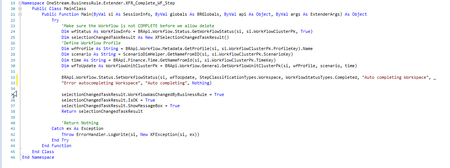
- 2 years ago
Create 1 Dashboard Extender rule with 2 functions - one to Complete and one to Revert. Do not do this by way of a DM Sequence. There is no API for Refresh Application. Take 1 step back to take 2 steps forward.
Hope this helps!
 2 years ago
Hi YanSavinsky,
I believe the following solution will give you what you are looking for with minimal changes to your existing logic:
- Remove the last step from your DM Sequence - EPU_Complete_WF
- Create a Dashboard Extender Rule that triggers the DM Sequence and updates the WF Status in case of success (see snippet below)
- Update the button to trigger this dashboard Extender Rule instead
Case Is = DashboardExtenderFunctionType.ComponentSelectionChanged
  If args.FunctionName.XFEqualsIgnoreCase("ProcessDMSequenceAndUpdateWFStatus") Then
    '{REP_SolutionHelper}{ProcessDMSequenceAndUpdateWFStatus}{}
    Dim selectionChangedTaskResult As New XFSelectionChangedTaskResult()
    selectionChangedTaskResult.IsOK = False
    selectionChangedTaskResult.ShowMessageBox = True

    'Launch data management sequence
    Dim customSubstVars As New Dictionary(Of String, String) 'You can use this dictionary to pass on parameters to your DM Sequence
    Dim objTaskActivityItem As TaskActivityItem = BRApi.Utilities.ExecuteDataMgmtSequence(si, "Workflow EPU Process IFRS", customSubstVars)
    objTaskActivityItem = BRApi.TaskActivity.GetTaskActivityItem(si, objTaskActivityItem.UniqueID)
    If (objTaskActivityItem.HasError) Then ' -- If there were errors
      selectionChangedTaskResult.Message = "Process completed with errors."
      Return selectionChangedTaskResult
    Else ' -- If DM sequence runs ok
      selectionChangedTaskResult.IsOK = True
      selectionChangedTaskResult.Message = "Process has completed successfully."
      ' You can paste and adapt your existing WF Status Update code here

      Return selectionChangedTaskResult
    End If
  End If
I hope this helps.
Thanks,
Fred

YanSavinsky
2 years agoNew Contributor III
Thank you, Mike!
Here is my issue: my current setup actually works exactly as I intended: there is a button on my dashboard that launches the DM sequence. The last step in that sequence runs the BR that completes the workflow step, which is type "Workspace". That rule DOES complete the step. The problem is that this step does not show as completed. The only way to make it show as completed is for the user to click on the "Refresh Application" icon.
In addition, on my dashboard I also have 2 buttons to complete and revert the workflow. These buttons are configured with the call to the Dashboard Extender, as you advised, and they work fine.
I wonder if there is a method in BRApi to "Refresh Application"?
FredLucas OneStream Employee
2 years agoOneStream EmployeeHi YanSavinsky,
I believe the following solution will give you what you are looking for with minimal changes to your existing logic:
- Remove the last step from your DM Sequence - EPU_Complete_WF
- Create a Dashboard Extender Rule that triggers the DM Sequence and updates the WF Status in case of success (see snippet below)
- Update the button to trigger this dashboard Extender Rule instead
Case Is = DashboardExtenderFunctionType.ComponentSelectionChanged
  If args.FunctionName.XFEqualsIgnoreCase("ProcessDMSequenceAndUpdateWFStatus") Then
    '{REP_SolutionHelper}{ProcessDMSequenceAndUpdateWFStatus}{}
    Dim selectionChangedTaskResult As New XFSelectionChangedTaskResult()
    selectionChangedTaskResult.IsOK = False
    selectionChangedTaskResult.ShowMessageBox = True

    'Launch data management sequence
    Dim customSubstVars As New Dictionary(Of String, String) 'You can use this dictionary to pass on parameters to your DM Sequence
    Dim objTaskActivityItem As TaskActivityItem = BRApi.Utilities.ExecuteDataMgmtSequence(si, "Workflow EPU Process IFRS", customSubstVars)
    objTaskActivityItem = BRApi.TaskActivity.GetTaskActivityItem(si, objTaskActivityItem.UniqueID)
    If (objTaskActivityItem.HasError) Then ' -- If there were errors
      selectionChangedTaskResult.Message = "Process completed with errors."
      Return selectionChangedTaskResult
    Else ' -- If DM sequence runs ok
      selectionChangedTaskResult.IsOK = True
      selectionChangedTaskResult.Message = "Process has completed successfully."
      ' You can paste and adapt your existing WF Status Update code here

      Return selectionChangedTaskResult
    End If
  End If
I hope this helps.
Thanks,
Fred
Related Content
- 2 years ago
- 1 year ago