The OneStream Community is temporarily frozen until June 29th due to the ongoing maintenance. Please read the blog post here to learn more.
Forum Discussion

FlorisvdPoel
2 years agoContributor
Tree view showing full hierarchy
Hi everyone,
Thanks in advance for helping.
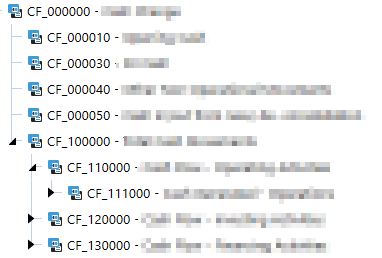
I am new to tree views and trying to get a simple hierarchy (from the account dimension) to show as a tree view. Part of the structure is shown in the ...
- 2 years ago
I like to use https://en.wikipedia.org/wiki/Recursive_function for things like this. Not sure if there is a more out of the box way as I haven't done a lot with treeviews.
I asked AI to turn your code into a recursive function. No idea if it works but it might set you on the path.
Sub BuildTree(ByVal si As SessionInfo, ByVal DimPk As DimPk, ByVal parentMbrId As Integer, ByVal parentMbrName As String, ByVal parentMbrDescription As String, ByVal textColour As String, ByVal imageSource As String, ByVal imageName As String, ByVal isBold As Boolean, ByVal isEnabled As Boolean, ByVal isSelected As Boolean, ByVal isExpanded As Boolean, ByVal treeCollection As XFTreeItemCollection)
    'Declare the child list of the parent
    Dim childList As List(Of Member) = BRApi.Finance.Members.GetChildren(si, DimPk, parentMbrId)
    'Dim the new XFTreeItem List
    Dim treeChildren As New List(Of XFTreeItem)()

    'Loop through the children
    For Each child As Member In childList
        ' Recursively build children of children
        Dim childTreeCollection As New XFTreeItemCollection()
        BuildTree(si, DimPk, child.Id, child.Name, child.NameAndDescription, textColour, imageSource, imageName, isBold, isEnabled, isSelected, isExpanded, childTreeCollection)
        ' Create XFTreeItem for current child and add children to it
        Dim childTreeItem As New XFTreeItem(child.Name, child.NameAndDescription, textColour, isBold, isEnabled, isSelected, isExpanded, imageSource, imageName, child.Name, childTreeCollection)
        treeChildren.Add(childTreeItem)
    Next

    ' Add the children to the parent
    Dim parentTreeItem As New XFTreeItem(parentMbrName, parentMbrDescription, textColour, isBold, isEnabled, isSelected, isExpanded, imageSource, imageName, parentMbrName, treeChildren)
    treeCollection.TreeItems.Add(parentTreeItem)
End Sub

' Usage:
Dim DimPk As DimPk = BRApi.Finance.Dim.GetDimPk(si, "actAccount")
Dim parentMbrId As Integer = BRApi.Finance.Members.GetMemberId(si, dimTypeId.Account, "CF_000000")
Dim parentMbr As Member = BRApi.Finance.Members.GetMember(si, dimTypeId.Account, parentMbrId)
Dim textColour As String = XFColors.Black.Name
Dim imageSource As String = XFImageFileSourceType.ClientImage
Dim imageName As String = XFClientImageTypes.StatusGrayBall.Name
Dim isBold As Boolean = False
Dim isEnabled As Boolean = True
Dim isSelected As Boolean = False
Dim isExpanded As Boolean = True
Dim treeCollection As New XFTreeItemCollection()
BuildTree(si, DimPk, parentMbrId, parentMbr.Name, parentMbr.NameAndDescription, textColour, imageSource, imageName, isBold, isEnabled, isSelected, isExpanded, treeCollection)


sameburn OneStream Employee
2 years agoOneStream EmployeeHi FlorisvdPoel given your use case, you might want to consider using one of the no-code approaches to achieve the same e.g. using the Member Tree component with a Member Dialog parameter type?
I wrote a blog on this here that you might find useful. Otherwise you will need a recursive function to iterate through each level in your hierarchy as per advice from DanielWillis
 FlorisvdPoel2 years agoContributor
Hi Sameburn, Daniel,
Thanks for your responses.
I indeed got the initial code from your blog sameburn. The reason I'm not going for the no-code solution is mainly because I have an external (mapping) table that maps certain accounts to other accounts within the structure I would like to present.
So, after I get the above structure in the tree view, I want to show the mapped accounts under the already presented members.
I will try the recursive function from DanielWillis!
Thanks a lot.
Floris
Related Content
- 2 years ago
- 2 years ago
- 3 years ago