The OneStream Community is temporarily frozen until June 29th due to the ongoing maintenance. Please read the blog post here to learn more.
Forum Discussion

cbriscoe OneStream Employee
2 years agoOneStream EmployeeVB.NET Rules - For Better Performance
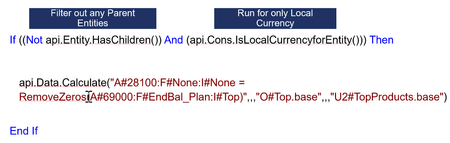
Api.Data.Calculate(“A#28100=A#69000”)
What is wrong with writing a calculation like this? Tips.
A#28100 might contain thousands of cells.
Calculation MAY work but will damage performance.
Def...
- 2 years ago
Hi cbriscoe great reminder!
While refactoring, consider also using short-circuit operators when optimizing code for efficiency. In this case, if HasChildren() evaluates true, there's no need to check if isLocalCurrencyForEntity is also true, 'AndAlso' provides the short-circuit to skip the unnecessary second evaluation.:If Not api.Entity.HasChildren() AndAlso api.Cons.IsLocalCurrencyForEntity() Then api.Data.Calculate("A#28100:F#None:I#None = RemoveZeros(A#69000:F#EndBal_Plan:I#Top)", "O#Top.base", "U2#TopProducts.base") End If
When setting these up, if you know which part of the If will most likely evaluate false, put that at the far left of the If statement where it will get looked at first by the IF. E.g. if isLocalCurrencyForEntity is false more than HasChildren, evaluate it first (furthest left).
Personally I'm willing to give up a tiny bit of performance for increasing readability:Dim isBaseEntity as Boolean = Not api.Entity.HasChildren() Dim isLocalCurrency as Boolean = api.Cons.IsLocalCurrencyForEntity() If isBaseEntity AndAlso isLocalCurrency Then api.Data.Calculate("A#28100:F#None:I#None = RemoveZeros(A#69000:F#EndBal_Plan:I#Top)", "O#Top.base", "U2#TopProducts.base") End If

RobbSalzmann
2 years agoValued Contributor II
Hi cbriscoe great reminder!
While refactoring, consider also using short-circuit operators when optimizing code for efficiency. In this case, if HasChildren() evaluates true, there's no need to check if isLocalCurrencyForEntity is also true, 'AndAlso' provides the short-circuit to skip the unnecessary second evaluation.:
If Not api.Entity.HasChildren() AndAlso api.Cons.IsLocalCurrencyForEntity() Then
    api.Data.Calculate("A#28100:F#None:I#None = RemoveZeros(A#69000:F#EndBal_Plan:I#Top)", "O#Top.base", "U2#TopProducts.base")
End If
When setting these up, if you know which part of the If will most likely evaluate false, put that at the far left of the If statement where it will get looked at first by the IF. E.g. if isLocalCurrencyForEntity is false more than HasChildren, evaluate it first (furthest left).
Personally I'm willing to give up a tiny bit of performance for increasing readability:
Dim isBaseEntity as Boolean = Not api.Entity.HasChildren()
Dim isLocalCurrency as Boolean = api.Cons.IsLocalCurrencyForEntity()

If isBaseEntity AndAlso isLocalCurrency Then
    api.Data.Calculate("A#28100:F#None:I#None = RemoveZeros(A#69000:F#EndBal_Plan:I#Top)", "O#Top.base", "U2#TopProducts.base")
End If
Related Content
- 2 years ago
- 2 years ago
- 2 years ago
- 6 months ago
- 8 months ago