The OneStream Community is temporarily frozen until June 29th due to the ongoing maintenance. Please read the blog post here to learn more.
Forum Discussion

WillVitale
2 years agoContributor II
Scenario Type 3 Not Showing Up in Workflow Profile
Hello,
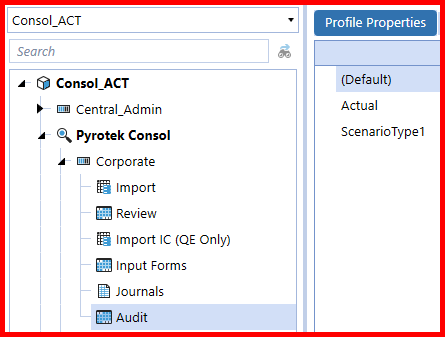
I created a new Scenario and assigned it as ScenarioType 3. I went into Application Properties and made sure ScenarioType2 general and dimensions were set up for it. I then went into the Wor...
- 2 years ago
Hey Will, I can see that on your first screenshot you are looking at a workflow profile under the Consol_ACT Cube Root WF profile but on your cube setting the suffix assigned to Scenario Type3 is AUD. If you want to see ScenarioType3 on a WF profile under the _ACT you need to assign the same suffix. Otherwise you can create a new cube root WF profile (Consol_AUD) and create a new WF profile under that and your ScenarioType3 will be there.

Noemi OneStream Employee
2 years agoOneStream EmployeeHey Will, I can see that on your first screenshot you are looking at a workflow profile under the Consol_ACT Cube Root WF profile but on your cube setting the suffix assigned to Scenario Type3 is AUD. If you want to see ScenarioType3 on a WF profile under the _ACT you need to assign the same suffix. Otherwise you can create a new cube root WF profile (Consol_AUD) and create a new WF profile under that and your ScenarioType3 will be there.
- WillVitale2 years agoContributor II
Oh I didn't know that! Thank you so much. That worked 🙂
Will

Related Content
- 1 year ago
- 2 years ago