The OneStream Community is temporarily frozen until June 29th due to the ongoing maintenance. Please read the blog post here to learn more.
Forum Discussion

SRAI
4 years agoNew Contributor III
Cell Details Export via Business Rule
Hello Experts,
I am trying to export Cell Details to a CSV using a business rule function as shown below:
If args.CustomCalculateArgs.FunctionName.XFEqualsIgnoreCase("Export_CellDetails_...
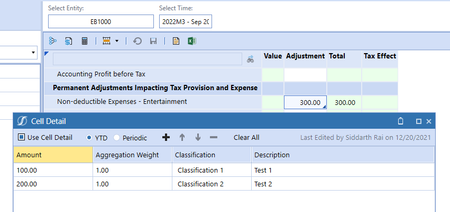
 4 years ago
The E# (and the S#) is only needed, if it says filter in the parameter name, I like to correct my previous statement. In the help it says:
Dim sValue As String = BRApi.Finance.Data.ExportCellDetailToCsv(si, serverFilePath, entityDimensionName, entityMemberFilter, scenarioName, timeMemberFilter)
This means, your code should be like this:
Dim sValue As String = BRApi.Finance.Data.ExportCellDetailToCsv(si, csvFilePath, "
E#T_Entities", "E#EB1000", "S#ACTUAL", "T#2022M3")=
Dim sValue As String = BRApi.Finance.Data.ExportCellDetailToCsv(si, csvFilePath, "T_Entities", "E#EB1000", "ACTUAL", "T#2022M3")
Is it working?

SRAI
4 years agoNew Contributor III
Hi Christian,
Sorry it has E#. I didn't put it here by mistake.
ChristianW OneStream Employee
4 years agoOneStream EmployeeThe E# (and the S#) is only needed, if it says filter in the parameter name, I like to correct my previous statement. In the help it says:
Dim sValue As String = BRApi.Finance.Data.ExportCellDetailToCsv(si, serverFilePath, entityDimensionName, entityMemberFilter, scenarioName, timeMemberFilter)
This means, your code should be like this:
Dim sValue As String = BRApi.Finance.Data.ExportCellDetailToCsv(si, csvFilePath, "E#T_Entities", "E#EB1000", "S#ACTUAL", "T#2022M3")
=
Dim sValue As String = BRApi.Finance.Data.ExportCellDetailToCsv(si, csvFilePath, "T_Entities", "E#EB1000", "ACTUAL", "T#2022M3")
Is it working?
- SRAI4 years agoNew Contributor III
Hi Christian,
It worked. my mistake. Thanks 🙂
Related Content
- 7 months ago
- 2 years ago