Navigation behavior
Hi everyone, I’ve developed a report using Cube Views and noticed the following behavior with keyboard navigation: The Tab key moves right and then wraps to the next row The Arrow keys move in their respective directions and wrap at the boundaries When navigation reaches the end of the report, it continues by jumping back to the beginning and starts again from the top. Is there a way to stop this wrap-around behavior at the report boundaries? Is there any property setting to control or disable this? Thanks in advance, ArchanaSolved55Views0likes3Comments
MTD values in cube view
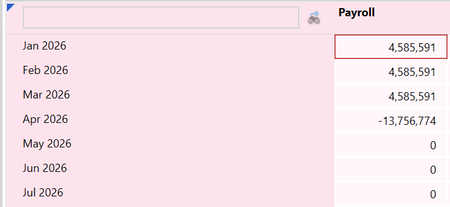
Hi all, my client is loading in OS Actual data in MTD. I set up a cube view to show the actuals MTD month by month. If the user loads the first 3 months, the cv correctly shows the MTD for the first 3 months, but for the 4th month it shows the YTD with inverted sign: If I understand correctly, this setup should be configurable by intervening on the following WF Profile settings: I also changed the following setting in the scenario configuration: nevertheless, the cv keeps showing the inverted YTD in the new month. Can anyone explain why? Thank you!23Views0likes0CommentsReturning text from a BR# inside GetDataCell — possible?
I'm building a cube view column that shows combined annotations from descendants. I'm calling an Finance Cell Service BR from inside GetDataCell so I can pass dashboard params needed for the logic. GetDataCell(T#|CVTime|:BR#[BRName=..., FunctionName=CombinedComment, Flux_ID = {fluxID}]:U8#{ud8}):Name({ud8} Combined). I need to the UD8 POV member because that distinguishes what type of comment it is (CMvsPM, CQvsPQ, CMvsPYM, Ect...). The BR returns a String, but GetDataCell expects a numeric amount so the text doesn't render in the cell. Pointing the column at V#Annotation doesn't help either. Has anyone gotten BR-returned text to display in a GetDataCell with full POV/param context? Thanks, Ben56Views0likes0Comments
Report (PDF) Header Background Fill Color Not Extending to Bottom of the Space
The background fill color on the header is not filling the entire space when viewed in PDF. You can see on four of the six columns there is white space where the text is shorter. I need the teal color to fill to the bottom of the header space, and not just exist where the text is located. It works fine in excel and cube view. The issue only exists in report PDFs. Does anyone know of a way to accomplish this? Report/PDF: Excel: Cube View: Here's an example of a PDF that looks good because the length of the header text is more comparable across the columns: I'm sure there's a way to accomplish this through a Custom Report Formatting rule or formula. I'm trying to avoid this, as I feel the formatting should already default to what I want. But, if I have to go this route, I will. Thanks in advance!2KViews0likes6CommentsCVR and GetDataCell Issue in cube views
Hello, I currently have a cube where I am having an issue calculating variances. The row has GetDataCell(CVR(Row1)+CVR(Row2)) and Column is has T#POV, T#POVPrior12, GetDatacell(T#Pov-T#POVPrior12). When I run the report, the first two columns run correctly for T#POV and T#POVPriorYear, but the third column where the two get data cells meet does not calculate correctly. I can't get it to work on a column override either as I know there is a order of operation for the GetDataCell. I want to keep the report as dynamic as possible, is there a way this can be achieved without breaking the columns out and manually doing the overrides?65Views0likes1CommentReportBackgroundColor not filling the entire cell when viewing the report as a PDF
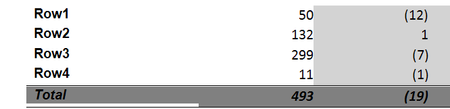
Hi, I am encountering an issue with the header format of the 'Total' row below where the ReportBackgroundColor is not filling the entire cell when viewing the report as a PDF. There is no issue when viewing view the cube view or Excel. Below is the header formatting we're suing: ELSE IF (RowName Contains ':Total:') THEN ExcelBottomBorderColor = Black, ExcelTopBorderColor = Black, ExcelTopBorderLineStyle = Thin, Italic = True, ReportBackgroundColor = Gray, ReportUseBottomLine1 = True, ReportUseTopLine1 = True I'm using the same formatting for Header and Cell Format but as you can see from the screenshot below, there is a blank space below Total. Has anyone encountered this?37Views0likes1CommentParameters not working in cube views
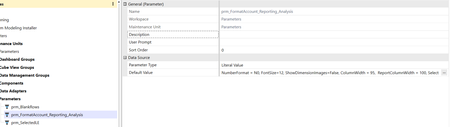
Hi all, I'm having a strange problem with cubeviews. I created some parameters to apply a standard formatting to my cube views: when I use them into the cubeview and I launch it, though, they appear in the initial popup without any value, as if they were user input params: am I missing something? is there anything I need to configure to make them work automatically? Any help is appreciated!Solved115Views0likes3Comments
Passing Entity in a Cube View Row to an XFBR in a Cube View Column
Hi all, I have an XFBR that I would like to take the entity member in any given row in a cube view. I've tried |MFEntity| but that doesn't work. |CVEntity| and |POVEntity| don't work either since they can only pass a single entity for a given cube view. Is there a way to get what I need outside of manually doing a column override for every single row in my cube view and hard coding the entity that I need to pass to the XFBR?28Views0likes0Comments
Linking external Excel Spreadsheet to cube view input spreadsheet
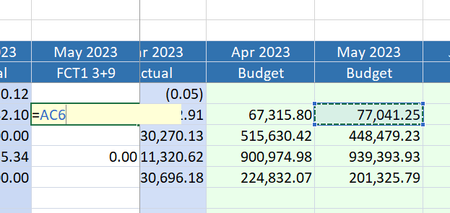
Hi all, I'm building a cube view which includes pre-filled columns including 12 months for CY budget, PY actuals and columns for YTD actuals. Additionally, I have included all future months in the year to be for the Forecast scenario for users to input. I have embedded this cube view into a spreadsheet form, so that users can either directly enter their forecast numbers into the spreadsheet in OS app, or it can be opened in Excel for users to complete outside the system. When I open the file in Excel, the CV correctly works and refreshes, and submission correctly writes the cells back to Onestream when FCT1 numbers are entered. However, I am stuck on one thing - is there a way to update the Cube View form cells by referencing other cells in another spreadsheet, or in the workbook? I can link 1 cell individually, but once I reference the cell, it automatically converts to a number and I cannot autofill any formula link to the remaining cells. Most users will either be wanting to link to the budget numbers and adjusting those, or workings they have in their own spreadsheets. I know another option is to use setcells, but I am trying to avoid this method if possible for this purpose. Happy to hear of any thoughts, maybe I'm missing something simple. Able to link 1 cell: Converts immediately to a number and unable to drag cell reference down: Thanks AndrewSolved3.1KViews0likes4Comments