- 4.4KViews0likes1Comment

Unlocking the Power of Attributes in OneStream: Balancing Potential with Performance
OneStream offers users the ability to activate Attributes for key dimensions such as Entities, Scenarios, Accounts, and User-Defined dimensions. The process to enable Attribute Members is relatively straightforward, found within the Settings -> Attribute Member section of the User-Defined dimensions. While Attributes hold the promise of expanding the Financial Model capabilities of OneStream, they also come with a caveat - the potential to impact system performance. In this blog post, we embark on a journey through the realm of Attributes in OneStream. We will delve into the opportunities they present for enriching your financial model and dive into the challenges that may arise, particularly concerning performance issues. By the end of this exploration, you'll have a comprehensive understanding of when and how to implement Attributes effectively, ensuring that your OneStream application strikes the right balance between functionality and performance.3.1KViews13likes2Comments
Guiding Principles
Overview Whether designing or building a OneStream application, it’s vital to keep end-user experience, performance, and administration in balance. An application that lacks any one of them risks full acceptance and ultimately a successful rollout within the organization. In this article, you’ll read about guiding principles that will steer you towards establishing the balance needed within your application. Design Design the process. It’s important to know exactly who is doing what and when they’re doing it. By designing the process, you’re designing the Workflow. There are many steps that need to be completed throughout it. An accounting to reporting process may include: importing data from a source system or a file entering of data via form posting of journal entries (which can include preparation, approval/rejection and posting steps) calculating/translating/sub-consolidating data reviewing/rejecting/approving data publishing final reporting packages Alternatively, a planning or forecasting process often looks completely different from the accounting process: seeding data from actuals, prior forecasts or budgets updating drivers, limits, percentages creating targets for different departments, regions or business units adding/updating calculations calculating/translating/sub-consolidating data reviewing/rejecting/approving of final submissions The process includes knowing your business rules and member formulas along with how/when they will be triggered throughout the data submission process. Calculate, translate, and consolidate only when necessary and not excessively. One common request is to run calculations when a user saves data in a form. It’s important to know which calculations will run when that user saves. If the process or calculations haven’t been well planned, the system can run calculations unnecessarily and/or excessively and that takes time. This wait time negatively impacts performance (or perceived performance) as well as the end-user experience. Utilize extensibility in the Cube design. This foundational design principle should be incorporated into every OneStream application. Our customers’ end-user experience, data quality and application performance all benefit from extensibility as it’s one of OneStream’s many differentiators. Although the business requirements may not alert the implementation team that extensibility is necessary during the initial implementation, it provides future flexibility should the need arise. The maintenance of extended cubes and dimensions may not be as straightforward as other products however, administrators will quickly learn where and how to maintain them. Write efficient, concise calculations. Doing this in both business rules and member formulas improves performance by reducing redundancy and excess. You establish efficiency by pairing process knowledge with good VB.net and/or C# practices. Specifically for OneStream, keep the following in mind. Understand how, when and who will trigger the calculation – knowing the entire process, from data submission through corporate consolidation, will help you optimize application performance. Building the triggers into the process results in rules running only when necessary and not excessively. This couples tightly with Workflow design, covered later in this article. You can also get creative by building in “perceived performance”. Let’s take a forecast seeding process as an example. For the M9 forecast, OneStream needs to copy nine months of Actuals data along with 3 months of the prior forecast data as a starting point for the FP&A team. For simplicity, each month takes one hour to complete so once M9 closes, FP&A needs to wait 12 hours to begin their process. If we think about this, M1 – M8 have been closed for some time. We can seed M1 – M8 data while no one’s waiting for it to complete. At the same time, the prior forecast data has been ready weeks prior to the current month closing so we’ll seed that, too. Now, when M9 closes, the only data that needs to be copied is M9 Actuals. Although it still takes 12 hours to seed all months, FP&A users only need to wait an hour after M9 closes to start their process. This is what I mean by “perceived performance” – it’s not faster, but because end-users wait less, it seems faster. Add conditions for data unit dimensions – most calculations don’t need to run on both an entity’s local currency as well as a translated currency because OneStream translates the result of the calculation. However, there are exceptions to this, such as copying Net Income from the P&L to the Balance Sheet. When the NI is copied to Current Year Net Income in local currency, if OneStream were to translate this, it would use the closing rate and direct method – we don’t want this. In this case, we want the calculation to happen in both local and translated currencies. A second example of adding conditions on data unit dimensions is excluding the calculations from running on parent entities. Parents consolidate the values of their children. Once that happens, if the calculation runs again, the result of the calculation will likely yield the same result as the consolidation. This introduces redundancy and can negatively affect the overall performance of the application. Target specific intersections when writing clear and calculate statements – leaving a dimension open on a calculation when the calculation will yield results on a small subsection of that dimension doesn’t necessarily mean that performance will suffer. However, OneStream is evaluating intersections that will never yield data and that takes time. It may be milliseconds for that particular calculation but those add up quickly in applications containing a high volume of calculations. Minimize nested loops and eliminate looping over lists. By itself, looping through lists of text is fast and unnoticeable to an end-user. Updating metadata properties via apis within loops also has a minimal effect on rule performance. However, introducing database calculation calls into those loops is where the time begins to add up. To counter this, OneStream introduced filtering into their database calculation calls. So instead of creating a list of base members under a parent and doing a calculation, write the calculation and filter it on Parent.base. Set data buffers once, outside of any necessary For/Next loops – data buffers should only be used when cell-by-cell processing is necessary. While looping through each cell, avoid database calls. Instead, create a result data buffer and while looping, add the result cell to it. Once the loop completes, write the result data buffer to the database. You’re only hitting the database once rather than at every trip through the loop. Minimize writing zero or near zero data to the database – by wrapping your calculate statements with RemoveZeros. Unnecessary zeros in the database generally provide no value while increasing Data Unit size which can negatively impact performance. That being said, copying data between two scenarios that have differing View and No Data Zero View properties often requires loading/calculating zeros. Establish standards, minimize exceptions, and create dynamic, consistent artifacts. Inconsistencies among artifacts and within processes can increase maintenance complexity, lengthen the time to resolve issues and confuse end users and administrators. Standard naming conventions, a seemingly trivial subject, can greatly improve the administrator’s experience maintaining the application. Consistency among Cube Views allows easy adoption for both end-users and administrators. Sharing row and column sets and utilizing parameters and member filters eases maintenance. Conclusion The two most inadequately designed areas that I’ve seen are Workflow and extensibility. The requirements and design phases are understandably early in the implementation to know the exact steps and tasks that will happen in the final Workflow. However, it’s important to have a mid- to high level outline in mind. It provides the skeleton on which to build and gives the implementation team, including SMEs, an idea of what the Workflow may look like. You’ll often find that customers may push back on building extensibility into their application. Why? Not only is it a difficult concept to grasp for those new to OneStream, but it’s also a challenge for them to understand it enough to realize the benefit. I suggest that you collect the requirements and present a design that includes extensibility, explaining why it’s the best design for their application. It's important to keep all the principles in mind throughout the implementation. Regardless of if you’re writing rules or member formulas, building Cube Views or dashboards, or designing the cube structures or process, think about how it affects the end-user’s experience, the application’s performance, or the administrator’s responsibility to maintain the application once the consulting team departs. Original Source: Blueprint Bulletin2.3KViews7likes0Comments
Matrix Consolidation: Eliminating Beyond Legal Entity
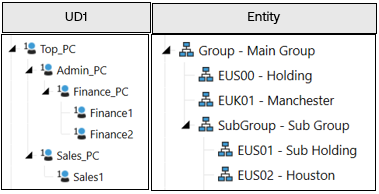
Purpose of the document To goal of this document is to share our experience in designing for a matrix consolidation requirement, as well as to drive discussion on the topic. What we mean by “matrix consolidation” Matrix consolidation is a term commonly used when finance teams want to prepare their management & statutory financials concurrently. This prevents the need to maintain separate scenarios and processes in the system. It will usually involve running eliminations on something more than just legal entity. In OneStream this can mean using a user defined dimension as part of the elimination process. The Requirement A common use case is to run eliminations between Profit Centres or Segments. Whilst inter-profit-centre eliminations will be used as the example in this document, it is not the only potential use case. The requirement we will attempt to solve for is that the customer wants an elimination to only occur at the first common parent in both the Legal Entity and Profit Centre hierarchies. First let’s look at the two broad ways in which this can be achieved. ENTITY DIMENSION OR USER DEFINED (UD) DIMENSION So, there is a requirement to do eliminations on a level of detail below the legal entity/company code level. The example we will use in the section is where the customer wants to generate eliminations between Profit Centres (PC). You have two main options on how to tackle this, outlined in the following two sub-sections. OPTION 1: ENTITY DIMENSION Include this Profit Centre detail in your entity dimension as base members. These will be children of the legal entity members. OPTION 1: ENTITY DIMENSION Include this Profit Centre detail in your entity dimension as base members. Pros Cons Business Logic · No additional Logic required to get eliminations running by Profit Centre. · Impacts consolidation performance more than option 2 in a typical setup, due to multiplication of members in the entity dimension (i.e. more data units) that are to be consolidated. Exact impact need to be analysed in each project. · If you move a PC in the entity hierarchy, you will need to reconsolidate all history. Dimensions · Uses fewer UD dimensions than option 2. · Generally, only appropriate when Profit Centres are unique to entities, since otherwise they will need to be duplicated for each entity. · Can end up with a very large entity dimension · To achieve some reporting, alternative entity hierarchies (and therefore additional consolidations) may be required. · Often leads to creation of additional “dummy” or “journal” Profit Centre entities to contain data that doesn’t need to be captured by Profit Centre (e.g. Balance Sheet Data). This creates even more entities to be consolidated! · When Profit Centres are not unique to entities, shared Profit Centres will create lots of duplicate entities and should be avoided. · Less flexible since profit centres need to be created & moved within the entity hierarchy. Workflows · If the responsibility structure (and therefore workflow design) is by Profit centre, then can make workflow design/build better. · If the responsibility structure is not based around Profit Centre, more entities will need to be assigned and considered in workflow design. · Makes Profit Centres the basis for everything where data is stored, processed and locked. Reporting & Matching · May align with the way it was done in legacy systems, so users are familiar with the approach. · Standard IC matching reports will work for Profit Centre matching (although this requirement is less common from our experience). · Out-of-the-box matching will now only be at PC level. Legal Entity matching will require custom reporting. · Alternative entity hierarchies (and therefore consolidations) may be required to achieve some reporting. · Execution of consolidation required to see legal entity level data (as they will be parent entities) Security · Native using the entity dimension. · Requires maintenance on a Profit Centre level even if not required on that level. OPTION 2: USER DEFINED DIMENSION Create a Profit Centre dimension in a UD. OPTION 2: USER DEFINED (UD) DIMENSION Include the Profit Centre detail in a User Defined Dimension Pros Cons Business Logic · Logic can be customised to specific requirements. · Does not add additional members to the entity dimension (i.e. data units), which is beneficial for consolidation performance in a typical setup. · Running a consolidation, will run a statutory and management consolidation in parallel. · Requires additional development time for business logic if not part of a starter kit. Dimensions · A cleaner entity dimension to support legal entity and group reporting. · Matrix view of consolidation can be created (e.g. with entities in rows and Profit Centres in columns) · Can be combined with extensibility if Profit Centres aren’t applicable to all entities/divisions. · Requires the use of two UD dimensions (one for Profit Centre and another for PC counterparty). This is discussed later. Workflows · Often more closely aligns with the responsibility structure for Actuals (by legal entity). Reporting & Matching · Standard IC matching reports will support legal entity matching. · Consolidation not required to view total legal entity values (pre-elimination data) · Custom IC matching reports may be required for Profit Centre matching. This is less common as a requirement. Security · Native using the entity dimension if security is driven by Legal Entity. · Requires slice security (via Cube Data Access security) if required at Profit Centre level (can impact reporting performance if security is complex). Other Design Considerations Data quality of matrix counterpart – Remember, all intercompany data from the source system needs to be sourced for all matrix dimensions. It will negatively impact user experience if this data is not readily and accurately available in the source system (lots of manual input will be required). Stability of the matrix dimension – This is to say, in your situation, will the Profit Centre hierarchy change regularly with relationships changing? This requires significant consideration in the design phase. Some discussion points are included in a later section. New or existing application – The choice of solution may depend on whether this is a new implementation or an addition to an existing one. It will likely be easier to add a new UD to an existing application rather than re-develop the entity dimension! Performance – Common design considerations of performance, data unit sizes, number of data units etc. apply. Elimination vs. Matching – Remember that just because a customer wants their eliminations to happen on PC doesn’t mean that they need to do their month end intercompany matching at this level. It’s important to clarify this as two separate requirements during gathering. Workflow – Ensure you consider the responsibility structure of the organisation as this will have a big impact on the decision. If the true process (loading, locking, calculating & certifying the data) is by Profit Centre, then this could be a good justification for using the Entity dimension (option 1). However, it’s much more typical that these are based on legal entity for Actuals, making a UD solution (option 2) more appropriate. Option Overview The best approach will vary depending on the specific requirements, but the above gives some common indications of the benefits & drawbacks of each approach. Adding members to the entity dimension creates additional overhead during consolidation since the system must run the data unit calculation sequence (DUCS), consolidate and check the status on each entity member. Therefore, including profit centre in the entity dimension will often be slower than using a UD (in the presence of typical data volumes, exceptions always apply!). Regardless of the approach, remember that with the default eliminations always occur at the first common parent in the Entity dimension. If the client wants something different, then you would be looking at a “non-matrix” solution (i.e. separate cubes for statutory and management). But that is a different topic… Since option 1 mostly uses system-default logic for processing and eliminating the data, the setup is mostly straight forward. Therefore, the rest of the document focuses on how to design for Option 2, using a user defined dimension to contain this detail and run eliminations. Out of the Box - view of Eliminations It is worth stating that just because a client says “we need the eliminations to run by profit centre” doesn’t mean that they need to implement a full matrix consolidation solution. If they don’t need the profit centre elimination to happen at the first common parent in the PC hierarchy, then the out of the box eliminations will suffice as you can report the eliminated data simply by selecting the correct combination of members (Origin, PC, etc.). For those less familiar with the topic, let’s just take a moment to set up a simple example that shows the default behaviour of eliminations in OneStream. We have a Profit Centre dimension in UD1, and an entity dimension for the legal entity members as follows (all entities are using USD only & are 100% owned, for the sake of a simple example): There is an intercompany transaction between the legal entities Manchester & Houston: Within Manchester it is captured within the Finance PC, and within the Houston Sales PC. When out-of-the-box eliminations are run, we will see the following results (eliminations in red, consolidated results in the blue box): The eliminations occur at the first common parent in the entity dimension (in this case the first common parent is the Main Group). In the UD1 the eliminations happen on the same member as the original data, so at the group level we still see the plug amounts by Profit Centre. If we zoom into the Profit Centre dimension (UD1) at the top Main Group reporting entity member, we see the following, where 100 is the aggregated difference on the plug account of the two base level Profit Centres Finance1 and Sales1: Matrix Consolidation - View of Eliminations Now let’s imagine we have the same setup but want to apply matrix consolidation. We have the same data, but now we are capturing the Counterpart Profit Centre for each transaction: Notice how in the below screenshot our eliminations will be happening on a new “elimination member” within UD1, rather than the member the data sits on (highlighted in the green boxes below; the required elimination members are discussed further in the next section on the setup). The member where the elimination occurs represents the first common parent of the PC & Counterparty PC in the hierarchy (in our example this is the “Top_PC” member in UD1). Again, if we look at this result in more detail at the Main Group entity level, you can now see that within the UD1 hierarchy, the elimination doesn’t occur until the first common parent in the UD dimension. So, at “Top_PC” the data is eliminated, but at descendant UD1 members, it is not (e.g. Admin_PC, Finance_PC, Sales_PC). Note that we have the same result at the Top Profit centre and Group entity, but the way we get there is different. Now that we understand the situation we are trying to tackle, let’s look at the setup used in this example. Setup The following items are configured in our matrix consolidation example. Entity No changes are required to the entity dimension for matrix consolidation. Account No changes are required to the account dimension for matrix consolidation. We will use the same plug accounts. UD1 – Profit centre Some additional elimination members are required in our UD1 as follows. Whilst UD1 is used in our example, the usual design decisions apply to which UD you use. These new elimination members will be required at every point an elimination may happen, so you can see that this can potentially add a large number of members to your existing hierarchy. A common naming convention is often used to allow the system to derive where to post the elimination. In this case you can see it is the parent member name with a prefix of “Elim_”. Alternatively, you could use text fields to store this information. Either way, the logic will rely on this being updated accurately and consistently. Tip: Ensure your consolidation logic provides helpful error messages if it finds that an elimination member does not exist or is misconfigured. UD7 - NEW Counterparty PROFIT CENTRE A new dimension is needed to capture the counterparty Profit Centre information. Like the Intercompany dimension in OneStream, this can be (and almost always is) a simple flat list of the base counterparties. All relevant intercompany data now needs to be analysed by this dimension so input forms & transformation rules will need updating. In data models where (almost) all UDs are already in use, this element can be challenging and requires consideration. Whilst UD7 is used in our example, the usual design decisions apply to which UD you use. Remember that this dimension is simply used to capture the counterparty so if your design is already using lots of dimensions then you may be able to combine this with other supplementary data, or maybe even use UD8 (although this will need additional consideration in your dynamic reporting design). Tip: Consider how this dimension will be maintained going forwards as it will be important for the logic that all members exist with the same naming in this counterparty dimension. Consider if the counterparty dimension could/should be automated to align with the main PC dimension. Business Logic Since, unlike the entity dimension, all parents in a UD are calculated on-the-fly this approach will require additional eliminations to be calculated. You will need to store your new matrix consolidation logic somewhere; in our case it is a business rule attached to the cube, but it could also be attached to a member formula: Tip: You DO NOT need to switch on custom consolidation algorithm on the cube to achieve a matrix consolidation result. Always consider the wider requirements & design. Reporting Custom reports will need to be developed to allow users to do IC matching and report on the resulting eliminations meaningfully. If the customer already does their elimination like this, they should have existing specifications that can be designed for. But if not, end users will need to understand Matrix consolidation when they build their own reports/Quick Views or just run LE-based reports with “Top” for Profit Centres. Tip: You can use Data Set business rules to help you efficiently gather your data for interactive dashboard & reports. Business Logic Consolidation Algorithm When a matrix consolidation requirement exists, it has been commonly observed that consultants will switch on the Custom Consolidation algorithm on the relevant cube(s). However simply because this stores the Share data, this has a negative impact on consolidation performance, and database size. Before you reach for the Custom algorithm though, I would recommend considering calculating the matrix elimination adjustments during the calculation pass of C#Elimination, within a UD member (potentially within your data audit dimension). This will allow you to remain on the Standard or Org-by-Period algorithm and within this member you can update the standard eliminations with the PC detail. Of course, you may have other requirements that lead to you using the Custom algorithm, in which case the approach for matrix eliminations can be determined in the context of the overall design. Tip: Consider whether matrix eliminations are required for all processes & scenarios and ensure it is only running on those where it is truly required. Useful Snippets The general approach for writing a matrix consolidation rule is to check that the elimination only occurs at the first common parent – other than that it will follow standard OneStream rule writing techniques such as using data buffers. The following functions can be useful (comments correct as of version 8.5): Function Comment api.Members.GetFirstCommonParent() You will want to use this function to check both the entity and profit centre parents to see if they’re common to the IC or counterparty member. api.Members.IsDescendant() Note that this doesn’t check whether a descendant has a consolidation percentage greater than zero. So, if doing org-by-period this may need additional consideration. api.Entity.PercentConsolidation() Useful for checking whether entity is being consolidated. Ensure you only pass valid parent/entity combinations into the function. Example rule Attached to this paper you will find a sample rule that can be used as a starting point to implement matrix consolidation. Disclaimer: The provided rule is an example only, and its purpose it to demonstrate an approach that can be taken. If used as a starting point, then all care should be taken to adapt and thoroughly test it before implementation. Updates may be made, without notice, to the example in future. Whilst there are arguably different ways to approach this, the example takes the following approach: Retrieves a data buffer of the system generated eliminations. Reallocates the elimination (both IC & Plug account entry) to the correct PC. Reverses lower-level eliminations from current eliminations (without this step the process will repeat at each parent after the first common parent). Clears the system Elimination as “No Data”. Save Results. This should be assigned to the cube when using the standard or org-by-period consolidation algorithm. It reallocates the out-of-the-box eliminations to the relevant UD member. With some quick reconfiguration of the dimensions & names referenced in the rule, it should work with the setup described in the previous section. org-by period in the UD With regards to matrix consolidation, I have previously been asked the following question: “What happens to the eliminations if we change our Profit Centre structure?” Well in our Entity dimension, we have built in tools to handle org-by-period, so that entities can have relationship properties vary by time period. Data is also stored on parent entities which aids in this org-by-period. Within our UD, no such functionality exists, so if I move a member, that member is moved for all history. If I duplicate a member, the values are duplicated (depending on the aggregation weight of course, but keep in mind that this cannot be varied by time!) So how can we approach this is when a Profit Centre needs to change parents one month: Change the main hierarchy – The old view will no longer be visible. The added complexity is that the eliminations for prior periods will occur in the “wrong” place in the UD hierarchy from a historical point of view unless a consolidation is rerun on all those periods. Of course, if you rerun the consolidation on prior periods, then all your results will change (although not at the top level provided nothing else has changed). This implies that the elimination will correctly display the elimination after the change; Historical data will not be kept for the re-consolidated periods. Create alternate hierarchies (e.g. Top_2023, Top_2024 etc.) – New hierarchies can be created, with unique parents that will allow the old hierarchy to be preserved. As with the first option, re-consolidation of prior periods will be required to view historic data in the same format. However, if the data is only required in the new format going forwards then re-consolidation of prior periods can be avoided. Tip: For every alternate hierarchy in which you run your matrix eliminations, the eliminations will be “duplicated”. Therefore, your business logic should allow you to configure, by time period & scenario, which hierarchies are eliminated to ensure only necessary calculations are run. This could be done, for instance, through tags on text fields of the members. Whilst not such a common scenario, it is a consideration worth making during the requirements gathering & design.1.7KViews10likes3CommentsThe Magic and Math of C#Top
I hear that you’ve bought the OneStream Administrator Handbook – well, well, congratulations on taking the steps that will (hopefully) make your life as an Administrator easier! The book is brimming with great examples and use cases on topics that the Administrator will likely encounter, but here’s something a little extra – a more detailed break-down on how C#Top works between the base entities to their parents! This comes in handy when an end user new to OneStream, comes to you and says something along the lines of, “Hey, the sum of the base entities doesn’t equal to the parent entity, what gives?”1.7KViews6likes1Comment