Entity-Specific Historical FX Rates for Acquisitions — A More Accurate IFRS Translation
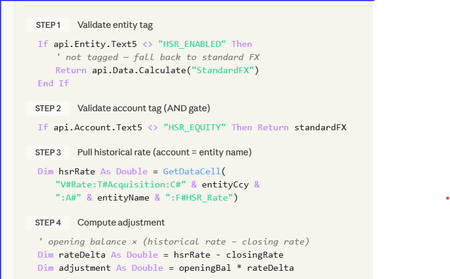
Stop Fighting Your Equity Translation — Let HSR Do the Heavy Lifting A 5-minute read for anyone who's ever stared at a CTA movement and whispered: “Where did that come from?” _____________________________________________________________________________ The consolidation problem we all know It’s day 4 of close. Consolidation runs clean. FX looks fine. Then someone opens the equity rollforward. “Why is acquired share capital moving again?” The entity was acquired years ago at a historical acquisition rate, but the system is retranslating equity at current closing FX every month. CTA absorbs the movement. Auditors ask questions. Finance posts manual journals. Everyone loses time. This is the classic Historical Spot Rate (HSR) challenge. The design principle The goal was simple: Freeze selected equity accounts at acquisition FX rates while keeping the standard OneStream Software translation engine intact. No new cube. No custom dimensions. No complicated override framework. Just: metadata tagging, controlled FX logic, and safe fallback behaviour. The HSR pattern Component Design Entity activation Entity.Text5 = "HSR_Entity" Equity tagging Account.Text15 = "HSR_Accounts" Historic rates Stored in dedicated HSR rate technical accounts Translation logic Finance Business Rule Audit trail Dedicated FX movement flow HSR = Historical Spot Rate. The rule only activates when BOTH: The entity is tagged, and The account is tagged. This creates a simple but effective control framework. The historic rate storage design should remain flexible: use technical accounts, use whatever Text property the project governance model agrees on, and confirm all translation account tagging requirements with the Group Reporting Manager before deployment. What does the rule actually do? Check if Entity is HSR_Entity Check if Account is HSR_Accounts Retrieve stored historic rate Calculate FX adjustment Post adjustment to MVMT_TRANS_FX If anything fails → revert to standard FX That last line is important. The design intentionally prioritises: consolidation stability, auditability, and safe fallback behaviour. If metadata is incomplete or a rate is missing, the application simply reverts to standard FX translation logic. No broken consolidations. No blocked close process. Why did this work well in practice? The biggest advantage was operational simplicity. Adding a newly acquired entity became: Load historic rate Apply metadata tags Run consolidation No code changes required. The approach also kept: CTA cleaner, Equity movements are more stable, And audit support is significantly easier. The real challenge: governance The code itself was straightforward. The harder part was operational discipline: Maintaining 1:1 entity-to-rate mapping Controlling metadata tagging Defining fallback expectations Building reconciliation reporting Testing CTA behaviour thoroughly In my experience, most FX translation problems are not technical problems. They are governance problems. Community question I’d be interested to hear how other certified OneStream Software architects and administrators are handling Historical Spot Rate scenarios. Particularly: Are you using metadata-driven activation? How are you storing historic rates? Have you handled HSR entirely through translation override logic? Any alternative designs that further reduce maintenance? How are you handling CTA transparency and audit reporting? Always interested in seeing cleaner or more efficient approaches from the community.11Views0likes0Comments
v9.0.4 Platform Upgrade - OFC Impact
Hello all, It's unclear to me if upgrading the platform to v9.0.4 will impact the continued use of OFC PV 8.4 SV112. Does anyone have any insight if OFC needs to be upgraded to PV9.0.0 SV201 if the platform if upgraded to v.9.0.4? Thank you!Solved74Views0likes1Comment
Hiding Rows within a CV and more
Hi everyone!! I am trying to share a total amount that is calculated form one cubeview to another but it will not let me if I do not bring the source rows for the calculation (From the 1st CV to the 2nd) but I only want the totals. (If anyone knows how to do this great!!) My other alternative is to bring those rows and hide them. Does anyone know how to do this? Thanks!!!Solved94Views0likes2CommentsHow to Run Workspace Assembly from a Data Management Step In 6 Easy Steps
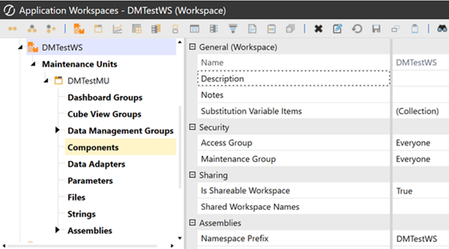
This was originally a question.It took a while to figure out, so to save someone else the hours of trial and error, here is the process I use in detail, start to finish, to run a Workspace-based Data Management step in a Workspace Assembly business rule. Here's a How-to step by step: List of abbreviations used below: DM: Data Management WS: Workspace MU: Maintenance Unit BR: Business Rule AS: Assembly 1. Workspace:Set the NameSpace Prefix - this is what gets filled in at runtime for __WSNameSpacePrefix 2. Assemblies: Note these properties 3. Create the Assembly Business Rule:Create an "Extender" business rule, this is done by right clicking files and selecting "Extensibility Rules" Add some test code, to verify correct configuration, such as BRApi.ErrorLog.LogMessage(si, "Hello from the new extender!"then code the way you would any other extender 4. Create The Data Management Group: Create a DataManagement Group in the same workspace that the Assembly that has your business rule is in 5. Create a Data Management Step - Create a DM step in the new DM Group, reference the rule using the pattern: Workspace.{WorkspacePrefix}.{AssemblyName}.{BusinessRuleName} In this case it would be: Workspace.Current.DMTestAS.DMTestStepExtender Note: we could also use 'DMTestWS' instead of 'Current'.We use Current because the DM Step is in the same WS as the Extender Rule. 7. Done! Test the DM Step with run button and check the error log(System Tab -> Logging -> Error Log),for your test code's output.930Views2likes10CommentsSmarter Data Loading: How OneStream Transformation Rules Automatically Handle New Members
In the world of Enterprise Performance Management (EPM), clean and accurate dimensional mapping is essential for a reliable reporting process. Fortunately, OneStream makes this easier through its robust Transformation Rule framework, which intelligently handles new dimension members automatically. Whether it's a new GL account, cost center, or entity, OneStream’s transformation engine ensures that new data doesn’t derail your process, even before user intervention. 🔍 Key Benefits Dynamic Member Detection When a new source member enters the system—say, a newly created account in the ERP—OneStream flags it immediately as “Not Mapped” in the staging area. This provides the user or administrator with a clear indication that attention is required. Mapping can then be quickly added or adjusted to keep data flowing seamlessly. Centralized and Flexible Maintenance Transformation rules support Wildcard and Dynamic Mapping, making it easy to set default routes for unknown members (e.g., directing all new accounts to a placeholder for Unmapped Accounts). From there, consultants or admins can reassign the correct mappings when ready. This approach provides control without interrupting the load process. Built-In Mapping Validation There’s no need to build dashboards or manual reports to detect mapping issues. OneStream’s Data Source and Transformation Rule editors include built-in validation tools to identify unmapped or incorrectly mapped items before they affect results. This enables early detection, faster resolution, and reduces dependence on visual checks. ✅ Why This Matters By leveraging these out-of-the-box capabilities, organizations save time, reduce risk, and streamline their integration workflows. Consultants can focus on higher-value tasks instead of constantly updating mappings, and end users can trust that data loads will highlight issues automatically, before reporting is impacted. Please keep it simple. Do you agree that OneStream handles what it's built to do?207Views0likes0Comments
How can I become a Advanced User of Member Filter Builder in QuickView
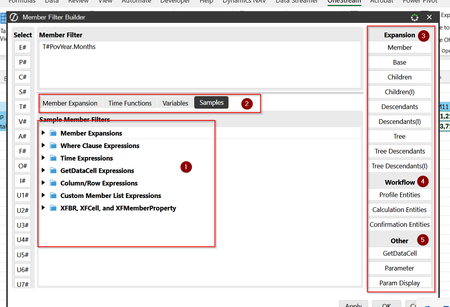
I am a Financial Planner and Analyst and My Organization use OnStream. I want to understand better how to extract the data for Multiple scenarios (act, fcst, budget, py) using Member filters, variables understand workflows, and parameters?67Views0likes0CommentsCube Data Access - pull data to parameter?
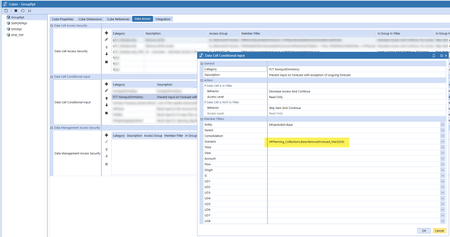
Hi, I have an admin dashboard where I show all parameter values and information I need before I start my Data mgmt jobs. There is one value I dont figure out how to show in my dashboard. I have a Conditional input rule on the Cube. Can I create a parameter or Data Adapter or something to be able to pull the value and show in my dashboard? I only need to retrieve the Scenario value.99Views0likes1Comment
Business Rules for new OS implementation
Hi, we are implementing OS at present, and this is our first-ever project in OneStream; I need guidance on Business Rules. I am not sure what business rules we need to consider after and before we import the data from the Client system to match the client's legacy system data with OneStream numbers. Thanks, PreetiSolved155Views0likes2CommentsMetadata Automation
Hi there, I'm looking to automate dimension uploads in that I want the dimension to be "replaced" with the new one that I am loading. I want to reduce the burden of having to add or remove members from dimension and just automate that process. How can this be done and where should I start? Thank you in advance, Joesef77Views0likes1Comment
Rule Rules - ONLY write rules when necessary.
Rules TIP - ONLY write / use Rules when necessary. OneStream projects should not be a contest to see who is better at writing complex rules. If you must write rules please remember: Unless specified, the calculation will run on Base Entities AND each Parent Entity. Use these lines almost always in your rules. For Base entities only use: If Not api.entity.HasChildren Then For Parent entities only use: If api.entity.HasChildren Then For ALL entities: api.Data.Calculate(“A#Account1 = A#Account2”) There are up to 6 calculation operations in the Consolidation process per Entity. Conditional statements can be added to formulas to limit which Consolidation calculation processes will do something for this formula. For Local currency only: If Api.Cons.IsLocalCurrencyforEntity Then For Translated currency only: If api.Cons.IsForeignCurrencyForEntity Then For Parent-Child Relationship levels: Api.Cons.IsRelationshipLevel returns True for Consolidation level being OwnerPreAdj, Share, Elimination or OwnerPostAdj. For best performance, use Remove Functions – Zero and No Data Can be used in a Member Formula or a Business Rule. RemoveZeros Function removes data cells with cell amount of 0 from data buffer AND removes data cells with cell status of NoData from data buffer. RemoveNoData Function ONLY removes data cells with cell status of NoData from data buffer (data cells in a Data Unit). When declaring variables in a member formula or business rule, ensure the variables are within the calculation conditions to avoid unnecessary code execution. TIP 2 - Don’t Stack api.Data.Calculate Functions. Let's say we need to calculate data for the dimension members below. What shall we do? Use a filter; don’t be afraid to create alternate groupings. Use member filters to perform the same calculation logic for multiple members. Use the hierarchy to drive calculations. Reduces the number of times the Data Unit is called into memory and the number of times data is written back to the Cube. Avoid referencing a user's workflow POV in stored formulas: Finance rules can and often do run outside the workflow. Instead of the above - do the list below. For more information: OneStream Finance Rules and Calculations Handbook. Level 2: Financial Model Rules course.Solved2.4KViews11likes4Comments