The OneStream Community has moved.Visit the new Community at community.onestream.com →
Metadata
24 Topics
Dimension Member Names - Renaming and Deleting
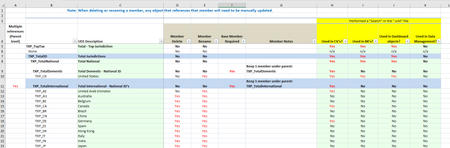
Attached is a 10 tab Excel file that shows which member names can be renamed, deleted or not changed at all. It also indicates if the member name is used in CV's, BR's, Dashboard objects or in Data Management. It looks at the following dimensions: Scenario Entities Accounts Flow UD1, UD2, UD3, UD4, UD7 and UD81.6KViews0likes2CommentsDimension - UD7 - Group Filing
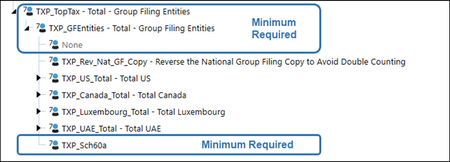
The following has been taken from the Tax Provision Blueprint "Instruction Guide" starting at page 100. See KB article: "Tax Provision Blueprint Instruction Guide - PV7.3.0 SV100" See KB article: "Dimension Member Names - Renaming and Deleting" See KB article: "Dimension Text Fields - Summary" UD7 Group Filing XFW_TXP_UD7 is the Tax Provision Blueprint UD7 – Total – Group Filing Entities Dimension that contains a set of country specific entities used for reporting. The original members should be modified to reflect the app specific entities. The base level UD7 members and the country level UD7 parents MUST be exactly the same as the base level and parent country level Entity members - No exceptions. Only countries that are doing group filing require a country hierarchy in this dimension. If no Group Filing is being used, then only the top parent member (TXP_TopTax) and the three children members (TXP_GFEntities, None and TXP_Sch60a) is the minimum required. Business rules have been written with this minimum in mind. UD7 Group Filing Entity Notes: No Text Properties in use. Aggregation weights are used on the None member. No Member Formulas are used. Base level and the country parent level UD7 members must be the same as the base level and parent level entity members. Some WF Text 2 position 2 references the country parent entity which is also used as the UD7 parent on some schedules (i.e., Schedule 02, 05 / 05 FC, 06a / 06a FC, 06b / 06b FC, 06c & 06d). See BR Dashboard XFBR String: TXP_ParamHelper Function: “UD7Sch2RTP”, “UD7Sch5” or “UD7Sch6”. All parent members must have the word Total in the description. This will help in the formatting of Cube Views. The None member must be included in each country hierarchy with an aggregation weight of 0.00. The “TXP_Rev_Nat_GF_Copy” member is only required for National group filing and is a calculated member through the business rule “TXP_Copy_Data”. It is used to keep the data in balance as we copy National data for the Filer entity to the UD7 filer entity member. Note: UD7 member TXP_Sch60a is setup as a DynamicCalc formula type and is used specifically for cube view formatting. TXP_Sch60a - Required for formatting in Cube Views. Cube Views that use the UD7 member TXP_Sch60a are: 60a_TaxableIncome_Consol_TXP365Views0likes0CommentsDimension - UD1 - Tax Jurisdiction
The following has been taken from the Tax Provision Blueprint "Instruction Guide" starting at page 89. See KB article: "Tax Provision Blueprint Instruction Guide - PV7.3.0 SV100" See KB article: "Dimension Member Names - Renaming and Deleting" See KB article: "Dimension Text Fields - Summary" UD1 Tax Jurisdiction XFW_TXP_UD1 is Tax Provision Blueprint UD1 - Tax Jurisdiction Dimension. The Jurisdiction members are linked with the Entity Dimension to drive Business Rules calculations for the tax provision as well as reporting formats. Jurisdictions are grouped by National, Local, Domestic, and International. Do Not modify the existing parent members nor the naming convention used for base members. If an Entity has Local Jurisdictions, there must also be a National Jurisdiction assigned. UD1 Tax Jurisdiction Notes Text 1 Properties are used on all base members. Text 2 Properties are used on base members for a National group filing tax jurisdiction. Alternate hierarchies are used. Aggregation weights are used. No Member Formulas are used. See the Finance BR TXP_BusinessRules. All parent members must have the word Total in the description. This will help in the formatting of cube views. New base members should be created with the same Member Properties as their sibling members. Each Entity Dimension Member needs to be assigned the appropriate UD1 - Tax Jurisdiction Member in the Entity Member Properties: UD1 Constraint, UD1 Default, and Text 8 field. See also KB article: "Dimension - Entities". All base level UD1 members must have a Text 1 of TXP_Local or TXP_National. This is used to drive parameters in the Tax Schedules. It is not necessary to put this on parent UD1 members. Base level National members that are using National group filings must have the Text 2 populated with “NatGF=Yes”. For the Tax Provision Blueprint app, this applies to TXP_CA, TXP_LU and TXP_AE. There are several alternate hierarchies to help with different Cube Views, Parameters, Business Rules, and Reporting. National Jurisdiction Tax Provision Blueprint includes 20 countries for National Jurisdiction. The naming convention is based on the 2-digit ISO Country Code: TXP_XX where XX is the ISO Code, (such as US for United States). The Domestic Jurisdiction should be the main reporting country for the Tax Provision Blueprint (which is presumably the same as the Finance Cube). In Tax Provision Blueprint, the Domestic Jurisdiction is the United States. If this is implemented for a different reporting country, Canada for example, then the Canadian Jurisdiction TXP_CA should be moved under TXP_TotalDomestic and TXP_US should be moved under TXP_TotalInternational. Countries not required may be removed and countries required but not included may be added. Note the “TXP_XX” National Jurisdiction is included to facilitate circumstances that may not require a specific country Jurisdiction. This member may also be removed. Local Jurisdiction Local Jurisdictions work in conjunction with a single National Jurisdiction. Similar to the Total National Jurisdiction reporting hierarchy, there is a Total Local (TXP_TotalLocal) reporting hierarchy that distinguishes between Domestic and International. If the reporting country is different than the US, continuing our example above with Canada as the reporting country, move parent TXP_CA_Local under TXP_Domestic_Local and move parent TXP_US_Local under TXP_International_Local. Here is an example of the steps necessary to create a new country level UD1 hierarchy that has both local jurisdictions and a National jurisdiction. Total Country Local: Create TXP_UK_Local as a sibling to TXP_CA_Local under TXP_International_Local. Assign Member Properties similar to TXP_CA_Local. Add TXP_UK_Blended as the first child of TXP_UK_Local. All Local Jurisdictions should have one member with Blended as the Local code. E.g., TXP_UK_Blended. Assign Member Property -> Text 1: TXP_Local. Add the required Local Jurisdictions for UK, following the naming convention: TXP_UK_GB, where UK is the National Jurisdiction code and GB (Great Britain) is a 2-digit Local code. Assign Member Property -> Text 1: TXP_Local. Country Total: Create TXP_UK_Total as a sibling to TXP_CA_Total. Assign Member Properties similar to TXP_CA_Total. Relationship Properties: set the Aggregation Weight for TXP_UK_Total to 0.00. Add TXP_UK as the first child. Add TXP_UK_Local as the next child. Entity Dimension Member Properties to Update: Change UD1 Constraint for TXP_UK_101 (or any applicable UK entity) to TXP_UK_Total. Change Text 8 for TXP_UK_101 (or any applicable UK entity) to TXP_UK_Total. UD1 Default stays the same: TXP_UK. Update Text 7 if the National Benefit will apply to the UK entity. Other: If group filing is required, then update UD7 for the UK entities. No Local Jurisdiction Required If Tax Provision Blueprint does not require provisioning for Local Jurisdictions, retaining one Local Domestic group and one Local International group is recommended to allow for future expansion and to minimize the impact on the Objects that are included with Tax Provision Blueprint.355Views0likes0CommentsTime Profiles
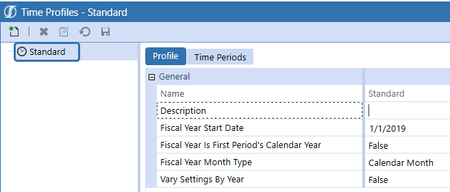
The following has been taken from the Tax Provision Blueprint "Instruction Guide" starting at page 40. See KB article: "Tax Provision Blueprint Instruction Guide - PV7.3.0 SV100" See KB article: "Application Properties" See KB article: "Using a Time Profile With Weeks" Time Profiles The XFW_TXP cube uses the “Standard” time profile. The Fiscal Year Start Date is set to 1/1/2019. These settings can be adjusted based on your application. Also, if you are sharing with other cubes (ie: Finance), this may have an earlier year than your seed Year (that is OK). Please also see the Dimensions tab in "Application Properties". This is where you set the start year that controls the list of years in your POV. Remember, that this is an application settings that will impact all Cubes.608Views0likes0CommentsDimension - Scenarios
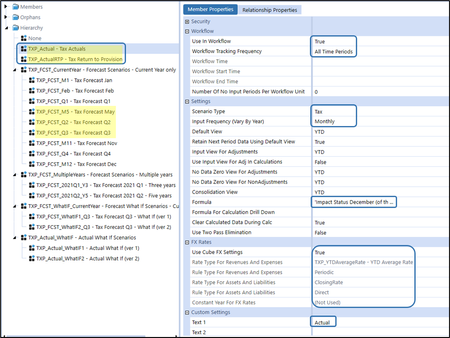
The following has been taken from the Tax Provision Blueprint "Instruction Guide" starting at page 61. See KB article: "Tax Provision Blueprint Instruction Guide - PV7.3.0 SV100" See KB article: "Dimension Member Names - Renaming and Deleting" See KB article: "Dimension Text Fields - Summary" Scenarios XFW_TXP_Scenario is the Tax Provision Blueprint Scenario Dimension that includes TXP_Actual for the Tax Actuals (Tax Provision Blueprint Calculation) and TXP_ActualRTP for the Tax Return to Provision reconciliation. The two Actual Scenario members should not be modified because they are core to the application and are tied to the TXP_BusinessRules that have been provided. The Tax Scenarios must retain the attributes as shown in the screen capture below. The yellow shaded scenarios above (5 of them) are used in Tax Provision Blueprint for illustration purposes. All other scenarios have been created just for informational purposes and may be used for future development. Note: The Scenario Text 1 was never used in the latest release. It was meant to identify the type of scenario. However, in BR's we use the Scenario Type. Forecast Scenario Setup Notes: Several current year forecast scenarios have been created. TXP_FCST_M5, TXP_FCST_Q2, TXP_FCST_Q3 have been set up with all required attributes and may be used as examples for creating a new or modifying an existing TXP forecast scenario. When adding / creating a new forecast scenario follow the naming convention: TXP_FCST_xxx. Recommend having at least one forecast scenario under the TXP_FCST_CurrentYear parent. Many of the Scenario Properties for a forecast scenario differ from the TXP_Actual scenario. Assign Number of No Input Periods Per Workflow Unit: Data may be copied into these periods from a data management copy, but the user cannot modify the data. This property is used in CV’s, BR’s DM’s, etc. FX Rates: Assign the Rate Type For Revenues and Expenses and Rate Type For Assets and Liabilities. Assign the Settings the same as the yellow highlighted Settings in the screen shot below. Assign Text 1: Forecast_Current_Year Assign Text 2: ActualCopyPeriods=n. This number is used in the DM’s that copy data to the forecast scenario from a source scenario (typically TXP_Actual). In the TXP_BusinessRules file, we reference forecast scenarios by their scenario type. So, the main BR file is setup for scenarios as either: (1) TXP_Actual and/or (2) TXP_ActualRTP and/or (3) ScenarioType8. Adding new Scenario Members to this Dimension will require modifications to the TXP_BusinessRules to allow the new Scenario member to be processed within the existing rules and/or to add new calculations. For example, adding new Forecast scenarios that use a different Scenario Type will require changes to the BR’s. Note: Both Actual scenarios use the Tax Scenario Type in the Settings section. It is assumed that current year Forecast scenarios will use the Scenario Type “ScenarioType8”, and multi-year Forecast scenarios will use the Scenario Type “ScenarioType7”. Tax Provision Blueprint has been designed to have only one Return to Provision (RTP) scenario (TXP_ActualRTP). There is an impacted scenario rule on TXP_Actual. When you calculate period 12, it throws an impacted status into period M01 of the following year. This can be removed if it is not deemed necessary for a specific application. For the TXP_ActualRTP scenario, we have also added an impacted rule, but it will need to be modified based on your application’s needs. This can be removed if it’s not deemed necessary for your specific application. Several Forecast scenarios have been created for future use. We do not currently make use of these scenarios. The following attributes have been modified on these scenarios: Scenario Type Input Frequency (Vary by Year)763Views0likes0CommentsSecurity
The following has been taken from the Tax Provision Blueprint "Instruction Guide" starting at page 215. See KB article: "Tax Provision Blueprint Instruction Guide - PV7.3.0 SV100" Security Tax Provision Blueprint will need to have additional Security Groups added to the OneStream Framework for each environment where Tax Provision Blueprint is used. The Security Groups are used to provide user access to Tax Provision Blueprint and the Workflow structure for the solution. The only place where standard security has been set up is in the Maintenance Group of objects. These are set to Administrators. All other security options are left at the “out-of-the-box” defaults. We have not created any security groups. Note: Creating and assigning security groups will be required for every implementation.533Views0likes0CommentsData Copy - What Happens When Different Entity Currencies are Involved?
Observations: OneStream will not copy a Local USD amount into a Local CAD cell. This is expected OS behavior. OneStream will not automatically translate prior to the Copy. The translate must be done prior to the Copy rule executing (either manually by the user or automated in a Data Management (DM) step). The CV does not re-render/refresh after the “Copy” or “Clear” is done (minor bug). So a manual “Refresh” is necessary in order to see the completed results. To fix this, the following two dashboard buttons need to be updated as follows - one is the "Clear" button and the other is the "Copy" button: This would hold true for the other Data Copy schedules / buttons. You can always add a Data Management step to first do a translations / consolidation prior to the Copy DM running. Testing Process: I first created a TXP_CA_102_US entity. It’s the same at TXP_CA_102 but with a USD currency. Also, this new entity has no Text 7 attributes. Next, I updated the UD7 hierarchy: Next, I updated the National GF definitions as follows: Next, I updated the workflow for the new entity. I put it in with the existing CA_102 entity. Next, I input a few pieces of data into Schedule 5. Save the data. Did a calculate to get a “OK” calc status. Next, open up “DM 10aAdmin”, set the POV and click on Refresh. Notice that you need to perform a “TR”. If you just run the “Copy” now, nothing will copy over. Right click on any cell in the “TR” column, and then do a Force Translate. Now you are ready to perform the “Copy”. After executing the “Copy”.351Views0likes0CommentsDesign Assumptions
The following has been taken from the Tax Provision Blueprint "Instruction Guide" starting at page 12. See KB article: "Tax Provision Blueprint Instruction Guide - PV7.3.0 SV100" See KB article: "Dimension Member Names - Renaming and Deleting" See KB article: "Dimension Text Fields - Summary" Tax Provision Blueprint Design Assumptions Tax Provision Blueprint has made several assumptions in order for this blueprint to function properly in all sorts of client environments. Below is a list of the key assumptions. Cube: The app comes with a pre-defined cube called “XFW_TXP” We have used the Standard calendar that is defined monthly from Jan (M1) to Dec (M12). Your application may use a different calendar and most likely will follow what has been used in the Finance cube/app. For purposes of this document, the Seed year is 2019 and the first tax provision that is calculated is in 2020. Application Properties: Application Properties are not packaged with the Tax Provision Blueprint app as it could conflict and overwrite existing application properties. OneStream Dimensions: Scenarios: The app comes with a set of tax scenarios. Two actual scenarios are used called “TXP_Actual” (holds Actuals data) and “TXP_ActualRTP” (holds return to provision data). These scenarios use the scenario type of “Tax”. Several forecast scenarios have been created. These current year Forecast scenarios use the scenario type of “ScenarioType8”. Multi-year forecast scenarios are set up as “ScenarioType7”. This release has not been tested for multi-year forecasts and these scenarios are there for future development. Entities: The app comes with a set of test entities. It is expected that these entities will be removed and replaced with client specific entities. Base entities use - UD1 Constraint / UD7 Constraint / UD1 Default / Text 7 / Text 8 Parent entities use - UD1 Constraint / UD7 Constraint / Text 7 / Text 8 An admin entity called TXP_GLTaxAdmin is required. Accounts: The app comes with a set of tax accounts. Text 1 is used on base and parent members to identify “Discrete” accounts. Text 1 is also used on base members to identify “Losses Not Benefitted”. Alternate hierarchies are used with Aggregation weights. Flow: The app comes with a set of tax flow members. Text 1 is used on base and parent members to identify “Discrete” flows. Alternate hierarchies are used with Aggregation weights. UD1 (Jurisdictions): The app comes with a set of tax UD1 members. Text 1 is used on all base and parent UD1 members. Text 2 is used on some base level UD1 National members for countries doing National group filing. Alternate hierarchies are used with Aggregation weights. UD2 (Data Type): The app comes with a set of tax UD2 members. Alternate hierarchies are used with Aggregation weights. UD3 (Reporting/Accounting Type): The app comes with a set of tax UD3 members. UD4 (Tax Type): The app comes with a set of tax UD4 members. UD5 and UD6: The UD5 and UD6 dimensions are not used. The default is None. If you use UD5 and/or UD6 or the other dimensions differently than the Tax Provision Blueprint setup, significant updates and testing will be required in all the BR's, CV's, Parameters, Data Management sequences and Dashboards. UD7 (Group Filing entities): The app comes with a set of tax UD7 members. Base level and country parent level UD7 members must be the same as the base level and parent level entity members. Only required for countries doing Local and/or National group filing. Minimum required members are: TXP_TopTax / TXP_GFEntities / None when no group filing is used. UD8 (Dynamic Reporting): The app comes with a set of tax UD8 members. Cube Views: The app comes with several cube view groups and profiles. Schedules: Schedules (Form templates) are rendered through Dashboards. Several schedules have linked CV’s to get at additional detail (i.e.: the UD7 group filer entity detail). Business Rules: Most of the Tax Provision Blueprint business rules reside in the main Finance BR called “TXP_BusinessRules”. It is attached to the tax cube (XFW_TXP) as Business Rule 1. Dashboards: Dashboards are used extensively throughout the Tax Provision Blueprint app. All the tax schedules and reports are rendered through a dashboard. Workflows: The app comes with a set of workflow profiles. All entities assigned to a workflow must be in the same tax country (National jurisdiction). Workflow Text 1, 2 and 3 apply to all base level workflows (at the Tax Schedule/Forms workflow and the immediate parent workflow.) The “Adj” base level workflow is not active. This can be adjusted in your application. We have used a workflow suffix naming convention for the different types of workflow profile names. This makes it easier to understand what each type of workflow represents. Examples are: Xxx_LocalGroupFiler Xxx_NatGroupFiler Xxx_LocalGF Xxx_NatPrep Xxx_Nat_LocalGF Xxx_NoLocalGF Workflow Types: National Group Filing: Only one National Group Filer workflow is allowed per country. This workflow must end with “NatGroupFiler”. UD7 is used to hold the entities being filed by country. The base level UD7 members must be defined exactly how the entities are defined. No exceptions. Local Group Filing: Only one Local Group Filer workflow is allowed per country. This workflow must end with “LocalGroupFiler”. UD7 is used to hold the entities being filed by country. The base level UD7 members must be defined exactly how the entities are defined. No exceptions. Workflow Entity: Multiple workflow filers can be created in a country. Confirmation Rules: There are a few confirmation rules that are supplied with the app for both Actual and Forecast scenarios. They do not have to be used. They serve as a starting point Security: There is no security setup in the Tax Provision Blueprint app. We only use the two supplied groups called “Everyone” and “Administrators”. Other Important System Design Information National and/or Local group filing is either “On” or “Off” per country. It cannot be on for some entities/workflows and off for others. All dimension member parents should have the word “Total” somewhere in the description. This will assist with formatting the CV’s. We strongly recommend that you install the Tax Provision Blueprint app as is in a development environment. We have also supplied a supplemental Excel file that shows more detailed setup that is difficult to show and explain in Word. It is strongly recommended to review this file and reference it during your client specific setup. It can be downloaded from the Global Setting dashboard. There is also a supplemental Excel file that shows which dimension members can be deleted or renamed. It can be downloaded from the Global Setting dashboard.755Views0likes0CommentsTax Cube Setup - XFW_TXP
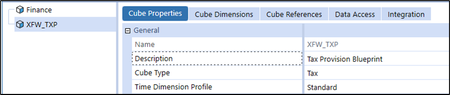
The following has been taken from the Tax Provision Blueprint "Instruction Guide" starting at page 41. See KB article: "Tax Provision Blueprint Instruction Guide - PV7.3.0 SV100" See KB article: "Can I Rename the "XFW_TXP Tax Cube?" The XFW_TXP Cube is the organizational structure that holds the Tax Provision Blueprint data. Related XFW_TXP Cubes may need to be created for OneStream Linked Cube application designs if entries are necessary on the Cube References tab of this Cube (depending on Entity Dimension assigned and if Extensible Dimensionality is in play). If you opt to not use the Cube name “XFW_TXP”, then extensive search and replace will be required on all objects in the Tax Provision Blueprint application. Therefore, changing the Cube name is NOT recommended. If you opt to rename the tax cube, we strongly recommend complete comprehensive testing of ALL functionality. Note: Cube setup changes to the original objects may impact calculations or data access. Cube Properties – General The following Cube Properties are core to the application: Description: Tax Provision Blueprint - May be changed. Cube Type: Tax - Do not change. Time Dimension Profile: Standard - May be changed but will require review and possible updates to Business Rules, Cube Views, reports, workflows, and other objects. Cube Properties - Security Security will need to be implemented for each application. The only change that was made here is with the Maintenance Group. Cube Properties - Workflow Workflow suffix for varying Workflow by Scenario type has been used. “NotUsed” has been attached to all the scenario types except for Tax, ScenarioType7 (attached to multi-year forecast scenarios) and ScenarioType8 (attached to current year Forecast scenarios). These should not be modified as scenario types are referenced throughout BR’s and parameters. Cube Properties - Calculation No changes from the default. Cube Properties - Business Rules TXP_BusinessRules is the primary Finance Business Rule assigned as Business Rule 1 to the XFW_TXP Cube. This Business Rule set provides most of the tax provision functionality for calculations in the Cube. Other Business Rules may be assigned, as necessary. This BR may need to be moved to Business Rule 3 if member formulas are required to execute first. See also: Data Unit Calculation Sequences (DUCS) in the OneStream Design and Reference Guide. Cube Properties - FX Rates In the FX Rates section, note the use of the TXP_YTDAverageRate type that was created earlier. Cube Dimensions The XFW_TXP_Entities dimension is provided based on the XFW_TXP_Entities Dimension included with Tax Provision Blueprint. The Cube Entity Dimension assignment may be changed if the customer’s design decision is to use an existing Entity Dimension for a Legal or Tax reporting structure that is actively used and maintained in the OneStream Financial Model. Changing the assigned entity dimension may require updates to any references for XFW_TXP_Entities Dimension in Business Rules, Cube Views, Dashboards or Parameters. The Scenario Dimension assigned may also be the same as the Finance Cube. The two required Tax Scenarios (TXP_Actual and TXP_ActualRTP) with their specific attributes would need to be added. Make sure that the Scenario Settings are set up appropriately. The (Default) scenario type option is only used for the Entity and Scenario dimensions. The remaining dimensions are defined at the “Tax”, “ScenarioType7” and “ScenarioType8” (if current year Forecast scenarios are used) scenario types: Below is a summary of the Cube Dimensions and their expected modification status. Note that UD5 and UD6 are not currently used. Cube References This section is currently not used for Tax Provision Blueprint. This area may need to be updated in the case of a Linked Cube Financial Model design. Data Access This section is currently not used for Tax Provision Blueprint. Integration This section controls the Dimensions that are updated with the Import Input Type in Workflow and the columns of data that appear in the Stage database when imported data is viewed. It determines the order of processing Dimensions and which Dimensions are turned on for data integration. If one Dimension must process before another (rare case), the transformation sequence can be changed. All integration settings are defined at the “Tax”, “ScenarioType7” and “ScenarioType8” scenario types.516Views0likes0CommentsDimension - UD8 - Dynamic Calculations
The following has been taken from the Tax Provision Blueprint "Instruction Guide" starting at page 102. See KB article: "Tax Provision Blueprint Instruction Guide - PV7.3.0 SV100" See KB article: "Dimension Member Names - Renaming and Deleting" See KB article: "Dimension Text Fields - Summary" UD8 Dynamic Calculations XFW_TXP_UD8 is the Tax Provision Blueprint UD8 – Dynamic Calculations Dimension contains dynamic calculations designed for TXP. The following TXP Dynamic Calculation Members should not be modified as they are core to the application. Additional dynamic calculations can be added to meet additional reporting requirements. UD8 Dynamic Calculations Notes No Text Properties in use. This Dimension is used for dynamic reporting. All data imported or loaded goes to None. Member Formulas are used for Dynamic Calc’s.499Views0likes0Comments