The OneStream Community has moved.Visit the new Community at community.onestream.com →
Metadata
24 Topics
Metadata Components - Overview
The following has been taken from the Tax Provision Blueprint "Instruction Guide" starting at page 40. See KB article: "Tax Provision Blueprint Instruction Guide - PV7.3.0 SV100" Tax Provision Blueprint Components Here are the links to all the Metadata components that are used in the Tax Provision Blueprint solution. Time Profiles Tax Cube Setup - XFW_TXP Can I Rename the "XFW_TXP" Tax Cube? Application Properties Global Options Dashboard Create New FX Rate Types Dimension - Scenarios Dimension - Entities Dimension - Accounts (1/2) Dimension - Accounts (2/2) Dimension - Flow Dimension - UD1 - Tax Jurisdiction Dimension - UD2 - Data Type Dimension - UD3 - Reporting Type (Accounting Method) Dimension - UD4 - Tax Type Dimension - UD5 & UD6 Dimension - UD7 - Group Filing Dimension - UD8 - Dynamic Calculations395Views0likes0CommentsTime Profiles
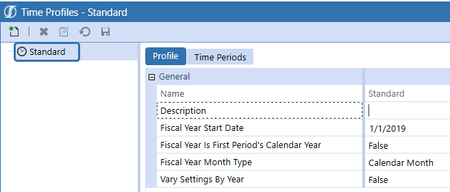
The following has been taken from the Tax Provision Blueprint "Instruction Guide" starting at page 40. See KB article: "Tax Provision Blueprint Instruction Guide - PV7.3.0 SV100" See KB article: "Application Properties" See KB article: "Using a Time Profile With Weeks" Time Profiles The XFW_TXP cube uses the “Standard” time profile. The Fiscal Year Start Date is set to 1/1/2019. These settings can be adjusted based on your application. Also, if you are sharing with other cubes (ie: Finance), this may have an earlier year than your seed Year (that is OK). Please also see the Dimensions tab in "Application Properties". This is where you set the start year that controls the list of years in your POV. Remember, that this is an application settings that will impact all Cubes.608Views0likes0CommentsDimension - UD1 - Tax Jurisdiction
The following has been taken from the Tax Provision Blueprint "Instruction Guide" starting at page 89. See KB article: "Tax Provision Blueprint Instruction Guide - PV7.3.0 SV100" See KB article: "Dimension Member Names - Renaming and Deleting" See KB article: "Dimension Text Fields - Summary" UD1 Tax Jurisdiction XFW_TXP_UD1 is Tax Provision Blueprint UD1 - Tax Jurisdiction Dimension. The Jurisdiction members are linked with the Entity Dimension to drive Business Rules calculations for the tax provision as well as reporting formats. Jurisdictions are grouped by National, Local, Domestic, and International. Do Not modify the existing parent members nor the naming convention used for base members. If an Entity has Local Jurisdictions, there must also be a National Jurisdiction assigned. UD1 Tax Jurisdiction Notes Text 1 Properties are used on all base members. Text 2 Properties are used on base members for a National group filing tax jurisdiction. Alternate hierarchies are used. Aggregation weights are used. No Member Formulas are used. See the Finance BR TXP_BusinessRules. All parent members must have the word Total in the description. This will help in the formatting of cube views. New base members should be created with the same Member Properties as their sibling members. Each Entity Dimension Member needs to be assigned the appropriate UD1 - Tax Jurisdiction Member in the Entity Member Properties: UD1 Constraint, UD1 Default, and Text 8 field. See also KB article: "Dimension - Entities". All base level UD1 members must have a Text 1 of TXP_Local or TXP_National. This is used to drive parameters in the Tax Schedules. It is not necessary to put this on parent UD1 members. Base level National members that are using National group filings must have the Text 2 populated with “NatGF=Yes”. For the Tax Provision Blueprint app, this applies to TXP_CA, TXP_LU and TXP_AE. There are several alternate hierarchies to help with different Cube Views, Parameters, Business Rules, and Reporting. National Jurisdiction Tax Provision Blueprint includes 20 countries for National Jurisdiction. The naming convention is based on the 2-digit ISO Country Code: TXP_XX where XX is the ISO Code, (such as US for United States). The Domestic Jurisdiction should be the main reporting country for the Tax Provision Blueprint (which is presumably the same as the Finance Cube). In Tax Provision Blueprint, the Domestic Jurisdiction is the United States. If this is implemented for a different reporting country, Canada for example, then the Canadian Jurisdiction TXP_CA should be moved under TXP_TotalDomestic and TXP_US should be moved under TXP_TotalInternational. Countries not required may be removed and countries required but not included may be added. Note the “TXP_XX” National Jurisdiction is included to facilitate circumstances that may not require a specific country Jurisdiction. This member may also be removed. Local Jurisdiction Local Jurisdictions work in conjunction with a single National Jurisdiction. Similar to the Total National Jurisdiction reporting hierarchy, there is a Total Local (TXP_TotalLocal) reporting hierarchy that distinguishes between Domestic and International. If the reporting country is different than the US, continuing our example above with Canada as the reporting country, move parent TXP_CA_Local under TXP_Domestic_Local and move parent TXP_US_Local under TXP_International_Local. Here is an example of the steps necessary to create a new country level UD1 hierarchy that has both local jurisdictions and a National jurisdiction. Total Country Local: Create TXP_UK_Local as a sibling to TXP_CA_Local under TXP_International_Local. Assign Member Properties similar to TXP_CA_Local. Add TXP_UK_Blended as the first child of TXP_UK_Local. All Local Jurisdictions should have one member with Blended as the Local code. E.g., TXP_UK_Blended. Assign Member Property -> Text 1: TXP_Local. Add the required Local Jurisdictions for UK, following the naming convention: TXP_UK_GB, where UK is the National Jurisdiction code and GB (Great Britain) is a 2-digit Local code. Assign Member Property -> Text 1: TXP_Local. Country Total: Create TXP_UK_Total as a sibling to TXP_CA_Total. Assign Member Properties similar to TXP_CA_Total. Relationship Properties: set the Aggregation Weight for TXP_UK_Total to 0.00. Add TXP_UK as the first child. Add TXP_UK_Local as the next child. Entity Dimension Member Properties to Update: Change UD1 Constraint for TXP_UK_101 (or any applicable UK entity) to TXP_UK_Total. Change Text 8 for TXP_UK_101 (or any applicable UK entity) to TXP_UK_Total. UD1 Default stays the same: TXP_UK. Update Text 7 if the National Benefit will apply to the UK entity. Other: If group filing is required, then update UD7 for the UK entities. No Local Jurisdiction Required If Tax Provision Blueprint does not require provisioning for Local Jurisdictions, retaining one Local Domestic group and one Local International group is recommended to allow for future expansion and to minimize the impact on the Objects that are included with Tax Provision Blueprint.355Views0likes0CommentsDimension - Flow
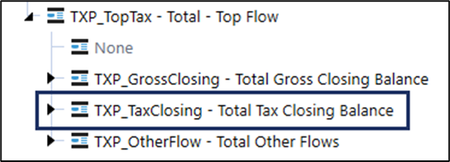
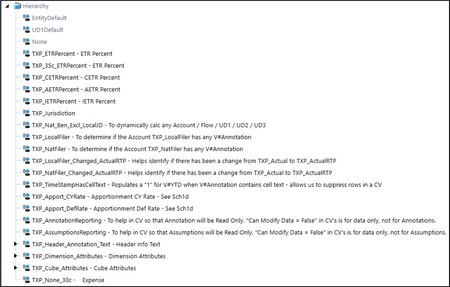
The following has been taken from the Tax Provision Blueprint "Instruction Guide" starting at page 84. See KB article: "Tax Provision Blueprint Instruction Guide - PV7.3.0 SV100" See KB article: "Dimension Member Names - Renaming and Deleting" See KB article: "Dimension Text Fields - Summary" Flow XFW_TXP_Flow is the Tax Provision Blueprint Flow Dimension that holds the flow structure for the tax provision calculations, including the Deferred Tax Roll Forward Gross Closing and Tax Closing rollups. Flow Notes Text 1 Property is used to identify Discrete flow members. Any base level flow member that is classified as Discrete must have the Text 1 property of Discrete=Yes. Parent flow members where all children are Discrete should also have Text 1 Discrete=Yes. This is used to drive Parameters, BR’s, etc. Switch Type for activity type data. Alternate hierarchies are used. Aggregation weights are used. No Member Formulas are used. See the Finance BR TXP_BusinessRules. All parent members must have the word Total in the description. This will help in the formatting of the Cube Views: When referencing TXP_TopTax for Flow, TXP_TaxClosing will be the subtotal that is displayed. TXP_GrossClosing and TXP_OtherFlow have an Aggregation Weight of zero assigned. The screen shot below is a partially collapsed view of the Flow Dimension with the Schedules listed that are associated with members. Do not change any of the Flow Member names included with Tax Provision Blueprint. TXP_GrossClosing & TXP_TaxClosing Setup Notes TXP_GrossClosing contains the Gross activity data for the Deferred Tax Roll Forward. TXP_TaxClosing contains the Tax Effected activity data for the Deferred Tax Roll Forward. This is also differentiated via the UD2 member. The only difference between the Gross and Tax Flow hierarchies is the TXP_RCTotal Parent and Children. These members hold the Rate Change Impact data which does not exist for Gross data. TXP_OtherOpenAdj_Dscr, TXP_TotalDefOther_NonDscr, TXP_TotalDefOther_Dscr and TXP_TotalDefBSO: Base members may be added. If the expected calculations for a new base member are the same as the siblings, no business rule modifications are required. A new base member for any of these parents will also require a similar member to be added to the TXP_TaxLCTotalCF hierarchy. E.g.: Add TXP_DefOther3 as a child of TXP_DefOther_NonDscr. Add TXP_TLCDefOther3 as a child of TXP_TLCDefOther_NonDscr. TXP_AdjOpeningBal_NonDscr: Add new base member (e.g., TXP_DiscAdj with a Non-Discrete classification) requires updates to metadata, BR’s CV’s, etc. New Flow Member required for TXP_TaxLCTotalCF Add TXP_TLCDiscAdj as a child of TXP_TLCOpeningAdj_NonDscr. Rules for Schedule 06 will need to be updated. Update alternate flow hierarchies referenced in Business Rules: Add TXP_DiscAdj as a child of TXP_ActivityTax, TXP_ETRNatBenOther, TXP_ETRLocalDefExpOther, TXP_ETRLocalVA. Add TXP_TLCDiscAdj as a child of TXP_ActivityTLC. No Input business rules may need to be modified. Update Business Rules in section Schedule05_06_PartB (this is related to the National Benefit and Schedule 6b TXP_DefLocal account tax calculation). New account required for Tax Account Reconciliation (TXP_TxRAccountRecon). Most likely this should be added as a child of TXP_TxRAdjustedOpeningBal (e.g., TXP_TxRDiscAdj). Rules for Schedule 07 will need to be updated. Add new account required in the alternate hierarchy TXP_ETRVATotal as a child of TXP_ETRVA_NonDscr (e.g., TXP_ETRVADiscAdj). Business Rules for Schedule 08 & Schedule 09 will need to be updated. Add new account required in the alternate hierarchy TXP_ETRDeferredTotal as a child of TXP_ETRDeferred_NonDscr (e.g., TXP_ETRDiscAdj). Business Rules for Schedule 08 & Schedule 09 will need to be updated. TXP_CYPL: Add new base member (e.g., TXP_CYOther with a non-discrete classification as a sibling to TXP_CYProvision). New Flow Member required for TXP_TaxLCTotalCF as a sibling of TXP_TLCExpiration (e.g., TXP_TLCCYOther). Business Rules for Schedule 06 will need to be updated. Update alternate flow hierarchies referenced in Business Rules: Add TXP_CYOther as a child of TXP_ETRNatBenOther, TXP_ETRLocalDefExpOther. Add TXP_TLCCYOther as a child of TXP_ActivityTLC. New account required for Tax Account Reconciliation (TXP_TxRAccountRecon). Most likely this should be added as a child of TXP_TxRDefProvision (e.g., TXP_TxRCYOther). The Business Rules for Schedule 07 will need to be updated. New account required in the alternate hierarchy TXP_ETRVATotal as a child of TXP_ETRVA_NonDscr (e.g., TXP_ETRVACYOther). Business Rules for Schedule 08 & Schedule 09 will need to be updated. New account required in the alternate hierarchy TXP_ETRDeferredTotal as a child of TXP_ETRVA_NonDscr (e.g., TXP_ETRCYOther). Business Rules for Schedule 08 & Schedule 09 will need to be updated. No Input business rules may need to be modified. Metadata, BR’s, CV’s, and other objects will need to be updated. Total Tax Loss/Credit Detail (TXP_TaxLCTotalCF) This alternate hierarchy contains data related to Tax Attributes: Losses and Credits. This data can be tracked by the year that the Attribute was created. The Total of each Loss and Credit account is copied to the TXP_GrossClosing equivalent member via Business Rules.536Views0likes0CommentsDimension - UD3 - Reporting Type (Accounting Method)
The following has been taken from the Tax Provision Blueprint "Instruction Guide" starting at page 98. See KB article: "Tax Provision Blueprint Instruction Guide - PV7.3.0 SV100" See KB article: "Dimension Member Names - Renaming and Deleting" See KB article: "Dimension Text Fields - Summary" UD3 Reporting Type (Accounting Method) XFW_TXP_UD3 is the Tax Provision Blueprint UD3 – Total – Top Reporting Type Dimension that contains a set of members used for reporting. The original members should not be modified or removed, but the base member descriptions may be modified to reflect alternate accounting methods such as US GAAP to Statutory (STAT) / Statutory (STAT) to Tax Reporting. This could also be used for IFRS reporting. UD3 Reporting Type (Accounting Method) Notes: No Text Properties in use. No aggregation weights are used. No Member Formulas are used. All parent members must have the work Total in the description. This will help in the formatting of Cube Views. If additional reporting members are required, then Business Rules and objects will need to be reviewed. Tax Provision Blueprint Business Rules have no constraints on UD3 members, except when applied to Tax Rates, where only the UD3 None member is used.227Views0likes0CommentsDimension - UD8 - Dynamic Calculations
The following has been taken from the Tax Provision Blueprint "Instruction Guide" starting at page 102. See KB article: "Tax Provision Blueprint Instruction Guide - PV7.3.0 SV100" See KB article: "Dimension Member Names - Renaming and Deleting" See KB article: "Dimension Text Fields - Summary" UD8 Dynamic Calculations XFW_TXP_UD8 is the Tax Provision Blueprint UD8 – Dynamic Calculations Dimension contains dynamic calculations designed for TXP. The following TXP Dynamic Calculation Members should not be modified as they are core to the application. Additional dynamic calculations can be added to meet additional reporting requirements. UD8 Dynamic Calculations Notes No Text Properties in use. This Dimension is used for dynamic reporting. All data imported or loaded goes to None. Member Formulas are used for Dynamic Calc’s.499Views0likes0CommentsDimension - UD5 & UD6
The following has been taken from the Tax Provision Blueprint "Instruction Guide" starting at page 23. See KB article: "Tax Provision Blueprint Instruction Guide - PV7.3.0 SV100" See KB article: "Dimension Member Names - Renaming and Deleting" See KB article: "Dimension Text Fields - Summary" UD5 and UD6 The UD5 and UD6 dimensions are not used. The default is None. If you use UD5 and/or UD6 or the other dimensions differently than the Tax Provision Blueprint setup, significant updates and testing will be required in all the BR's, CV's, Parameters, Data Management sequences and Dashboards.278Views0likes0CommentsDimension - UD2 - Data Type
The following has been taken from the Tax Provision Blueprint "Instruction Guide" starting at page 95. See KB article: "Tax Provision Blueprint Instruction Guide - PV7.3.0 SV100" See KB article: "Dimension Member Names - Renaming and Deleting" See KB article: "Dimension Text Fields - Summary" UD2 Data Type XFW_TXP_UD2 is the Tax Provision Blueprint UD2 – Data Type Dimension that contains tax data: Gross Tax, Tax Effected, Effective Tax Rate data, and other data type classifications. The original members of this Dimension should not be modified as they are core to the application. However new members may be added as needed. UD2 Data Type Notes: No Text Properties in use. Aggregation weights are used. No Member Formulas are used. All parent members must have the word Total in the description. This will help in the formatting of Cube Views. When adding a new TXP_TXRecData member, begin the member’s name with TXP_TXRec. When adding a new type of Tax Effected data begin the member’s name with TXP_Tax. Type of Tax Data: Gross or Tax Effected: (1) TXP_Gross_Input: Gross or pre-taxed data. This is the starting point of Tax Provision Blueprint data. (2) Tax Effected data: For each category of Tax Provision Blueprint data (current expense, deferred tax, return there are 3 types of tax rates that may be calculated: National, Apportionment and Local. Statutory (Local) Effective Tax Rate (ETR): TXP_Tax_SETR Consolidated Effective Tax Rate (ETR): TXP_Tax_CETR Interim Reporting Run Rate: TXP_Tax_IETR Applied Interim Reporting ETR: TXP_Tax_AETR If a new category of tax needs to be calculated, follow the existing naming convention. Business Rules and other Object updates will need to be added. (3) Tax Rate Type allows for the tax rates (Account Dimension base members of TXP_TaxRates) to contain both a statistical (National and Local) rate and an apportionment (Local only) rate when needed. This is also used in conjunction with UD4 to identify a rate as National or Local. (4) TXP_TxRecData applies to the Tax Account Reconciliation and will be based on the General Ledger accounts of the client. This hierarchy is normally modified to synchronize with finance account level detail for tax balance sheet and expense accounts. These modifications will require updates to Business Rules (Schedule7TaxAccountReconciliationLocalCurrency & Schedule7TaxAccountReconciliationTranslation) and Tax Forms (07 Tax Account Reconciliation / 07 FC Tax Account Reconciliation & 07b Tax Account Reconciliation / 07b FC Tax Account Reconciliation). The TXP_TxRecData hierarchy is grouped by Total Tax Expense data and Balance Sheet data. This hierarchy works with the Account hierarchy: TXP_TxRAccountRecon – Total Tax Account Recon – Tax Entry. If the Deferred Expense and/or the DTA/DTL data needs to be split into multiple accounts, add a parent member, e.g., TXP_TXRecTotDefExp – Total Deferred Exp. (Inc.). (5) TXP_OriginYears are used to populate the years on Schedule 3 – Tax Attributes / Schedule 03 FC Tax Attributes: Origin Year and Expiration Year. TXP_CurrentYearLess20 is a catchall member for any data greater than 19 years old. If more years are needed, Business Rules and objects will need to be updated. (6) TXP_FCST_Data_Copy accounts are used in Dashboards to help in the copy of (Actual) data into a Forecast scenario.367Views0likes0CommentsSecurity
The following has been taken from the Tax Provision Blueprint "Instruction Guide" starting at page 215. See KB article: "Tax Provision Blueprint Instruction Guide - PV7.3.0 SV100" Security Tax Provision Blueprint will need to have additional Security Groups added to the OneStream Framework for each environment where Tax Provision Blueprint is used. The Security Groups are used to provide user access to Tax Provision Blueprint and the Workflow structure for the solution. The only place where standard security has been set up is in the Maintenance Group of objects. These are set to Administrators. All other security options are left at the “out-of-the-box” defaults. We have not created any security groups. Note: Creating and assigning security groups will be required for every implementation.533Views0likes0CommentsApplication Properties
The following has been taken from the Tax Provision Blueprint "Instruction Guide" starting at page 213. See KB article: "Tax Provision Blueprint Instruction Guide - PV7.3.0 SV100" Application Properties We do not supply the Application Properties file with Tax Provision Blueprint as it could overwrite what is currently in your application. We walk you through what we have set up in the Tax Provision Blueprint. Within the General section, update the Global Scenario, Global Time, and the Currency Filter. For Tax, ScenarioType7 and ScenarioType8, we have these settings to help in loading historical data. These can be modified based upon your application requirements. Within the Dimensions section, we have set the Start Year to 2019 and the End Year to 2030. We have also given each UDx dimension a description – this is optional. You will need to consider other cubes in the app (i.e.: Finance, Planning…). Please review and manually adjust based on your application. Note: The User Defined Dimensions descriptions do not extract (this is a known bug). If you wish, you can update your specific application. It will not impact the Tax Provision Blueprint app.465Views0likes0Comments