REST api and breaking changes for authentication in v8
We have been using the onestream REST api for a couple years now. In the past we had been using Open-ID-connect (OIDC) to authenticate against an Azure AD ("Entra") directory, and then generate reports from cubeviews or data adapters. During our current upgrade to v8, we started receiving lots of mixed messages from onestream employees about whether OpenID is still supported. I'm assuming that the OS support team knows what they are talking about, but it seems to contradict the docs in substantial ways. Moreover, it contradicts common sense. What they are telling me is that in the "hosted" version of Onestream v8 on Azure, we are NO LONGER allowed to use OIDC to authenticate a service principal (app registration) and connect to the REST api. Instead, they are saying that a new engineering team at onestream (called "OIS" team?) have rebuilt the authentication layers and they removed OIDC support in favor of PAT tokens. Supposedly the PAT tokens are the only way to use the REST api in onestream going forward. This seems to be a massive step backwards - we lose our ability to connect with a normal service principal from Entra ID, and we must start using a custom login that originates in onestream (one that will not have consistent governance as various other services that are managed by our security team.) NOTE: The docs talk a lot about both OIDC *and* PAT tokens, so it seems like both are allowable.... Whenever the terms are contrasted or are used in close proximity to each other, the docs will say that customers "may use" PAT tokens. They never say we "must use" PAT tokens. Can anyone provide some more color to help customers understand this change? It feels like a regression. I suspect it may not have been intentional. In my opinion, these PAT tokens aren't appropriate for the back-end service integrations, and we would rather continue using our old service principals originating in Entra ID. Any additional information would be very much appreciated.1KViews0likes6Comments
EncryptText And DecryptText Replacement
Does anyone know what replaces the 2 utility commands below? I get a warning message that those commands are obsolete but it does not give any indication or hints of what the new commands are or what's currently available? BrApi.Utilities.EncryptText andBrApi.Utilities.DecryptText Any help is highly appreciated. Thanks, JunSolved247Views0likes3Comments
Multiple source columns to a single target dim based on hierarchical relationships - Mapping
Hello Experts, Here's the scenario: We have a flat file coming from the client's source with multiple source columns. We need "Region", "Cost Center", and "Business Unit" in this case from the file to build the solution. We have developed an unique UD2 dimension in the app which will act as a target dimension for these 3 source columns(Region, CC, & BU). Creating a one to one mapping for all the possible combinations for (Region, CC, & BU) would be tedious. Currently, we are thinking of writing a Complex Expression in the UD2(target) transformational rule, that would first lookup the parent values of all the base members from the 3 columns combination and return the respective value of it's target. Something like the below snippet. Any sample code or alternative solution would be really helpful. Thanks! Dim U1 As String = args.GetTarget("U1#") Dim U3 As String = args.GetTarget("U3#") Dim U4 As String = args.GetTarget("U4#") Dim objDimPk As DimPk = BRApi.Finance.Dim.GetDimPk(si, CostCenter) Dim sValue As Integer = BRApi.Finance.Members.GetMemberId(si, dimTypeId, memberName) Dim eValue As Integer = BRApi.Finance.Members.GetMemberId(si, dimTypeId, memberName) Dim bValue As Boolean = BRApi.Finance.Members.IsDescendant(si, objDimPk, sValue, eValue, dimDisplayOptions) If (U1 = "ABC" And IsDescendant(U4, "CostCenter", "XYZ")) Then Return "TARGETUD2" Else Return "" End If50Views0likes0CommentsIdentifying API Parameters for OneStream Audit Log Export via Postman
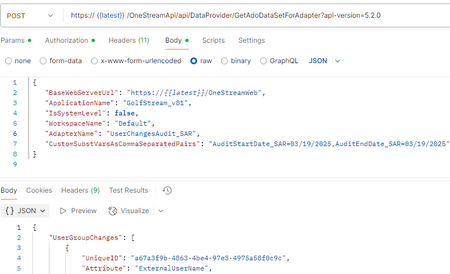
Hello all, I joined a company where they have implemented OneStream solution. I have access to the platform, and still exploring the way it was implemented. I am currently working on integrating OneStream with an external platform and need to export audit logs using the product's API. While setting up the request in Postman, i've encountered difficulty identifying the correct values for the following parameters: ApplicationName AdapterName Despite reviewing the available documentation, these tags remain unclear. Has anyone successfully queried audit logs via the OneStream API and can share insights on where these parameters are defined or how to retrieve them? Any guidance or examples would be greatly appreciated. Thank you in advance!135Views0likes3Comments
Pass parameters through Rest API
Hi All, This is probably an easy one, but I am stuck. I have a Dashboard dataset rule that used FDX to run a query. It takes two input values. I have a data adapter that calls that BR and I can hardcode parameters in there to pass to the BR. Now I am trying to call that Data Adapter using the REST API. I am trying to pass parameters using CustomSubstVarsAsCommaSeparatedPairs. How should I have the Data Adapter set up to accept these parameters. For reference the hardcoded query looks like this: {_GetData}{GetDataSet}{ScenarioName=Actual, TimeName = 2024M3} What do I need to change "Actual" and "2024M3" to in order for it to use the values from the REST API call? Thanks, ScottSolved122Views0likes1CommentIntermittent 500 Error when calling OS Data Adaptor using Rest API 5.2.0
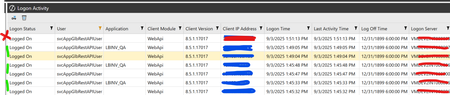
We have several applications calling OneStream data adaptor via Rest API. Very frequently and randomly the connection fails with a 500 error. If we wait and retry the connection is successful. We have not been able to find the root cause. We observed that when the Rest API has 2 entries in the Log Activity table in OneStream the connection is successful. The screen shot is from the Logon Activity table in OneStream. Every so often the connection fails with a HTTP 500 Error and we observed that only one the set is entered in the table. Have any of you encountered this type of issue.178Views0likes5CommentsConnect different OneStream SaaS deployments
Hi Folks, We're just starting on a OneStream SaaS implementation to replace HFM. We're far from the stage of actively working on any data integrations yet but I'm already starting to think about how things will hang together and how data will potentially flow in the future state of things. Two of the downstream feeds that we currently receive in our HFM system are companies which are current users of OneStream SaaS. Just thinking at a very high level for now, does anyone know if there are any ways downstream systems could submit data to us without punching out to the internet e.g. using Azure Private Link service and staying within the Microsoft network (or some other networkey magic)? High level pretty picture :) Obviously we wouldn't be able to configure this ourselves as this is SaaS but I'm interested to hear if anyone else has any experience exploring this or anything similar with OneStream SaaS and if anything like this is even possible in the SaaS world. Regards Craig221Views0likes8Comments
REST API Execute LogonAndReturnCookie
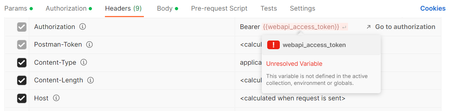
I am trying to determine if we are using any REST APIs. We were instructed to run a logonandreturncookie via Postman. https://documentation.onestream.com/1384528/Content/PDFs/REST_API_Implementation_Guide.pdf I followed the instructions in page 26 and ran into this error message: Error: Invalid character in header content ["Authorization"] I entered "{{webapi_access_token}}", similar to the screenshot in page 27. I hovered over the token and saw a message stating it's not defined. Where should I set up this variable or is there an issue with my params/body?