OS Genesis CubeViewTreeView
Hi All, When opening a cube view via OS Genesis cube view tree view, the content block can take a while to open. Even though there is no data, it is a simple cube view PnL. Opening it via cube view or dashboard takes only 2 seconds with data. Is there a way to improve the performance of the cube view tree view content? Appreciate your help on this.10Views0likes0Comments
CVR and GetDataCell Issue in cube views
Hello, I currently have a cube where I am having an issue calculating variances. The row has GetDataCell(CVR(Row1)+CVR(Row2)) and Column is has T#POV, T#POVPrior12, GetDatacell(T#Pov-T#POVPrior12). When I run the report, the first two columns run correctly for T#POV and T#POVPriorYear, but the third column where the two get data cells meet does not calculate correctly. I can't get it to work on a column override either as I know there is a order of operation for the GetDataCell. I want to keep the report as dynamic as possible, is there a way this can be achieved without breaking the columns out and manually doing the overrides?17Views0likes0Comments
OS V9 Excel Add-in Parameters Feature
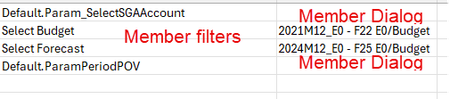
Hi all, I've been playing with this feature for a bit and it would appear that if you've made a cube view connection to a CV that contains parameters based on "Member Dialog", those parameters don't seem to work as expected. The resulting worksheet does create a space for those parameters but in the cell where you would select your member, there is no dropdown available to open and choose. The cell is completely blank. Upon refresh, I am prompted for those member dialog parameters but even the result I choose is not returned to display on the sheet. Doesn't seem to be any issues if the parameter is based on a Member Filter. Am I doing something wrong or is the use of Member Dialog parameters in Excel add-in simply not possible? There is nothing in the existing documentation that I can find that discusses this. Attaching a screen capture of the Excel results:68Views0likes1Comment
Top N in Cubeview using BR
I am trying to get top N (top 10) customers by revenue account in my cubeview. For this i re-purposed the snippet finance code for List Ranked to this: Namespace OneStream.BusinessRule.Finance.Ranked_list Public Class MainClass Public Function Main( ByVal si As SessionInfo, ByVal globals As BRGlobals, ByVal api As FinanceRulesApi, ByVal args As FinanceRulesArgs ) As Object Try Select Case api.FunctionType Case FinanceFunctionType.MemberListHeaders Return New List(Of MemberListHeader) From { New MemberListHeader("Ranked") } Case FinanceFunctionType.MemberList If args.MemberListArgs.MemberListName.Equals("Ranked", StringComparison.InvariantCultureIgnoreCase) Then Dim header As New MemberListHeader("Ranked") Dim members As List(Of Member) = GetRankedMembers(si, api, args) Return New MemberList(header, members) End If End Select Return Nothing Catch ex As Exception Throw ErrorHandler.LogWrite(si, New XFException(si, ex)) End Try End Function #Region "Ranking Logic" Private Function GetRankedMembers( ByVal si As SessionInfo, ByVal api As FinanceRulesApi, ByVal args As FinanceRulesArgs ) As List(Of Member) Try '------------------------------- ' Required parameters '------------------------------- Dim rankType As String = args.MemberListArgs.NameValuePairs("RankType") Dim rankCount As Integer = Convert.ToInt32(args.MemberListArgs.NameValuePairs("RankCount")) Dim loopMemberFilter As String = args.MemberListArgs.NameValuePairs("LoopMemberFilter") If Not args.MemberListArgs.NameValuePairs.ContainsKey("DataCellToRankMemberFilter") Then Throw New Exception("Missing required parameter: DataCellToRankMemberFilter") End If Dim dataCellFilter As String = args.MemberListArgs.NameValuePairs("DataCellToRankMemberFilter") Dim cubeName As String = New MemberScriptBuilder(dataCellFilter).Cube '------------------------------- ' Determine looping dimension '------------------------------- Dim loopDimPk As DimPk = GetDimPkForLoopMemberFilter(si, api, cubeName, loopMemberFilter, dataCellFilter) Dim membersToLoop As List(Of MemberInfo) = api.Members.GetMembersUsingFilter(loopDimPk, loopMemberFilter, Nothing) Dim rankedCells As New List(Of MemberAndCellValue) '------------------------------- ' Loop members and evaluate cell '------------------------------- For Each mi As MemberInfo In membersToLoop Dim mfb As MemberScriptBuilder = SubstituteLoopMember(loopMemberFilter, dataCellFilter, mi.Member.Name) Dim cell As DataCellInfoUsingMemberScript = BRApi.Finance.Data.GetDataCellUsingMemberScript( si, cubeName, mfb.GetMemberScript ) If cell IsNot Nothing AndAlso Not cell.DataCellEx.DataCell.CellStatus.Invalid AndAlso Not cell.DataCellEx.DataCell.CellStatus.IsNoData Then rankedCells.Add( New MemberAndCellValue( mi.Member, cell.DataCellEx.DataCell.CellAmount ) ) End If Next '------------------------------- ' Rank results '------------------------------- Dim result As New List(Of Member) Select Case rankType.ToUpperInvariant() Case "TOP" result = rankedCells. OrderByDescending(Function(x) x.CellValue). Take(rankCount). Select(Function(x) x.Member). ToList() Case "BOTTOM" result = rankedCells. OrderBy(Function(x) x.CellValue). Take(rankCount). Select(Function(x) x.Member). ToList() Case "MAX" Dim maxItem = rankedCells.OrderByDescending(Function(x) x.CellValue).FirstOrDefault() If maxItem IsNot Nothing Then result.Add(maxItem.Member) Case "MIN" Dim minItem = rankedCells.OrderBy(Function(x) x.CellValue).FirstOrDefault() If minItem IsNot Nothing Then result.Add(minItem.Member) End Select Return result Catch ex As Exception Throw ErrorHandler.LogWrite(si, New XFException(si, ex)) End Try End Function #End Region #Region "Helpers" Private Function GetDimPkForLoopMemberFilter( si As SessionInfo, api As FinanceRulesApi, cubeName As String, loopFilter As String, dataCellFilter As String ) As DimPk Dim cube As CubeInfo = api.Cubes.GetCubeInfo(cubeName) If cube Is Nothing Then Throw New Exception("Invalid cube: " & cubeName) Dim dimType As DimType = DimType.GetItem(loopFilter.Split("#"c)(0)) Dim mfb As New MemberScriptBuilder(dataCellFilter) Dim scenario As Member = api.Members.GetMember(DimTypeId.Scenario, mfb.Scenario) Dim scenarioType As ScenarioType = api.Scenario.GetScenarioType(scenario.MemberId) Dim dimId As Integer = cube.Cube.CubeDims.GetDimId(dimType.Id, scenarioType.Id) Return New DimPk(dimType.Id, dimId) End Function Private Function SubstituteLoopMember( loopFilter As String, dataCellFilter As String, memberName As String ) As MemberScriptBuilder Dim mfb As New MemberScriptBuilder(dataCellFilter) Dim dimType As DimType = DimType.GetItem(loopFilter.Split("#"c)(0)) Select Case dimType.Id Case DimType.Entity.Id : mfb.Entity = memberName Case DimType.Account.Id : mfb.Account = memberName Case DimType.UD1.Id : mfb.UD1 = memberName Case DimType.UD2.Id : mfb.UD2 = memberName Case DimType.UD3.Id : mfb.UD3 = memberName Case DimType.UD4.Id : mfb.UD4 = memberName Case DimType.UD5.Id : mfb.UD5 = memberName Case DimType.UD6.Id : mfb.UD6 = memberName Case DimType.UD7.Id : mfb.UD7 = memberName Case DimType.UD8.Id : mfb.UD8 = memberName End Select Return mfb End Function #End Region #Region "Helper Class" Private Class MemberAndCellValue Public Property Member As Member Public Property CellValue As Decimal Public Sub New(m As Member, v As Decimal) Member = m CellValue = v End Sub End Class #End Region End Class End Namespace After this changed My cubeview row member filter to this, however when cubeview runs , it runs for a bit and then page comes back completely blank : U5#Root.CustomMemberList( BRName = Ranked_list, MemberListName = Ranked, RankType = Top, RankCount = 10, LoopMemberFilter = U5#Total_Customer.Children, DataCellToRankMemberFilter = Cb#Financials :E#TotalEntity :C#USD :S#Actual :T#2026M1 :V#YTD :A#A5 :F#EndBal :O#Top :I#Top :U1#Organization :U2#Project :U3#None :U4#None :U6#None :U7#None :U8#None ) Does anyone know what i could be missing?65Views0likes1CommentGenesis - Drill down > Open in New Tab
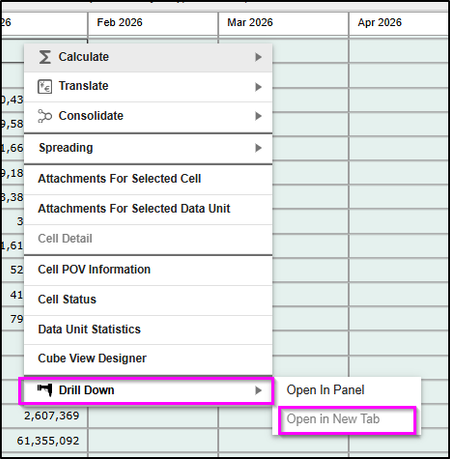
I am testing out drill functionalities in Genesis and found this "Open in New Tab" being grey out. I checked the cv in the page and am unable to find any config in this cv that relates to this. How do I make this option active for use? it will be really useful to see the drill results in another tab so that it can be view side by side with the original dashboard.Solved54Views0likes1CommentDashboard to show annotations details, footnote details, assumptions, variance explanations ...
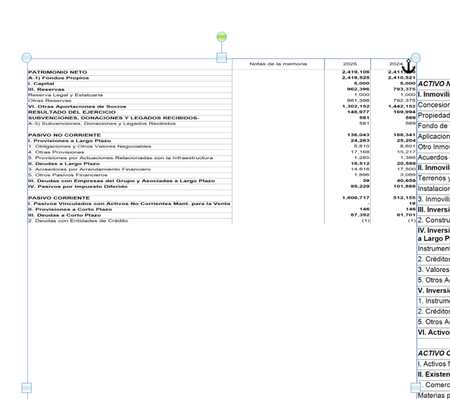
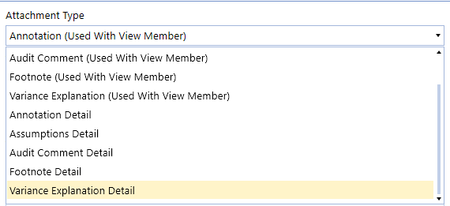
Dear Community, It is very easy for a user to add comments on a given cell, using data attachments : However, what are the reporting possibilities for such comments ? Could we use them in dashboard, for instance to be shown as footnote of a dashboard ? Or could these be used as footnotes in pixel-perfect pdf documents generated from a cube view ? Many thanks,2.8KViews0likes4Comments
Missing Account Values
This one is for all you Encyclopedia Brown fans out there. Like many companies, we have a cash flow cube view. We've recently added two balance sheet accounts to one of the lines in it, but the values in those accounts do not show up. Here is the code for the member formula for the Debt Payments cash flow line: If (Not api.Entity.HasChildren()) Then api.data.calculate("A#CF_DebtPymts:F#CF_ACTIVITY:I#None:O#Import = A#DebtCur:F#RF_Debt_ACTIVITY:I#Top:O#Top + A#Debt_LT:F#RF_Debt_ACTIVITY:I#Top:O#Top + A#Cur_equip_fin_liabs:F#RF_Debt_ACTIVITY:I#Top:O#Top + A#LT_equip_fin_liabs:F#RF_Debt_ACTIVITY:I#Top:O#Top") End If The last two accounts, Cur_equip_fin_liabs and LT_equip_fin_liabs are not pulling into the value for Debt Payments even though I've proven via a QuickView that there are data in the intersections specified in the above formula. I've compared the new accounts to the existing accounts in this formula, and all the settings are the same. These accounts were added before month end close, so everything has been through the entire process of consolidation and calculation. Why do the values not pull into this cash flow account?17Views0likes0CommentsPass through external parameters into dynamic cube view services
Hello, Is there a way to pass a combo box paramater into a cube view service? I think would be through the Service Factory. Since the cube view service runs when the cube view is executed and there is no call as XFBRs or Dashboard extenders, Is there a way to pass parameter values into the cube view service business rule?39Views0likes1Comment
Genesis cannot start: "Value cannot be null."
Hi What to do when I get this error messages in Genesis: Unable to open dashboard 'OpenPlace_(Designer)'. Error processing DataSet 'GetWFSteps'. Error executing Workspace Assembly Service class 'Workspace.Gen.CubeViewCharts_x2x.MUAssemblyFactory'.Value cannot be null. (Parameter 'reader'). How to reset? The problem happens when working with Block: Cube View Charts. It will not read my cube view and give the following comment: Value cannot be null. An error messages that is difficult to work with, as it does not say where the problem is. But this second, as I cannot get into the genesis instance.Solved49Views1like2Comments