Task Scheduler not executing tasks
I have scheduled a data management sequence to run every 120 minutes between a specified time range (7 am to 9 am) -- But the data management sequence is not being executed. There are no parameters needed in the data management sequence, and I have confirmed that manually running the sequence works without error. When I check the grid view in Task Scheduler, I can see the "Next Start Date/Time" column is correct. However, when the system finally reaches that time, the task is not executed, the "Count" column remains as zero, and the "Next Start Date/Time" column updates to 120 minutes later. I receive no system errors on why the task is not executing. I have confirmed the scheduling a one time task, or even a daily task works successfully. Any help on this would be great.10KViews3likes14Comments
Clear data using level 1 data unit (rather than level 2) on data load
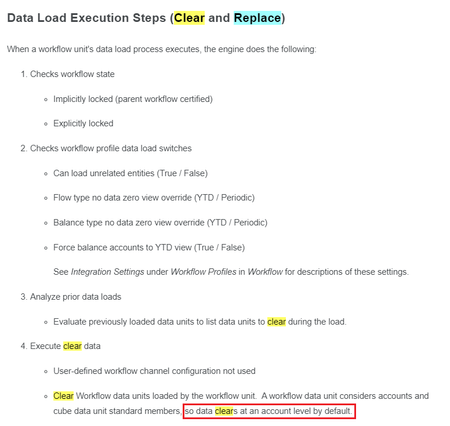
Hi all I was wondering if it is possible to override the default 'clear and load' settings on a data load step from 'Level 2: Workflow Data Unit' to 'Level 1: Cube Data Unit' Just to give a bit of context: We perform a data copy from a Budget scenario (using Data Management Sequence) to a Forecast scenario to provide a starting data position for divisions to use when they capture their forecast data. Once the data copy is complete, the process for divisions to update their forecasts is to extract an Excel Fixed File Template on which they will make their changes and additions over the copied Budget data, and then to import that file via their Workflow to the cube. However, when wanting to remove an account for instance, the only way to do so it to load zeros to that account. This is because the load clears by account and not entity. Is it possible to change the load so that it deletes all accounts? Thanks, Mark1.3KViews2likes3CommentsHow to "Import" "in parallel" via a "OneStream Connector" to a "Data Warehouse"?
Please share your practical advice to help us meet the new Integration requirements. - I couldn't find a OneStream KB/post nor a good result from free Gemini. - We're using SAAS on v9.0 to move to v10 upon its upcoming release. Thank you folks for sharing your expertise.88Views1like2Comments
Errors creating New Task in Data Import Schedule Manager
I am getting several errors when setting up a New Task in the Data Import Schedule Manager. We are on OS version 9.01.17403, and I have installed the latest version of DSM, which is 8.4.0_SV100. I suspect this may be a version compatibility issue, so I am curious if anyone has been able to get this solution to work in a 9.01 application. I have already uninstalled and reinstalled the solution, which didn’t resolve the issues. Below are the two errors I am seeing: When choosing Global Scenario from the Scenario(s) drop down list, I get an immediate error “Error processing member. The item was not found. Member, 11111111.” The details state: Unable to execute Business Rule ‘DSM_Paramhelper’ where it appears to be trying to call the Global Scenario by OneStream.Client.Api.DashboardsAjaxServiceReference.DashboardsAjaxServiceClient.GetParameterDisplayInfosUsingDashboardNameCompressed(SessionInfo si, LoadDashboardInfo loadDashboardInfo, Boolean isForDashboardUIWithInteractiveComponents, Dictionary`2 custSubstVarsAlreadyResolved). If I pick a specific Scenario, I am getting a different error. It allows me to pick the Scenario and Time, but when save the Task, I get “The input string ‘’ was not in a correct format.”. The error details show it is an issue with the same Business Rule ‘DSM_SolutionHelper’ where Conversion from string “” to type ‘Double’ is not valid. The input string ‘’ was not in a correct format. OneStream.Client.Api.DashboardsAjaxServiceReference.DashboardsAjaxServiceClient.StartExecuteSelectionChangedServerTaskCompressed(SessionInfo si, Boolean isSystemLevel, Guid primaryDashboardID, Guid embeddedDashboardID, Guid componentID, PageInstanceInfo pageInstanceInfo, XFSelectionChangedServerTaskInfo serverTaskInfo) Any advice on how to correct these issues would be greatly appreciated.Solved104Views1like1CommentAbout Foundation Second Edition
Beyond offering a training guide, the focus of this book is on the ‘why’ of design and building an application. While the foundational principles of building a solid, scalable OneStream application have remained largely unchanged, updates contained in this second edition reflect implemented software enhancements, along with the ongoing development of the OneStream landscape. Manage your Implementation with the OneStream methodology Understand Design and Build concepts Build solutions for the Consolidation of financial data, and develop Planning models Create Data Integration solutions that will feed your models Develop Workflows to guide and manage your End-Users Advance your solutions with Rules and Security Take advantage of detailed Data Reporting using tools such as Analytic Blend and Advanced Excel functionality Tune Performance, and optimize your application New content on Workspaces, Smart Integration, Dashboard design, and more. Over 180 updated images. The information contained within this book is relevant to software version 8.4.0. To access the complete publication, you must purchase either the PDF or the physical copy of the book. Purchases can be made at onestreampress.com. Table of Contents Foreword by Tom Shea Introduction [Peter Fugere, updated by Chul Smith] Methodology and the project [Greg Bankston, updated by Greg Bankston] Design and Build [Peter Fugere, updated by Chul Smith] Consolidation [Eric Osmanski, updated by Nick Bolinger] Planning [Jonathan Golembiewski, updated by Jonathan Golembiewski] Data Integration [John Von Allmen, updated by Joakim Kulan] Workflow [Todd Allen, updated by Chul Smith] Rules and Calculations [Nick Kroppe and Chul Smith, updated by Nick Kroppe and Chul Smith] Security [Jody Di Giovanni, updated by Bobby Doyon] Reporting [Jacqui Slone and Chul Smith, updated by Chul Smith] Excel and Spreadsheet Reporting [Nick Blazosky, updated by Nick Blazosky] Analytic Blend [Andy Moore, Sam Richards, and Terry Shea, updated by Chul Smith] Introduction to the Solution Exchange [Shawn Stalker, updated by Shawn Stalker] Performance Tuning [Jeff Jones and Tony Dimitrie, updated by Jeff Jones]99Views1like0Comments
Shrink & reindex, and elastic pool usage
Hi, I have recently reduced a PROD data table by several million rows but the Allocated table size has remained largely unchanged, as the reduction in the Used portion has just shifted to an increase in the Unused portion and the elastic pool usage has also remained unchanged. I'm assuming that if I run an app copy of PROD into DEV then OS will try to copy over the entire elastic pool size rather than differentiating between what is Used and Unused and only copying over the Used portion. A shrink and reindex has been suggested as a solution to reduce the Unused portions but I have been advised that running a shrink is a risky move as it can cause performance issues. I therefore wanted to check whether a shrink and reindex in the PROD environment, at least during monthly maintenance, is widely used and generally benefits the environment rather than being detrimental to it?186Views1like4Comments
Including Journal Entries from Different Origin Member in Account Reconciliation Discovery
Hi Community, I’m working on an Account Reconciliation solution where I need to ensure posted journal entries balances are also included in the Account Reconciliation discovery process. Currently, by design the Discovery process only pulls trial balance information already imported and validated in the Stage. Therefore, I wanted to check if there’s a recommended, or best practice approach, to accomplish this requirement. Any guidance or examples would be greatly appreciated, thanks in advance for your help!117Views1like3Comments
Exporting Data automatically to outside of OneStream
HI I am trying to automate a data extract process to send data from OneStream to another system eg Anaplan. I have a data Mgmt job to Export the data to a CSV on the file share. I now want to move that CSV file from the file share to say my desktop for example (or any other file storage place). Has anyone done any routine like that? If so is there any BR in OneStream that can be used for that. I havent done this before but sure others may have come across this so just wondered what the best approach would be. Thanks! TahirSolved18KViews1like17Comments