Loading Amount and Annotations together
Hi, not sure if anyone came across with this one but thought it was interesting to share If you have a file which has in the same line amount and annotation you can set View to YTD (or periodic), then in the text value complex expression use this api prop: api.Parser.TextValueRowViewMember = "Annotation" That will make the parser to automatically generate the line(s) with the annotation if text value have a value. HTHSolved1.9KViews8likes4CommentsHow to deal with an Amount Field that has space as a thousands separator AND a DR/CR indicator!
If you encounter an Amount field that has spaces as the thousands separator AND includes a DR/CR indicator (e.g. 12 345 678 D) then you'll need this to parse the value: Dim strRawAmount As String = api.Parser.DelimitedParsedValues(4) ' Zero-based and adjust for your columns! '----------------------------------------------------------------------------- ' If not empty then remove space separator and interpret D/C indicators If Not String.IsNullOrEmpty(strRawAmount) Then Dim strAmount As String = strRawAmount.Replace(" ", "") ' 12 345 678 D becomes 12345678D Dim strDRCR As String = Right(strAmount, 1) ' D or C on end of string? Dim dAmount As Decimal = Left(strAmount, len(strAmount) - 1).XFConvertToDecimal ' Strip D or C and convert to Decimal '----------------------------------------------------------------------------- ' Did conversion to Decimal work? If IsNumeric(dAmount) Then ' This is critical '----------------------------------------------------------------------------- api.ValueIsnumeric = True 'This is critical too!!! Select Case strDRCR Case "C" ' Credit Return (dAmount * -1).ToString Case "D" ' Debit Return (dAmount).ToString '----------------------------------------------------------------------------- End Select End If Else '----------------------------------------------------------------------------- ' Empty so bypass line globals.Bypass = True '----------------------------------------------------------------------------- End If Steve3KViews3likes5Comments
Clear data using level 1 data unit (rather than level 2) on data load
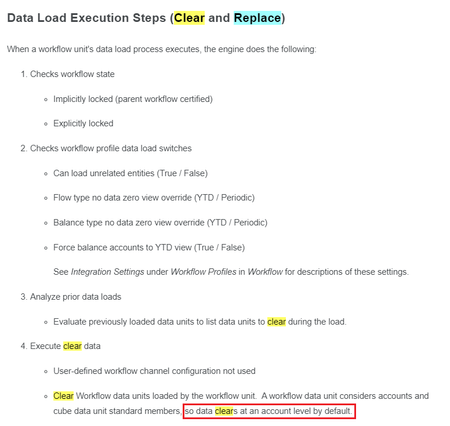
Hi all I was wondering if it is possible to override the default 'clear and load' settings on a data load step from 'Level 2: Workflow Data Unit' to 'Level 1: Cube Data Unit' Just to give a bit of context: We perform a data copy from a Budget scenario (using Data Management Sequence) to a Forecast scenario to provide a starting data position for divisions to use when they capture their forecast data. Once the data copy is complete, the process for divisions to update their forecasts is to extract an Excel Fixed File Template on which they will make their changes and additions over the copied Budget data, and then to import that file via their Workflow to the cube. However, when wanting to remove an account for instance, the only way to do so it to load zeros to that account. This is because the load clears by account and not entity. Is it possible to change the load so that it deletes all accounts? Thanks, Mark1.3KViews2likes3CommentsUnable to get value from another column in Parser BR
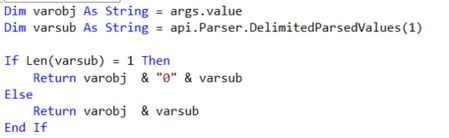
OneStream V7.0.1 We have a Data Source that takes data file that has 12 data columns Oct ... Sep. The year for the data in the 12 data columns is a field "Fiscal Year", the first column of the data file. We have a Parser BR that is called on each of the 12 data columns that looks at the first field in each record to get the year and concatenates that with the M<number> month for each month column to give the correct Time dimension member in which to store the data. e.g. 2023M1 The problem is we're getting the row header "Fiscal Year" instead of the year value in the record, so the string being returned looks like Fiscal YearM1 How do we get the year data from the first column instead of the column header? Public Function Main(ByVal si As SessionInfo, ByVal globals As BRGlobals, ByVal api As ParserDimension, ByVal args As ParserArgs) As Object Dim fiscalYear As String() = {"Oct","Nov","Dec""Jan","Feb","Mar","Apr","May","Jun","Jul","Aug","Sep"} Dim YearColPosition As Integer = 0 Dim year As String = String.Empty Dim month As String = String.Empty Try 'Both of these keep giving us the column header "Fiscal Year" 'instead Of the value In the currently parsed record year = api.Parser.DelimitedParsedValues(YearColPosition) 'year = args.Line.Split(",")(YearColPosition) 'this marries the index of the month name in the months array 'with M to give us the M1 notation for period. month = $"M{Array.IndexOf(fiscalYear, args.Value)+1}" BRApi.ErrorLog.LogMessage(si, $"Time: {year}{month}") Return $"{year}{month}" Catch ex As Exception Throw ErrorHandler.LogWrite(si, New XFException(si, ex)) End Try End FunctionSolved8.8KViews2likes23CommentsSo you have upgraded to 7.1.1 version . Check out the known error-
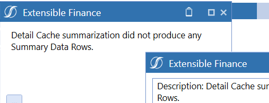
You will get this error during the import step. Reason - The load file doesnt have any data after transformation.( ByPass). The underlying code looks to summarize the data when it finds nothing, it throws an error.1.3KViews1like1Comment
Fields reference in a Connector Datasrc
Hi all, I need to assign a value in a field, dependeing on an other. I can do it in Delimited Files using "api.Parser.DelimitedParsedValues()" but I don't know wich function can provide me the string of an other field. So, in conclusion: how can I do this in a Connector Complex expression? Thanks!Solved4.4KViews1like6CommentsI just want to confirm how the data copy works in Data Management
Originally posted by George Waddell 11/1/2018 Hi, just want to confirm how the data copy works in Data Management...assuming all intersections from the Source are copied over to the Target? There is no capability to copy all data from source at a specific UD member to another UD member thru the Copy interface? Suppose a Business rule would be required instead?2.9KViews1like1CommentHow to "Import" "in parallel" via a "OneStream Connector" to a "Data Warehouse"?
Please share your practical advice to help us meet the new Integration requirements. - I couldn't find a OneStream KB/post nor a good result from free Gemini. - We're using SAAS on v9.0 to move to v10 upon its upcoming release. Thank you folks for sharing your expertise.84Views1like2CommentsAbout Foundation Second Edition
Beyond offering a training guide, the focus of this book is on the ‘why’ of design and building an application. While the foundational principles of building a solid, scalable OneStream application have remained largely unchanged, updates contained in this second edition reflect implemented software enhancements, along with the ongoing development of the OneStream landscape. Manage your Implementation with the OneStream methodology Understand Design and Build concepts Build solutions for the Consolidation of financial data, and develop Planning models Create Data Integration solutions that will feed your models Develop Workflows to guide and manage your End-Users Advance your solutions with Rules and Security Take advantage of detailed Data Reporting using tools such as Analytic Blend and Advanced Excel functionality Tune Performance, and optimize your application New content on Workspaces, Smart Integration, Dashboard design, and more. Over 180 updated images. The information contained within this book is relevant to software version 8.4.0. To access the complete publication, you must purchase either the PDF or the physical copy of the book. Purchases can be made at onestreampress.com. Table of Contents Foreword by Tom Shea Introduction [Peter Fugere, updated by Chul Smith] Methodology and the project [Greg Bankston, updated by Greg Bankston] Design and Build [Peter Fugere, updated by Chul Smith] Consolidation [Eric Osmanski, updated by Nick Bolinger] Planning [Jonathan Golembiewski, updated by Jonathan Golembiewski] Data Integration [John Von Allmen, updated by Joakim Kulan] Workflow [Todd Allen, updated by Chul Smith] Rules and Calculations [Nick Kroppe and Chul Smith, updated by Nick Kroppe and Chul Smith] Security [Jody Di Giovanni, updated by Bobby Doyon] Reporting [Jacqui Slone and Chul Smith, updated by Chul Smith] Excel and Spreadsheet Reporting [Nick Blazosky, updated by Nick Blazosky] Analytic Blend [Andy Moore, Sam Richards, and Terry Shea, updated by Chul Smith] Introduction to the Solution Exchange [Shawn Stalker, updated by Shawn Stalker] Performance Tuning [Jeff Jones and Tony Dimitrie, updated by Jeff Jones]95Views1like0Comments
OneStream and D365 Integration
Hi everyone, I'm currently working on integrating OneStream with Dynamics 365 (D365) and would love to hear about your experiences. Specifically, I'm interested in knowing which connector you used for the integration. Did you opt for OData, Synapse Link, or another method? Any insights, tips, or recommendations would be greatly appreciated! Thanks in advance!