Data Processing and Performance - A comprehensive guide of tables, and design
Overview To maintain well performing application, one must understand how the underlying database works and more importantly its limitations. Understanding how a system works, allows designers and administrators to create reliable, stable, and optimal performing applications. This white paper is intended to guide the design of those optimal data processing strategies for the OneStream platform. First, this document will provide a detailed look at the data structures used by the stage engine as well as those used by the in-memory financial analytic engine, providing a deep understanding of how the OneStream stage engine functions in relation to the in-memory financial analytic engine. The relationship between stage engine data structures and finance engine data structures will be discussed in detail. Understanding how data is stored and manipulated by these engines will help consultants build OneStream applications that are optimized for high-volume data processing. Second, the workflow engine configuration will be examined in detail throughout the document since it acts as the controller / orchestrated of most tasks in the system. The workflow engine is the primary tool used to configure data processing sequences and performance characteristics in an OneStream application. The are many different workflow structures and settings that specifically relate to data processing and these settings will be discussed in relation to the processing engine that they impact. Finally, this document will define best practices and logical data processing limits. This will include suggestions on how to create workflow structures and settings for specific data processing workloads. With respect to data defining processing limits, this document will help define practical / logical data processing limits in relation to hard/physical data processing limits and will provide a detailed explanation of the suggested logical limits. This is an important topic because in many situations the physical data processing limit will accept/tolerate that amount of data that is being processed, but the same data may be able to be processed in a much more efficient manner by adhering to logical limits and building the appropriate workflow structures to partition data. These concepts are particularly important because they enable efficient storage, potential parallel processing and high-performance reporting/consumption when properly implemented. Conclusion Large Data Units can create problems for loading, calculating, consolidating, and reporting data. This really is a limitation of what the hardware and networks can support. Your design needs to consider this. This paper provides some options to relieve some of the pressure points that could appear. NOTE: some tables mentioned in the paper have changed in version 9+. See this note for further details.17KViews24likes0Comments
Hybrid Source Scenarios - Additional Documentation / Details
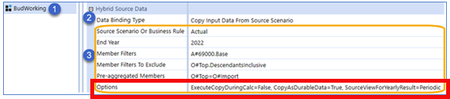
One of the new features in the 6.6 release is the introduction of Hybrid Source Scenarios. I've watched the 6.6 release and read through the abbreviated examples in the admin guide. Both have good high level content, but they seem to be missing details around the Options section within the Hybrid Source Data of Scenario properties. Does anyone have any additional details around what options are available and a description of each? Or more content around Hybrid Source scenarios in general? Thanks, Added screenshot to provide context.Solved8.6KViews0likes13Comments
Forecasting Adjustments
Hello! I have a question about other customer experiences and best practices regarding forecasting adjustments. We have forecast scenarios set up and previously would copy the entire scenario as the base for additional “adjustment” scenarios. We used these to toggle on or off certain risk adjustments in future periods but in order to save space and stop replicating so much data, we’re trying to move to another method instead. In our application, we have our UD3 set up as a more detailed Origin dimension where specific layers of adjustments are added (journal entries are split into more detail for GAAP or non-GAAP for example). This is where we were planning to add the adjustments but I wanted to check in with everyone else first to see if anyone has experience. Basically what we want is one scenario where I can pull a UD3 “base” of the expected forecast data then “base+adj1” which would be an alternate hierarchy of the base data plus adjustment 1. Then we’d replicate that alternate hierarchy as needed for specific adjustments. Would love to hear how you’re accomplishing this - any feedback would be appreciated!7.3KViews0likes13Comments
Entity Name Changes
Hi Team, I would like to understand how you are managing the Entity changes on a monthly basis. For eg: the Entity name in 2021 M6 is San_Jose_213 and it is changed to SFO_213 in 2021 M7. If I choose the rename option, then 2021M6 cube data will override but custom tables created for our requirement will remain with the old MEP name. On the other hand, if I chose to create a new entity how to intact both the entities for future reference6.3KViews0likes11Comments
Attribute member
Hi everyone, Can someone explain how the UD Member property "Is attribute member" works? I would like to assign to my UD5 members some attributes and be able to create CubeView base on the attributes. As an example, my UD5 could be Customers and the attribute I would like to assign to each Customer is the type of Customer (Retail, non-retail etc). I thought I would use the "Text 1" property of my Customer members to input the type of costumers. I would then create a separate UD5 dimension "CustomerAttributes" and list all the attributes. Finally, enable the "Is attribute memeber" property of my "CustomerAttributes" dimension members and do a comparison between the value in the Text 1 of my Customer members and the value in the "Comparison Text 1" of my attribute members.Solved5.5KViews0likes6CommentsMetadata import automation
Hi Can anyone suggest , how can we automate loading of metadata into onestream from a flat file /table. What is the format of the file. I am aware of loading using xml from utilizing the metadata excel builder utility , but my client wants to automate metadata update in Onestream. I am not finding much documentation around that. How is this achieved ?5.5KViews0likes8CommentsWhat is a Data Unit?
As you start to build and design an application, you may keep hearing the concept of a data unit. It is a critical concept and fundamental to how OneStream works. The following is an excerpt of the book OneStream Foundation Handbook by The Architect Factory. Not only do we cover data unit, but many design aspects and fundamental concepts to OneStream.5.4KViews2likes0Comments