Automated process to disable users based on Inactivity Threshold / Remaining Allowed Inactivity
We worked with OneStream to set the Inactivity Threshold to 90 days but discovered inactive users are not automatically Disabled after 90 days - only flagged as 0 days of "Remaining Allowed Inactivity". I'm assuming we could create a Business Rule or some other process that could query OneStream security data within the system to confirm users who meet the "Remaining Allowed Inactivity" = "0 Days" criteria. Manual review could work as well but not preferred. Any suggestions on how this could be automated in OneStream? Thanks in advance.2.8KViews4likes2Comments
Slice Security Alternatives
Hello Experts, We have requirements on having the access enabled/disabled for system dashboards/forms channelwise (UD2 members). For this multiple slice security rules were placed on the cube which has been a tedious maintenance task and is probably adding performance impact on the dashboards. We are thinking of replacing the slice security rules via a Finance rule which will set conditional input for selected Entity, Scenario, Time, UD1, UD2 members from super user dashboard, Admin can lock/unlock these intersections via a super user dashboard on a button click. Is there a better alternative for achieving this? Any leads would be appreciated.1.9KViews3likes2Comments
Audit report/dashboard for object security
Hi all, I'm trying to figure out if there is a dashboard, marketplace solution, or custom report where I can view security groups/users and references where they are assigned to objects. Preferably with the ability to sort. For example: Security Group Name: "Security Group" Object: Application -> Workflow -> Workflow Profiles -> "Cube" -> "WorkflowProfile" -> Profile Properties -> Security -> Access Group Application -> Tools -> Business Rules -> Connector -> "Business Rule" -> Properties -> Security -> Maintenance Group Thank you!Solved2.6KViews2likes2CommentsAnother user is already logged into the application on this client - Anyone else experiencing this?
Hi OS Community. has anyone encountered this error when logging into OneStream? "Another user is already logged into the application on this client. That user must log out of their external identity provider before you can log in." I ran into this issue today with a user and wanted to see if anyone has experienced the same thing and found a fix. Any help or suggestions would be greatly appreciated. Thank you! Edit: I found a similar post from past [ Unable to Login into OneStream] where it was suggested to log out of the organizational SSO account, but just wondering if there's a permanent fix or root cause of this.56Views1like1Comment
Automated User Provisioning: Best approach to sync Users & Security Groups?
Hi everyone, We need to automate user creation and security group assignments in OneStream using data from an external Identity system. I have two main questions: Is it feasible to fully automate this without manual intervention? What is the best way to implement it simply (avoiding heavy middleware)? We are considering two solutions: Just-in-Time (JIT) via OIS, and SCIM. Does anyone know how we can set these up? What is the recommended "standard" approach for this? Thanks for your help! Madiha64Views1like0Comments
Environment Management
Hi All, In your OneStream implementation, how many environments do you have? Dev, UAT and Prod? Or do you also have Pre-Prod environment that is common in ERP systems? Also, in the UAT environment do you also have copy of data so that when testing happens or developers need to test the changes - there is enough sample data to test? Would you consider brininging data from Prod, randomize it and load into UAT env so that UAT env data at all intersections as Prod? Thanks!31Views1like0Comments
Security Models
SOURCE: ONESTREAM CHAMPIONS Hi Everyone, Curious to hear others’ experience in the area of Security. At BDO, we currently have: 5k users configured, of which 4.5k are enabled. 3.6k are in our “basic” level security group, which we have automation to create and assign users to this group when they meet certain criteria. We have seen in our first year live about 50% of our enabled users utilizing our Production App at some point during the year. Primarily focus on Data Level Access (Cube Slice Security) to control access, which 1 of our 3 cubes has 137 slices configured in it, which is the most granular of our 3 cubes. For groups we are currently at 312, of which 150 have users directly assigned and the others are for nesting shared access across groups. For security, we do very little control by Entity or Workflows since most access to data is controlled in Cube Slices based on our U2 (Location) and U3 (Department), and outside of our automated loads, few users load data via workflows. Would like to hear other’s experience! How many users and groups do you have? Is your security model granular or more open and simple? Do you use any automation to manage your model? Anything unique about your model and processes for security? Thanks, Zach7.5KViews1like8CommentsCube | Data Access | Data Cell Access Security/Slice Security by U1#Geography
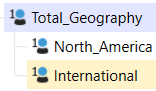
Data Management Access Security Please share your expertise to set up a Cube's Data Cell Access Security / Slice Security to limit data read access as outlined below: Dimension: U1# - Geography Total_Geography = Child 1 + Child 2 = Total / Top North_America = Child 1 / NA International = Child 2 / Int'l Slice Security: Access Level - Read Data by Geography - in a CV and a QV Total_Geo_Data = Read Total data | Read NA data and Read Intl data NA_Data = Read NA data | no data access = International and Total Intl_Data = Read Int'l data | no data access = North America and Total TY for your practical advice - SMEs.Solved393Views1like3Comments