Recent Content

Matrix Consolidation: Eliminating Beyond Legal Entity
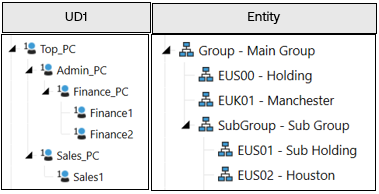
Purpose of the document To goal of this document is to share our experience in designing for a matrix consolidation requirement, as well as to drive discussion on the topic. What we mean by “matrix consolidation” Matrix consolidation is a term commonly used when finance teams want to prepare their management & statutory financials concurrently. This prevents the need to maintain separate scenarios and processes in the system. It will usually involve running eliminations on something more than just legal entity. In OneStream this can mean using a user defined dimension as part of the elimination process. The Requirement A common use case is to run eliminations between Profit Centres or Segments. Whilst inter-profit-centre eliminations will be used as the example in this document, it is not the only potential use case. The requirement we will attempt to solve for is that the customer wants an elimination to only occur at the first common parent in both the Legal Entity and Profit Centre hierarchies. First let’s look at the two broad ways in which this can be achieved. ENTITY DIMENSION OR USER DEFINED (UD) DIMENSION So, there is a requirement to do eliminations on a level of detail below the legal entity/company code level. The example we will use in the section is where the customer wants to generate eliminations between Profit Centres (PC). You have two main options on how to tackle this, outlined in the following two sub-sections. OPTION 1: ENTITY DIMENSION Include this Profit Centre detail in your entity dimension as base members. These will be children of the legal entity members. OPTION 1: ENTITY DIMENSION Include this Profit Centre detail in your entity dimension as base members. Pros Cons Business Logic · No additional Logic required to get eliminations running by Profit Centre. · Impacts consolidation performance more than option 2 in a typical setup, due to multiplication of members in the entity dimension (i.e. more data units) that are to be consolidated. Exact impact need to be analysed in each project. · If you move a PC in the entity hierarchy, you will need to reconsolidate all history. Dimensions · Uses fewer UD dimensions than option 2. · Generally, only appropriate when Profit Centres are unique to entities, since otherwise they will need to be duplicated for each entity. · Can end up with a very large entity dimension · To achieve some reporting, alternative entity hierarchies (and therefore additional consolidations) may be required. · Often leads to creation of additional “dummy” or “journal” Profit Centre entities to contain data that doesn’t need to be captured by Profit Centre (e.g. Balance Sheet Data). This creates even more entities to be consolidated! · When Profit Centres are not unique to entities, shared Profit Centres will create lots of duplicate entities and should be avoided. · Less flexible since profit centres need to be created & moved within the entity hierarchy. Workflows · If the responsibility structure (and therefore workflow design) is by Profit centre, then can make workflow design/build better. · If the responsibility structure is not based around Profit Centre, more entities will need to be assigned and considered in workflow design. · Makes Profit Centres the basis for everything where data is stored, processed and locked. Reporting & Matching · May align with the way it was done in legacy systems, so users are familiar with the approach. · Standard IC matching reports will work for Profit Centre matching (although this requirement is less common from our experience). · Out-of-the-box matching will now only be at PC level. Legal Entity matching will require custom reporting. · Alternative entity hierarchies (and therefore consolidations) may be required to achieve some reporting. · Execution of consolidation required to see legal entity level data (as they will be parent entities) Security · Native using the entity dimension. · Requires maintenance on a Profit Centre level even if not required on that level. OPTION 2: USER DEFINED DIMENSION Create a Profit Centre dimension in a UD. OPTION 2: USER DEFINED (UD) DIMENSION Include the Profit Centre detail in a User Defined Dimension Pros Cons Business Logic · Logic can be customised to specific requirements. · Does not add additional members to the entity dimension (i.e. data units), which is beneficial for consolidation performance in a typical setup. · Running a consolidation, will run a statutory and management consolidation in parallel. · Requires additional development time for business logic if not part of a starter kit. Dimensions · A cleaner entity dimension to support legal entity and group reporting. · Matrix view of consolidation can be created (e.g. with entities in rows and Profit Centres in columns) · Can be combined with extensibility if Profit Centres aren’t applicable to all entities/divisions. · Requires the use of two UD dimensions (one for Profit Centre and another for PC counterparty). This is discussed later. Workflows · Often more closely aligns with the responsibility structure for Actuals (by legal entity). Reporting & Matching · Standard IC matching reports will support legal entity matching. · Consolidation not required to view total legal entity values (pre-elimination data) · Custom IC matching reports may be required for Profit Centre matching. This is less common as a requirement. Security · Native using the entity dimension if security is driven by Legal Entity. · Requires slice security (via Cube Data Access security) if required at Profit Centre level (can impact reporting performance if security is complex). Other Design Considerations Data quality of matrix counterpart – Remember, all intercompany data from the source system needs to be sourced for all matrix dimensions. It will negatively impact user experience if this data is not readily and accurately available in the source system (lots of manual input will be required). Stability of the matrix dimension – This is to say, in your situation, will the Profit Centre hierarchy change regularly with relationships changing? This requires significant consideration in the design phase. Some discussion points are included in a later section. New or existing application – The choice of solution may depend on whether this is a new implementation or an addition to an existing one. It will likely be easier to add a new UD to an existing application rather than re-develop the entity dimension! Performance – Common design considerations of performance, data unit sizes, number of data units etc. apply. Elimination vs. Matching – Remember that just because a customer wants their eliminations to happen on PC doesn’t mean that they need to do their month end intercompany matching at this level. It’s important to clarify this as two separate requirements during gathering. Workflow – Ensure you consider the responsibility structure of the organisation as this will have a big impact on the decision. If the true process (loading, locking, calculating & certifying the data) is by Profit Centre, then this could be a good justification for using the Entity dimension (option 1). However, it’s much more typical that these are based on legal entity for Actuals, making a UD solution (option 2) more appropriate. Option Overview The best approach will vary depending on the specific requirements, but the above gives some common indications of the benefits & drawbacks of each approach. Adding members to the entity dimension creates additional overhead during consolidation since the system must run the data unit calculation sequence (DUCS), consolidate and check the status on each entity member. Therefore, including profit centre in the entity dimension will often be slower than using a UD (in the presence of typical data volumes, exceptions always apply!). Regardless of the approach, remember that with the default eliminations always occur at the first common parent in the Entity dimension. If the client wants something different, then you would be looking at a “non-matrix” solution (i.e. separate cubes for statutory and management). But that is a different topic… Since option 1 mostly uses system-default logic for processing and eliminating the data, the setup is mostly straight forward. Therefore, the rest of the document focuses on how to design for Option 2, using a user defined dimension to contain this detail and run eliminations. Out of the Box - view of Eliminations It is worth stating that just because a client says “we need the eliminations to run by profit centre” doesn’t mean that they need to implement a full matrix consolidation solution. If they don’t need the profit centre elimination to happen at the first common parent in the PC hierarchy, then the out of the box eliminations will suffice as you can report the eliminated data simply by selecting the correct combination of members (Origin, PC, etc.). For those less familiar with the topic, let’s just take a moment to set up a simple example that shows the default behaviour of eliminations in OneStream. We have a Profit Centre dimension in UD1, and an entity dimension for the legal entity members as follows (all entities are using USD only & are 100% owned, for the sake of a simple example): There is an intercompany transaction between the legal entities Manchester & Houston: Within Manchester it is captured within the Finance PC, and within the Houston Sales PC. When out-of-the-box eliminations are run, we will see the following results (eliminations in red, consolidated results in the blue box): The eliminations occur at the first common parent in the entity dimension (in this case the first common parent is the Main Group). In the UD1 the eliminations happen on the same member as the original data, so at the group level we still see the plug amounts by Profit Centre. If we zoom into the Profit Centre dimension (UD1) at the top Main Group reporting entity member, we see the following, where 100 is the aggregated difference on the plug account of the two base level Profit Centres Finance1 and Sales1: Matrix Consolidation - View of Eliminations Now let’s imagine we have the same setup but want to apply matrix consolidation. We have the same data, but now we are capturing the Counterpart Profit Centre for each transaction: Notice how in the below screenshot our eliminations will be happening on a new “elimination member” within UD1, rather than the member the data sits on (highlighted in the green boxes below; the required elimination members are discussed further in the next section on the setup). The member where the elimination occurs represents the first common parent of the PC & Counterparty PC in the hierarchy (in our example this is the “Top_PC” member in UD1). Again, if we look at this result in more detail at the Main Group entity level, you can now see that within the UD1 hierarchy, the elimination doesn’t occur until the first common parent in the UD dimension. So, at “Top_PC” the data is eliminated, but at descendant UD1 members, it is not (e.g. Admin_PC, Finance_PC, Sales_PC). Note that we have the same result at the Top Profit centre and Group entity, but the way we get there is different. Now that we understand the situation we are trying to tackle, let’s look at the setup used in this example. Setup The following items are configured in our matrix consolidation example. Entity No changes are required to the entity dimension for matrix consolidation. Account No changes are required to the account dimension for matrix consolidation. We will use the same plug accounts. UD1 – Profit centre Some additional elimination members are required in our UD1 as follows. Whilst UD1 is used in our example, the usual design decisions apply to which UD you use. These new elimination members will be required at every point an elimination may happen, so you can see that this can potentially add a large number of members to your existing hierarchy. A common naming convention is often used to allow the system to derive where to post the elimination. In this case you can see it is the parent member name with a prefix of “Elim_”. Alternatively, you could use text fields to store this information. Either way, the logic will rely on this being updated accurately and consistently. Tip: Ensure your consolidation logic provides helpful error messages if it finds that an elimination member does not exist or is misconfigured. UD7 - NEW Counterparty PROFIT CENTRE A new dimension is needed to capture the counterparty Profit Centre information. Like the Intercompany dimension in OneStream, this can be (and almost always is) a simple flat list of the base counterparties. All relevant intercompany data now needs to be analysed by this dimension so input forms & transformation rules will need updating. In data models where (almost) all UDs are already in use, this element can be challenging and requires consideration. Whilst UD7 is used in our example, the usual design decisions apply to which UD you use. Remember that this dimension is simply used to capture the counterparty so if your design is already using lots of dimensions then you may be able to combine this with other supplementary data, or maybe even use UD8 (although this will need additional consideration in your dynamic reporting design). Tip: Consider how this dimension will be maintained going forwards as it will be important for the logic that all members exist with the same naming in this counterparty dimension. Consider if the counterparty dimension could/should be automated to align with the main PC dimension. Business Logic Since, unlike the entity dimension, all parents in a UD are calculated on-the-fly this approach will require additional eliminations to be calculated. You will need to store your new matrix consolidation logic somewhere; in our case it is a business rule attached to the cube, but it could also be attached to a member formula: Tip: You DO NOT need to switch on custom consolidation algorithm on the cube to achieve a matrix consolidation result. Always consider the wider requirements & design. Reporting Custom reports will need to be developed to allow users to do IC matching and report on the resulting eliminations meaningfully. If the customer already does their elimination like this, they should have existing specifications that can be designed for. But if not, end users will need to understand Matrix consolidation when they build their own reports/Quick Views or just run LE-based reports with “Top” for Profit Centres. Tip: You can use Data Set business rules to help you efficiently gather your data for interactive dashboard & reports. Business Logic Consolidation Algorithm When a matrix consolidation requirement exists, it has been commonly observed that consultants will switch on the Custom Consolidation algorithm on the relevant cube(s). However simply because this stores the Share data, this has a negative impact on consolidation performance, and database size. Before you reach for the Custom algorithm though, I would recommend considering calculating the matrix elimination adjustments during the calculation pass of C#Elimination, within a UD member (potentially within your data audit dimension). This will allow you to remain on the Standard or Org-by-Period algorithm and within this member you can update the standard eliminations with the PC detail. Of course, you may have other requirements that lead to you using the Custom algorithm, in which case the approach for matrix eliminations can be determined in the context of the overall design. Tip: Consider whether matrix eliminations are required for all processes & scenarios and ensure it is only running on those where it is truly required. Useful Snippets The general approach for writing a matrix consolidation rule is to check that the elimination only occurs at the first common parent – other than that it will follow standard OneStream rule writing techniques such as using data buffers. The following functions can be useful (comments correct as of version 8.5): Function Comment api.Members.GetFirstCommonParent() You will want to use this function to check both the entity and profit centre parents to see if they’re common to the IC or counterparty member. api.Members.IsDescendant() Note that this doesn’t check whether a descendant has a consolidation percentage greater than zero. So, if doing org-by-period this may need additional consideration. api.Entity.PercentConsolidation() Useful for checking whether entity is being consolidated. Ensure you only pass valid parent/entity combinations into the function. Example rule Attached to this paper you will find a sample rule that can be used as a starting point to implement matrix consolidation. Disclaimer: The provided rule is an example only, and its purpose it to demonstrate an approach that can be taken. If used as a starting point, then all care should be taken to adapt and thoroughly test it before implementation. Updates may be made, without notice, to the example in future. Whilst there are arguably different ways to approach this, the example takes the following approach: Retrieves a data buffer of the system generated eliminations. Reallocates the elimination (both IC & Plug account entry) to the correct PC. Reverses lower-level eliminations from current eliminations (without this step the process will repeat at each parent after the first common parent). Clears the system Elimination as “No Data”. Save Results. This should be assigned to the cube when using the standard or org-by-period consolidation algorithm. It reallocates the out-of-the-box eliminations to the relevant UD member. With some quick reconfiguration of the dimensions & names referenced in the rule, it should work with the setup described in the previous section. org-by period in the UD With regards to matrix consolidation, I have previously been asked the following question: “What happens to the eliminations if we change our Profit Centre structure?” Well in our Entity dimension, we have built in tools to handle org-by-period, so that entities can have relationship properties vary by time period. Data is also stored on parent entities which aids in this org-by-period. Within our UD, no such functionality exists, so if I move a member, that member is moved for all history. If I duplicate a member, the values are duplicated (depending on the aggregation weight of course, but keep in mind that this cannot be varied by time!) So how can we approach this is when a Profit Centre needs to change parents one month: Change the main hierarchy – The old view will no longer be visible. The added complexity is that the eliminations for prior periods will occur in the “wrong” place in the UD hierarchy from a historical point of view unless a consolidation is rerun on all those periods. Of course, if you rerun the consolidation on prior periods, then all your results will change (although not at the top level provided nothing else has changed). This implies that the elimination will correctly display the elimination after the change; Historical data will not be kept for the re-consolidated periods. Create alternate hierarchies (e.g. Top_2023, Top_2024 etc.) – New hierarchies can be created, with unique parents that will allow the old hierarchy to be preserved. As with the first option, re-consolidation of prior periods will be required to view historic data in the same format. However, if the data is only required in the new format going forwards then re-consolidation of prior periods can be avoided. Tip: For every alternate hierarchy in which you run your matrix eliminations, the eliminations will be “duplicated”. Therefore, your business logic should allow you to configure, by time period & scenario, which hierarchies are eliminated to ensure only necessary calculations are run. This could be done, for instance, through tags on text fields of the members. Whilst not such a common scenario, it is a consideration worth making during the requirements gathering & design.Extensibility Series: Riding the Wave of Vertical Extensibility
What is Vertical Extensibility? Vertical or entity/cube extensibility is the transformative feature of OneStream’s Extensible Dimensionality that allows for the collapsing and extension of dimensional detail as you move up and down the entity hierarchy. This feature offers the ability to include and/or exclude detail at different levels in the entity structure, and its proper use has three major benefits: It allows for a single, unified, data model to provide the flexibility required in management reporting while maintaining a single source of truth. It allows for the management of data unit sizing to provide a highly performant end user experience. It provides flexibility and future-proofing by setting the foundation for growth in your business and the OneStream platform. Instead of needing separate, distinct, data sets to meet the various reporting needs of your business, vertical extensibility provides the ability to maintain a single linked data model. The cube structure and data model in OneStream is flexible enough to include the details where they are needed and exclude them where they are not (while still providing visibility through drill down). The main difference between horizontal and vertical extensibility is that horizontal is within the same cube across different Scenario Types while vertical extensibility is across cubes in the same Scenario Type. A common example of vertical extensibility showcasing all three of the benefits mentioned above is that of a Summary cube (sometimes referred to as a “super-cube”) containing a total company entity and various Detail cubes (or “sub-cubes”) for each of the various business units in that company. In the CPM Blueprint application, you can see this type of configuration within the FinRptg linked cube structure as diagramed below. In this example, the cubes and data models are linked through a common entity hierarchy. When we look at the entity dimension above, it’s not immediately apparent that anything is going on there. However, when we compare the cube dimension assignments for Actuals, you can start to see differences in the level of detail. In the FinRptg cube, we can see that a summary level of Accounts, UD1, and UD2 have been assigned. This will allow us to collapse the data unit down to that more summary level used in total company reporting. In the account dimension, for example, the lowest base members in the FinRptg cube would be at the NetRev, COGS, and OpEx level. When data consolidates from an entity in a sub-cube to a parent entity in the FinRptg cube, the records will be collapsed and stored in the higher dimensionality members. The lower-level base entities (ex. BU_100) and BU parent entities (ex. TotBU1) that exist in the FinBU1 and FinBU2 cubes will still have the more detailed granularity, but the TotCORP entity will only be stored in the database at that higher level. Without vertical extensibility, every distinct base intersection from both detailed cubes would also be stored for TotCORP as shown below: Applying vertical extensibility to our design allows us to collapse the data unit as it moves into the summary cube. This allows us to better manage the data unit size and keep the details where they are reported on. Applying this concept to the database records we looked at in the previous example, you can see a considerable reduction in the TotCorp entity data unit size and the amount of data we are storing in the database: Base revenue accounts collapsed into NetRev. Base geographies collapsed into a summary level (NA / EMEA). Base products collapsed into a summary product line (Product Line 1 / Product Line 2). The benefit of this is a direct reduction of the TotCORP entity’s data unit size which will lead to more snappy reporting and improved consolidation times. With the linked cube structure, we can directly drill down from TotCORP at the higher level into either TotBU1 or TotBU2 which sit in the detail cubes whenever we need to explore additional detail. Looking back at the CPM Blueprint application’s cube dimension assignment, we can also see a different application of vertical extensibility in UD3. FinBU1 does not collapse detail into FinRptg (as they both have the ProductSummary dimension assigned) but FinBU2 does. This shows the ability to vary base dimensions in each of the detail cubes. Perhaps different business units across the company use distinct cost centers, separate charts of accounts, or in this case, BU 1 may have a more detailed breakout of products than BU 2. This use of vertical extensibility allows the cubes to be more targeted to the data. This will improve the performance and end user experience by reducing sparseness. With this configuration, we can exclude members that aren’t applicable to BU 2. When designing an application, it’s important to consider future flexibility and expansion both within the business and the OneStream platform. Utilizing vertical extensibility to configure a linked cube design from the start leaves the door open by providing numerous possibilities in the future. By extending the entity dimension down from a summary cube to at least one detailed cube, you are then able to: Expand and collapse detail in separate scenario types as they consolidate up. Utilize vertical extensibility on any new dimensions activated in the future. Link additional detail cubes to the summary cube. Once Workflows have been configured and data has been loaded to a cube, you cannot add a summary cube above it. The foundation has been set and your options around flexibility and managing the data unit size have been truncated. How Should Vertical Extensibility be Applied? Vertical extensibility is the natural next step in the extensibility design process. After aligning on the levels of input each dimension should have, you should also discuss how the detail varies across business segments and what levels of detail are required for reporting. In design I find myself asking some of the following questions: Do all entities follow the same chart of accounts? Do all entities follow a similar breakout of detail (geography, products, cost center, etc.)? Are there common characteristics of entity groupings? How does corporate reporting differ from management and base entity reporting? At a consolidated level, do you need to see the lowest level of detail? The most granular GL accounts? Each individual product? Every project? Could a restructuring cause entities to move between BUs or other groupings? Planning & Preparation In terms of order, I like to start with horizontal extensibility first. Horizontal extensibility is more of a business process mapping into OneStream while vertical extensibility is more of a technical lever to drive performance, maintenance, and flexibility. Because of this, I find horizontal extensibility to be easier to understand, and I like to let the client walk before we run. I suggest having the business define input extensibility across scenario types first and then work into the reporting levels and variances across business units or other groupings. I find this exercise to be a back-and-forth refining process. Look at existing reports, analyze what needs to be produced out of OneStream, and make suggestions on the details in each cube. Solicit feedback and refine the suggestions. Bump up calculations that need to run, ad-hoc reporting, etc. to the suggestions and further refine. And finally, map out the combined vertical & horizontal extensibility in a matrix that the business can visualize and agree upon: Throughout this design process, it is helpful to mockup what the data will look like in OneStream and what will/will not be valid with this data model: Remember that alternate entity hierarchies will also need to be extended from summary into the detail cube(s). All entity structures (ex. Total Legal, Total Management, Total Tax, etc.) need to be thoughtfully planned out to incorporate extensibility and alternate entity parents placed in the proper cube. If possible and time permits, create a quick strawman and load some raw data in a OneStream application so the client can play around with it and visualize in QuickViews and drill downs. This will help further their understanding and learning journey. To reiterate, this is the time to set a healthy foundation for the future. Configuration The configuration of vertical extensibility and the linked cube structure has three main pieces: Configure the entity dimensions. Create the cubes and assign the created entity dimensions. Assign the cube references. Configuring the entity dimensions Continuing with the example in the CPM Blueprint application, we will need to configure three entity dimensions and link them by adding cross-dimensional relationships. First, we create the three entity dimensions and the desired members within each: Next, we need to add relationships to link the structure. Select the FinRptg entity dimension, click on the TotCORP entity, and follow the steps in the image below: Select “Add Relationship for Selected Member” TotCORP should be populated as the Parent Member. Select the ellipsis to the right of Child Member. Change the dimension from FinRptg to FinBU1. Select the TotBU1 entity. Select OK on the “Select Member” popup window. Select OK on the “Add Relationship” popup window. Repeat process for adding the TotBU2 entity relationship. After assigning these relationships, you will see the full linked structure in the FinRptg entity dimension. Note: The entities in black text are members of the FinRptg dimension while the entities in gray text are inherited members. Create the cubes and assign the created entity dimensions The next step is to create the cubes and assign the configured entity dimensions. Continuing with the CPM Blueprint application example, we will need to configure three cubes (FinBU1, FinBU2, & FinRptg) More information on proper cube dimension assignment can be found in the linked article. Assign the cube references The final step is configuring the cube dimensions and assigning the proper cube references to link them. Select the FinRptg cube and navigate to the “Cube References” tab. It will auto-populate based on the entity dimensions linked previously but the cube references also need to be assigned to complete the cube linking. After configuring extensibility and assigning the proper Cube References, the Cube Properties and Data Access settings may also need to be updated: Is Top Level Cube For Workflow should be set to “True” on the summary cube. Workflow suffixes should be set on the summary cube. This section will be grayed out on all linked detail cubes. Calculation settings typically align across the linked cube structure. Business Rules that need to be run in all cubes (ex. Custom Translation) should be assigned in both the summary and the linked detail cubes. Data cell security settings may need to be maintained in all cubes depending on the requirements around them (ex. UD1#200 requires data cell access security and UD1#200 exists in all cubes. Therefore, the data cell access “slice” security must be applied on all cubes in the linked structure). Recommendations & Considerations The Data Unit is a key concept to understand in OneStream. It is important to effectively manage its size to allow for optimal performance while accounting for future growth. Vertical extensibility directly affects the data unit size as you consolidate up the entity hierarchy by allowing you to vary the levels of detail assigned across business units and summary levels of the business. The mindset going into an application design should not be whether or not to use vertical extensibility but rather how it should be applied. There are very few cases where vertical extensibility should not be used because of the benefits outlined in this article. Even in cases where the same dimensions are assigned to both the summary and detailed cubes (therefore not collapsing the data unit at all), I would still utilize a linked cube structure. This foundational setup allows you to use a separate Scenario Type in the future if the data unit size or performance does become an issue as the business grows or new use-cases are brought into OneStream. When deciding how many detail cubes to include in an application design, it is important to weigh many different factors including: Are there data unit size concerns with a single detailed cube? Having a consolidated member across various BUs within a detailed cube could lead to an unmanageable data unit depending on the use of UDs and data volume. Is there a business reason to split into separate detail cubes? Maybe they have different charts of accounts or other dimensional differences (ex. Services vs Manufacturing). How often do entities move between business units? Frequent movements would be complicated between cubes so you may want to contain these in a single detail cube. However, if it’s once every three years or if you have to stretch to remember the last time it happened, the benefits may outweigh any effort to (potentially) move an entity between cubes later. What is shared across business units or other management structures vs what is distinct? If most items are shared, does it make sense to split across cubes? Consider any potential business changes as well if they may push these business units to be more aligned in the future. How do internal controls differ? How should we be thinking about cubes in relation to the security model? Applying extensibility is a balancing act. Too many dimensions and cubes can add maintenance overhead and detract from the end user experience. Too few can slow performance and also detract from the end user experience. There are typically compromises across the business during design. For example, it may make more sense to add a few accounts to a common chart to be able to share across the business, or to add some product lines to a business unit’s dimensionality even if they don’t use them. Instead of splitting these entities out into their own cubes, the complexities may outweigh the benefits. In design, it is important to outline the assumptions and reasoning behind a particular decision. List the options that were considered and the reasons they did not prove to be the best fit. With so many design levers at our disposal, it is helpful to have callbacks to the conversations that were had leading up to the final documented design. In a linked cube structure, reports in OneStream can be created using the parent cube. The concept of Merged Hierarchies allows OneStream to understand the extended entity’s data model from within the parent cube. Use “MergeMembersFromReferencedCubes” to control the extensibility level in reports. Example: A#IncomeStatement.TreeDescendantsInclusive.Options(Cube = |WFCube|, ScenarioType = XFMemberProperty(DimType=Scenario, Member=|WFScenario|, Property=ScenarioType), MergeMembersFromReferencedCubes = False) Finally, as detailed in the horizontal extensibility article, it is important to properly configure account-type dimension extensibility or else it will not consolidate up to the summary cube in a linked cube structure. When reconciling data in a detailed cube, this issue won’t present itself but when the data tries to consolidate up to a parent entity in the summary cube, it doesn’t have anywhere to go if you have not extended from a base member. For the most part, this consideration should apply to all configured dimensions but there are select use cases where it is desirable for the data not to consolidate up to the summary cube and those members not be visible to other business segments. Some examples of this include drivers specific to a business unit, dynamic calculations specific to one segment, and alternate hierarchies specific to one cube. Conclusion Vertical extensibility allows OneStream to remain a single source of truth for both corporate and management reporting. By extending dimensions down the entity hierarchy, organizations can avoid fragmented systems and empower users with the detail they need. Proper application of vertical extensibility provides: Performance benefits Flexibility to assign dimensional detail in a more purposeful way Future-proofing by leaving the door open to additional configuration options Lower maintenance overhead with a single unified data model Extensibility should be a discussion topic in every solution design. Its use is the key to unlocking the full potential of the OneStream platform.