The OneStream Community is temporarily frozen until June 29th due to the ongoing maintenance. Please read the blog post here to learn more.
Forum Discussion

AndreaF
1 year agoContributor III
Dashboard to refresh workflow POV after executing data management sequence
Hi, I have created a dashboard with a Reset Scenario button. The code behind the button updates the workflow time, wf start time and wf end time of the workflow scenario (there is actually a ...
 1 year ago
Yeah, it will have to be a dashboard extender rule for the above to work. Maybe a change for a rainy day 🙂

EricOsmanski OneStream Employee
1 year agoOneStream EmployeeAre you changing the Workflow POV through the buttons "POV Action" properties or are you doing it through a BR? Can you share more screenshots with the setup of the button and any BRs?

AndreaF
1 year agoContributor III
Hi EricOsmanski, I'm not changing the Workflow POV right now; I was just asking how to do it. What the button currently does isn't important. Whatever it does, I want the Workflow POV to change when it's clicked. I tried using the POV Action options you mentioned, but they don't seem to work.
For example with the POV Action set like this:
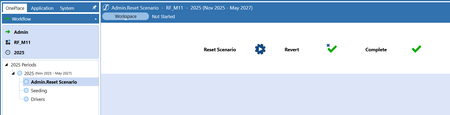
when pressing the button from the following workflow step:
there is no change in the workflow, it stays on [Admin.Reset Scenario/RF_M11/2026]. Am I doing something wrong with the POV Action setting?
- KarlT1 year ago
You can use something like this at the end of your dashboard extender to ensure it reflects the updated workflow POV
Dim wfInfo As WorkflowProfileInfo = BRApi.Workflow.Metadata.GetProfile(si, si.WorkflowClusterPk.ProfileKey)
							BRApi.Workflow.General.SetSelectedWorkflowView(si, wfInfo.Name,
								brapi.Finance.Members.GetMemberName(si,dimtypeid.Scenario,si.WorkflowClusterPk.ScenarioKey),
								"2028")


							Dim selectionResult As New XFSelectionChangedTaskResult()
							selectionResult.WorkflowWasChangedByBusinessRule = True
							Return selectionResult
Using the POV action should generally work fine, but for this use case with the Range scenario and the timing it won't work. The above code should achieve your result though.
- ckattookaran1 year agoValued Contributor
You do not need the ProfileInfo as he is navigating away from the current one. I would just type the name in there. Keep in mind to use the long names (profileparent.profilename). Remember that BRApi (setselectedworkflow) only works using a dashboard extender rule, as it needs a return to trigger some kind of cache refresh. I'm unable to figure out what cache refresh can trigger this from any other rule.
Related Content
- 5 months ago
- 3 years ago