The OneStream Community is temporarily frozen until June 29th due to the ongoing maintenance. Please read the blog post here to learn more.
Forum Discussion

FM
3 years agoNew Contributor III
Cube View Parametric driven column
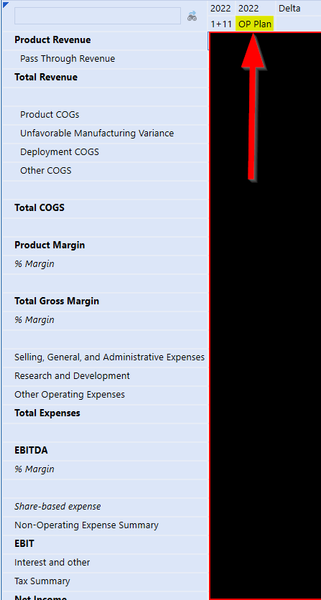
I have a cube view that I need to modify so that in the second column we are getting data that is driven by the selection that the user makes for the first column.
For example if the user selects a...
 3 years ago
Our consultant showed me to use Text attribute for scenario to get prior forecast. So in Jan_FCST, if you assign Text1 attribute as Feb_FCST, then in your OP filter, you can retrieve S#Fcsts.base.Where(Text1 = |!param_FCST!|). This setup allow when users select Feb_FCST for Forecast column, OP column will retrieve S#Fcsts.base.Where(Text1 = Feb_FCST) which would be Jan_FCST).
This works for cube view, but our users want to use this setup for quick view. However I don't know of a way to make parameter prompt in quick view. If anyone has any tips to apply this for quick view, please advise. Thank you!
 3 years ago
I agree with aricgresko on perhaps using an XFBR business rule. The below code could be optimized in many ways, but should work for what you need. This way you do not need to use/manage any text values.
"YourRuleNameHere" will equal what you named your XFBR business rule, ensure whatever you named it matches the XFBR call you place in the cube view.
XFBR Cube View Line Call (What you would put on your cube view line instead of "S#|!param_FCST!|"):
XFBR(YourRuleNameHere, GetPriorFcst, CurrentFcst=|!param_FCST!|)Create an XFBR Business Rule and paste in the following code:
Imports System
Imports System.Data
Imports System.Data.Common
Imports System.IO
Imports System.Collections.Generic
Imports System.Globalization
Imports System.Linq
Imports Microsoft.VisualBasic
Imports System.Windows.Forms
Imports OneStream.Shared.Common
Imports OneStream.Shared.Wcf
Imports OneStream.Shared.Engine
Imports OneStream.Shared.Database
Imports OneStream.Stage.Engine
Imports OneStream.Stage.Database
Imports OneStream.Finance.Engine
Imports OneStream.Finance.Database

Namespace OneStream.BusinessRule.DashboardStringFunction.YourRuleNameHere   '<--------- NEED TO CHANGE "YourRuleNameHere" AND ADD TO XFBR CALL WITHIN CUBE VIEW
	Public Class MainClass
		Public Function Main(ByVal si As SessionInfo, ByVal globals As BRGlobals, ByVal api As Object, ByVal args As DashboardStringFunctionArgs) As Object
			Try
				If args.FunctionName.XFEqualsIgnoreCase("GetPriorFcst") Then
						Dim CurrFcst As String = args.NameValuePairs("CurrentFcst")
				   	    Dim PriorFcst As String = String.Empty

						Select Case CurrFcst
							Case "Jan_FCST"
								PriorFcst = "Dec_FCST"
							Case "Feb_FCST"
								PriorFcst = "Jan_FCST"
							Case "Mar_FCST"
								PriorFcst = "Feb_FCST"
							Case "Apr_FCST"
								PriorFcst = "Mar_FCST"
							Case "May_FCST"
								PriorFcst = "Apr_FCST"
							Case "Jun_FCST"
								PriorFcst = "May_FCST"
							Case "Jul_FCST"
								PriorFcst = "Jun_FCST"
							Case "Aug_FCST"
								PriorFcst = "Jul_FCST"
							Case "Sep_FCST"
								PriorFcst = "Aug_FCST"
							Case "Oct_FCST"
								PriorFcst = "Sep_FCST"
							Case "Nov_FCST"
								PriorFcst = "Oct_FCST"
							Case "Dec_FCST"
								PriorFcst = "Nov_FCST"
						End Select

					Return "S#" & PriorFcst

				End If

				Return Nothing
			Catch ex As Exception
				Throw ErrorHandler.LogWrite(si, New XFException(si, ex))
			End Try
		End Function
	End Class
End Namespace
t_kaplanis
3 years agoNew Contributor III
I agree with aricgresko on perhaps using an XFBR business rule. The below code could be optimized in many ways, but should work for what you need. This way you do not need to use/manage any text values.
"YourRuleNameHere" will equal what you named your XFBR business rule, ensure whatever you named it matches the XFBR call you place in the cube view.
XFBR Cube View Line Call (What you would put on your cube view line instead of "S#|!param_FCST!|"):
XFBR(YourRuleNameHere, GetPriorFcst, CurrentFcst=|!param_FCST!|)Create an XFBR Business Rule and paste in the following code:
Imports System
Imports System.Data
Imports System.Data.Common
Imports System.IO
Imports System.Collections.Generic
Imports System.Globalization
Imports System.Linq
Imports Microsoft.VisualBasic
Imports System.Windows.Forms
Imports OneStream.Shared.Common
Imports OneStream.Shared.Wcf
Imports OneStream.Shared.Engine
Imports OneStream.Shared.Database
Imports OneStream.Stage.Engine
Imports OneStream.Stage.Database
Imports OneStream.Finance.Engine
Imports OneStream.Finance.Database

Namespace OneStream.BusinessRule.DashboardStringFunction.YourRuleNameHere   '<--------- NEED TO CHANGE "YourRuleNameHere" AND ADD TO XFBR CALL WITHIN CUBE VIEW
	Public Class MainClass
		Public Function Main(ByVal si As SessionInfo, ByVal globals As BRGlobals, ByVal api As Object, ByVal args As DashboardStringFunctionArgs) As Object
			Try
				If args.FunctionName.XFEqualsIgnoreCase("GetPriorFcst") Then
						Dim CurrFcst As String = args.NameValuePairs("CurrentFcst")
				   	    Dim PriorFcst As String = String.Empty

						Select Case CurrFcst
							Case "Jan_FCST"
								PriorFcst = "Dec_FCST"
							Case "Feb_FCST"
								PriorFcst = "Jan_FCST"
							Case "Mar_FCST"
								PriorFcst = "Feb_FCST"
							Case "Apr_FCST"
								PriorFcst = "Mar_FCST"
							Case "May_FCST"
								PriorFcst = "Apr_FCST"
							Case "Jun_FCST"
								PriorFcst = "May_FCST"
							Case "Jul_FCST"
								PriorFcst = "Jun_FCST"
							Case "Aug_FCST"
								PriorFcst = "Jul_FCST"
							Case "Sep_FCST"
								PriorFcst = "Aug_FCST"
							Case "Oct_FCST"
								PriorFcst = "Sep_FCST"
							Case "Nov_FCST"
								PriorFcst = "Oct_FCST"
							Case "Dec_FCST"
								PriorFcst = "Nov_FCST"
						End Select

					Return "S#" & PriorFcst

				End If

				Return Nothing
			Catch ex As Exception
				Throw ErrorHandler.LogWrite(si, New XFException(si, ex))
			End Try
		End Function
	End Class
End Namespace
 FM3 years agoNew Contributor III
Thank you very much to everyone that commented in here.
t_kaplanis I ended up using your solution and modifying the business rule slightly. I appreciate the input. Thank you very much
- CubeView3 years agoNew Contributor II
Hello! I have a similar use case and have been working on creating a version of the business rule for our use case (the above example has been extremely helpful - THANK YOU).
The Cube View is a Year Over Year Income Statement, the requirement is that the user can select either the full year, or a quarter. I have a parameter built that allows the user to select the current year quarter when the report is ran. Parameter name = CVQTR. This is in the POV for the CubeView
The first column presents current year Q1, this column is working as intended.The second column would return prior year Q1 -- this is where the business rule would come in and set the appropriate T#POV for that column.
I have created the business rule and checked the syntax - that part I believe is ready.
Business rule name is PriorYrQtr
Where I am struggling is in the Cube View design - where do I add the logic to run this rule?
I have added the rule to the Column Member Filter for the PY Column (see below), but am getting an error. I have tried various formatting and am a bit lost.Any advice on where to add / call out business rule and in what format? Possibly I need to take a different approach on how the current year column is also working?
Related Content
- 3 months ago