The OneStream Community is temporarily frozen until June 29th due to the ongoing maintenance. Please read the blog post here to learn more.
Forum Discussion

SarahS
3 years agoNew Contributor II
Derivative Check Rule - Display CheckRuleMessage
Hi, I'm using a Derivative Check Rule for the first time - using the sample available in GolfStream (HoustonSalesDetailOffset > ValidateCheckSum) - the Rule itself is working fine, I am getting the ...
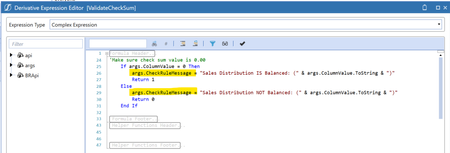
 3 years ago
In the end I raised a ticket for this - it's not a bug but a Cube Integration Setting! We had disabled/not enabled the Label Dimension > TextValue (Text)

OS_Pizza
3 years agoContributor III
It should be in the Validation -> Rule Text tab show as below -
- SarahS3 years agoNew Contributor II
Hi - mine displays the same as yours - just with the text 'Check Rule Errors' - can you get it to display something different in your example?
- OS_Pizza3 years agoContributor III
You should look at the Rule Text column(highlighted in Green) and not the heading. You can display any text.
- SarahS3 years agoNew Contributor II
Apologies - I see you have a column 'Rule Text'. I don't have that. Is there a setting somewhere to include/show it?
Thanks!
- OS_Pizza3 years agoContributor III
It could be hidden between the columns. Can you share a screenshot of all the column headings without any data.
- SarahS3 years agoNew Contributor II
I've tried hovering between columns to see if it's somehow collapsed but no luck... What version are you on? This is 7.2.2. I have access to a 7.3.1 environment as well, I'll try that and see if it's any different.
Related Content
- 5 months ago
- 2 years ago