The OneStream Community is temporarily frozen until June 29th due to the ongoing maintenance. Please read the blog post here to learn more.
Forum Discussion

SarahS
3 years agoNew Contributor II
Derivative Check Rule - Display CheckRuleMessage
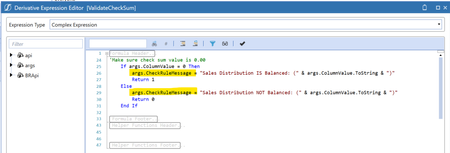
Hi, I'm using a Derivative Check Rule for the first time - using the sample available in GolfStream (HoustonSalesDetailOffset > ValidateCheckSum) - the Rule itself is working fine, I am getting the ...
 3 years ago
In the end I raised a ticket for this - it's not a bug but a Cube Integration Setting! We had disabled/not enabled the Label Dimension > TextValue (Text)

OS_Pizza
3 years agoContributor III
I have tested on both 6.8 and 7.4.1 and Rule text gets displayed on both.
- SarahS3 years agoNew Contributor II
I've just tested in 7.3.1 and it's fine - I'm thinking it's a 7.2.2 bug. Thanks for your help 🙂
- OS_Pizza3 years agoContributor III
Try creating a new derivative rule and use a simple expression as below.
A#[A*]=All:V#[*]=All_View:F#[*]=All_Flow:IC#[*]=ALL_IC:E#[*]=All_Entity:UD2#[*]=ALL_UD2:UD3#[*]=All_UD3:UD4#[*]=All_UD4:UD5#[*]=All_UD5:UD6#[*]=All_UD6:UD7#[*]=All_UD7
Read out this blog for more details on setting up the derivative rule.
https://medium.com/@kesanmanish/blog4-onestream-the-underlooked-asset-called-derivative-8d6349c5d035
Related Content
- 5 months ago
- 2 years ago