The OneStream Community is temporarily frozen until June 29th due to the ongoing maintenance. Please read the blog post here to learn more.
Forum Discussion

JérémyRenard
2 months agoNew Contributor III
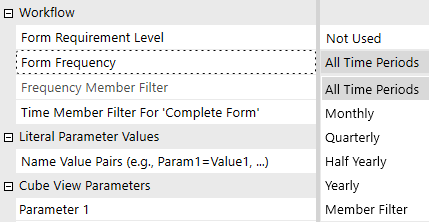
How can I retrieve the name of the form template using a finance business rule?
Hello everyone,
Thanks to this discussion: https://community.onestreamsoftware.com/discussions/WorkflowDI/forms-by-entity/13417
I can now show or hide the input cube views based on whether or not...
 2 months ago
As far as I know the args parameter does not contain the name of the Form that is calling the Business Rule. You have to add a parameter to the Frequency Member Filter like this:
T#Root.CustomMemberList(BRName=MyBRName, MemberListName=IsFormValidForEntity, FormName=[0001])You then process the parameters like this:
Public Function Main(ByVal si As SessionInfo, ByVal globals As BRGlobals, ByVal api As FinanceRulesApi, ByVal args As FinanceRulesArgs) As Object
	Try
		Select Case api.FunctionType
			Case Is = FinanceFunctionType.MemberList
				#Region "IsFormValidForEntity"
				If args.MemberListArgs.MemberListName.XFEqualsIgnoreCase("IsFormValidForEntity") Then
					'-- Usage: T#Root.CustomMemberList(BRName=myBRName, MemberListName=IsFormValidForEntity, FormName=[0001])
					Return IsFormValidForEntity(si, globals, api, args)
				End If
				#End Region
			.....
		End Select
    Catch ex as exception
		....
    End try
End Function

Private Function IsFormValidForEntity(ByVal si As SessionInfo, ByVal globals As BRGlobals, ByVal api As FinanceRulesApi, ByVal args As FinanceRulesArgs) As MemberList
	Try
		#Region "Form Parameters"
		' Get the parameters passed through from the Form Template
		Dim thisFormName As String = args.MemberListArgs.NameValuePairs.GetValueOrEmpty("FormName")
		#End Region

		' Build member list with Time members.

		Return memberList
    Catch ex as exception
		....

	End try
End Function
MarcusH
2 months agoValued Contributor

JérémyRenard
2 months agoNew Contributor III
Hello MarcusH
That’s actually the link I used to create my business rule.
But I’m not sure how to retrieve the name of the cubeview or form selected by the user, so that I can specify in my business rule whether that form should be displayed monthly, quarterly or at some other interval.
- MarcusH2 months agoValued Contributor
As far as I know the args parameter does not contain the name of the Form that is calling the Business Rule. You have to add a parameter to the Frequency Member Filter like this:
T#Root.CustomMemberList(BRName=MyBRName, MemberListName=IsFormValidForEntity, FormName=[0001])You then process the parameters like this:
Public Function Main(ByVal si As SessionInfo, ByVal globals As BRGlobals, ByVal api As FinanceRulesApi, ByVal args As FinanceRulesArgs) As Object
	Try
		Select Case api.FunctionType
			Case Is = FinanceFunctionType.MemberList
				#Region "IsFormValidForEntity"
				If args.MemberListArgs.MemberListName.XFEqualsIgnoreCase("IsFormValidForEntity") Then
					'-- Usage: T#Root.CustomMemberList(BRName=myBRName, MemberListName=IsFormValidForEntity, FormName=[0001])
					Return IsFormValidForEntity(si, globals, api, args)
				End If
				#End Region
			.....
		End Select
    Catch ex as exception
		....
    End try
End Function

Private Function IsFormValidForEntity(ByVal si As SessionInfo, ByVal globals As BRGlobals, ByVal api As FinanceRulesApi, ByVal args As FinanceRulesArgs) As MemberList
	Try
		#Region "Form Parameters"
		' Get the parameters passed through from the Form Template
		Dim thisFormName As String = args.MemberListArgs.NameValuePairs.GetValueOrEmpty("FormName")
		#End Region

		' Build member list with Time members.

		Return memberList
    Catch ex as exception
		....

	End try
End Function
Related Content
- 2 years ago
- 2 years ago
- 2 months ago