The OneStream Community is temporarily frozen until June 29th due to the ongoing maintenance. Please read the blog post here to learn more.
Forum Discussion

MarcR
4 years agoContributor II
Saving an export directly to the shared folder
Hi All,
For a client i've created a SQL script that generates a datatable that i want to save to a .csv file.
This works as expected via
BRApi.Utilities.SaveFileBytesToUserTempFo...
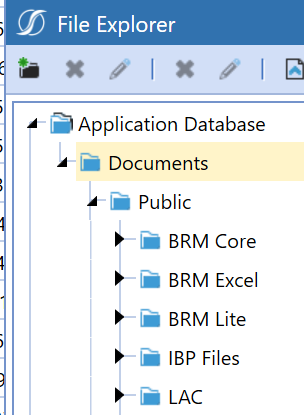
 4 years ago
Hi Marc
This works for me
Dim dt As datatable = aDataTable

Dim fileName As String = "a File Name"
Dim filePath As String = $"Documents/Users/{StringHelper.RemoveSystemCharacters(si.UserName,False,False)}"

'Use a string builder object
Dim filesAsString As New StringBuilder()

'headers as first row, if needed
filesAsString.AppendLine(String.Join(",", dt.Columns.Cast(Of DataColumn).select(Function(x) x.ColumnName)))

'loop the rows
For Each dr As DataRow In dt.Rows
	'use String.join to create a comma separated line
	filesAsString.AppendLine(String.Join(",", dr.ItemArray()))
Next dr

'Convert the string to an array of byte
Dim fileAsByte() As Byte = system.Text.Encoding.Unicode.GetBytes(filesAsString.ToString)

'Save fileAsByte
Dim fileDataInfo As New XFFileInfo(FileSystemLocation.ApplicationDatabase, $"{fileName}.csv", filePath)
Dim fileData As New XFFile(fileDataInfo, String.Empty, fileAsByte)
brapi.FileSystem.InsertOrUpdateFile(si, fileData)
you can control the culture using this command
Dim ci As CultureInfo
ci = New CultureInfo("de-DE")
CultureInfo.CurrentCulture = ci
but be careful, some cultures like German use the comma as decimal separator, then you have to use another character to separate columns
If Ci.NumberFormat.CurrencyDecimalSeparator = "," then ...I hope this helps and cheers
Christian
ChristianW OneStream Employee
4 years agoOneStream EmployeeHi Marc
This works for me
Dim dt As datatable = aDataTable

Dim fileName As String = "a File Name"
Dim filePath As String = $"Documents/Users/{StringHelper.RemoveSystemCharacters(si.UserName,False,False)}"

'Use a string builder object
Dim filesAsString As New StringBuilder()

'headers as first row, if needed
filesAsString.AppendLine(String.Join(",", dt.Columns.Cast(Of DataColumn).select(Function(x) x.ColumnName)))

'loop the rows
For Each dr As DataRow In dt.Rows
	'use String.join to create a comma separated line
	filesAsString.AppendLine(String.Join(",", dr.ItemArray()))
Next dr

'Convert the string to an array of byte
Dim fileAsByte() As Byte = system.Text.Encoding.Unicode.GetBytes(filesAsString.ToString)

'Save fileAsByte
Dim fileDataInfo As New XFFileInfo(FileSystemLocation.ApplicationDatabase, $"{fileName}.csv", filePath)
Dim fileData As New XFFile(fileDataInfo, String.Empty, fileAsByte)
brapi.FileSystem.InsertOrUpdateFile(si, fileData)
you can control the culture using this command
Dim ci As CultureInfo
ci = New CultureInfo("de-DE")
CultureInfo.CurrentCulture = ci
but be careful, some cultures like German use the comma as decimal separator, then you have to use another character to separate columns
If Ci.NumberFormat.CurrencyDecimalSeparator = "," then ...I hope this helps and cheers
Christian

Mustafa_A
4 years agoContributor II
Hi ChristianW
Thank you for sharing this.
How do you define the source sql table within OS? I'm assuming this is what we use. However I can not seem to make it work. Any direction will be appreciated.
Dim dt As datatable = aDataTable
Related Content
- 7 months ago
- 2 years ago