The OneStream Community is temporarily frozen until June 29th due to the ongoing maintenance. Please read the blog post here to learn more.
Forum Discussion

Rev
1 year agoNew Contributor II
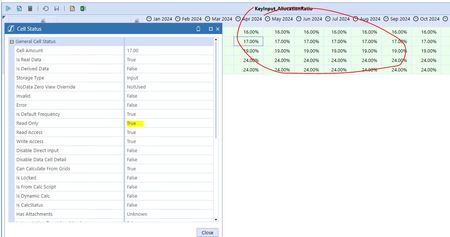
Data cells are read only
Hi all,
Noticed the data cells in my input forms are turned read only and cell status also shows the same. Please suggest on how to make it enabled for input. Thanks

BenvanBergen
1 year agoContributor
Hello, there can be several reasons for this:
Authorization, usually on scenario, or entity level.
Does the cubeview allow input in the cubeview properties, or on row/column level.
Can also be authorization in the workflow profile settings
I hope it's one of these.

Rev
1 year agoNew Contributor II
Workflow setting looks ok
entity security also looks ok:
scenario also looks ok :
cube view settings are ok too:
Is there something we're missing. I was able to input until yesterday.
 KarlT1 year ago
OneStream Employee
It could be that the workflow associated has been certified since you were previously able to input data.
- BenvanBergen1 year agoContributor
I see, not much entered on security. Was there another workflow profile created for the same entity maybe? You can have the entity assigned to only 1 workflow.
You can also check the pov to see if there are any parent members included, if it's not restricted in the cubeview, the pov can change based on your general pov settings
Related Content
- 3 years ago
- 2 years ago
- 26 days ago