The OneStream Community is temporarily frozen until June 29th due to the ongoing maintenance. Please read the blog post here to learn more.
Forum Discussion

DiegoRomero
2 years agoNew Contributor III
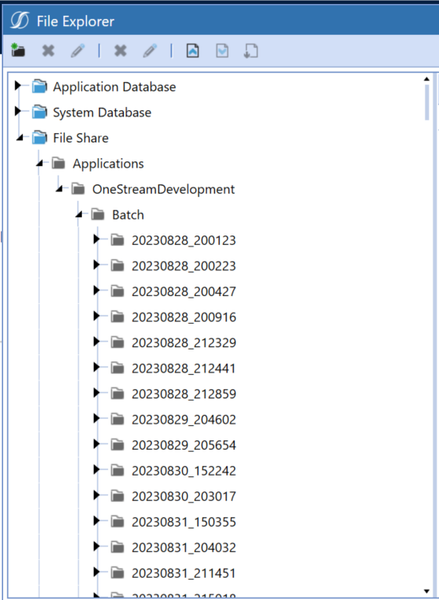
Question: Is there a way to clean up sub-folders within Batch?
We have been running several tests on DM jobs to upload batch files through the Harvest. We have a lot of subfolders created that we don't need anymore. Is there any way to delete?
Thanks!
- 2 years ago
Hello,
Here is a snippet of how to do so, all you need to do is add this 'Extensibility' business rule to a Data Management Step or launch it directly and you're set:
Dim folderPath As String = "Applications\<Your Application Name>\Batch"  ' You can use si.AppName
Dim mylistofFolders As List(Of XFFolderEx)= BRApi.FileSystem.GetFoldersInFolder(si, FileSystemLocation.FileShare, folderPath, True, True)
For Each folder As XFFolderEx In mylistofFolders
    If folder.XFFolder.Name <> "Harvest"
         Dim configSettings As AppServerConfigSettings = AppServerConfig.GetSettings(si)
         Dim sourceFolderPath As String = FileShareFolderHelper.GetBatchFolderForApp(si, True, configSettings.FileShareRootFolder, si.AppName) & "\" & folder.XFFolder.Name
         Directory.Delete(sourceFolderPath, True)
    End If
Next folder

Keyser_Soze
2 years agoContributor
Hello,
Here is a snippet of how to do so, all you need to do is add this 'Extensibility' business rule to a Data Management Step or launch it directly and you're set:
Dim folderPath As String = "Applications\<Your Application Name>\Batch"  ' You can use si.AppName
Dim mylistofFolders As List(Of XFFolderEx)= BRApi.FileSystem.GetFoldersInFolder(si, FileSystemLocation.FileShare, folderPath, True, True)
For Each folder As XFFolderEx In mylistofFolders
    If folder.XFFolder.Name <> "Harvest"
         Dim configSettings As AppServerConfigSettings = AppServerConfig.GetSettings(si)
         Dim sourceFolderPath As String = FileShareFolderHelper.GetBatchFolderForApp(si, True, configSettings.FileShareRootFolder, si.AppName) & "\" & folder.XFFolder.Name
         Directory.Delete(sourceFolderPath, True)
    End If
Next folder

DiegoRomero
2 years agoNew Contributor III
Thank you! very helpful!
Related Content
- 2 years ago
- 1 year ago
- 1 year ago