The OneStream Community is temporarily frozen until June 29th due to the ongoing maintenance. Please read the blog post here to learn more.
Forum Discussion

AndreaF
3 years agoContributor III
Run a parametrised data management sequence from a dashboard
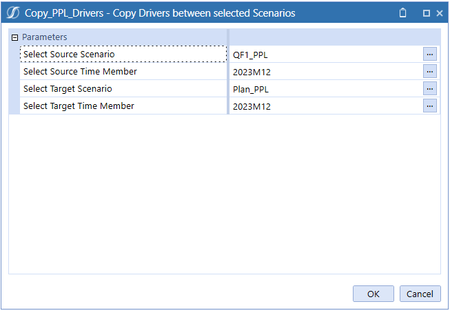
Hi all, I have a data management step which is of "execute business rule" type, and make use of parameters so that when I run it, it prompts me to select the parameters. The parameters are "member d...
 3 years ago
To give an update, I have been able to pass the parameters from the combo boxes to the data mng step via the standard button.
One thing to consider and that I was initially getting wrong is that the parameters to pass must be the member dialog parameters, and not the data mng step parameters name.
The following pictures will make it clearer.
This is the data mng step:
This does not work (using the data mng step parameter name):
This works (using the member dialog parameter):
ckattookaran
3 years agoValued Contributor
You can create a dashboard extender rule and do the following
Create a dictionary
Pass the combo box values to the rule.
Dim strCMBValue as String = args.NameValuePairs.XFGetValue("whatyoupasswdasbuttonclick")
Dim dictDMparams as New Dictionary( of string, strong)
dictDMparams.Add("DMParam", strCMBValue)
Brapi.utilities.executedmsequence(sequencename, dictDMparams)
- xfedericusx1 year agoNew Contributor II
Hi,
can you please explain how to use/recall the dictionary in the DataManagement sequence ? KarlT1 year ago
OneStream Employee
The items in the dictionary are the parameters being passed. So you would reference the name using the usual |!DMParam!| format

Related Content
- 4 months ago
- 2 years ago