Recent Discussions

Scheduled Monthly Reports
Does anyone know where I can look to start getting a better understanding of automatically scheduled monthly reports or packages? We have several Business Units that all look at the information a bit differently. Any suggestions on what has worked for your Business Leaders in regards to what they see each month?Luke20268 hours agoNew Contributor8Views0likes0CommentsIssue in Web Content and File Viewer component to directly open a HTML file in a browser
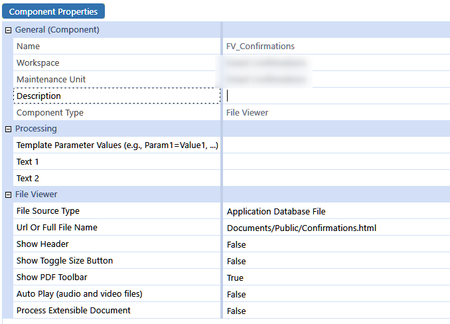
Dear community, I currently have an html document which is located in the file Explorer under "Documents/Public" folder. I am trying to get this HTML document to be presented into the components, embedded in a dashboard. However, with either a Web Content component or a File Viewer component (which will pinpoint to this specific file in Application Database File, as soon as I open the dashboard, it will load the html page into my default browser... I am using OS v8.1 ... is it a known bug or the expected behaviour ? What is even more strange, directing the Full File Name to a URL will correctly open a document in a dashboard ... Regards,Sergey2 days agoOneStream Employee3.3KViews0likes15Comments
Buttons: Does not aling when using browser.
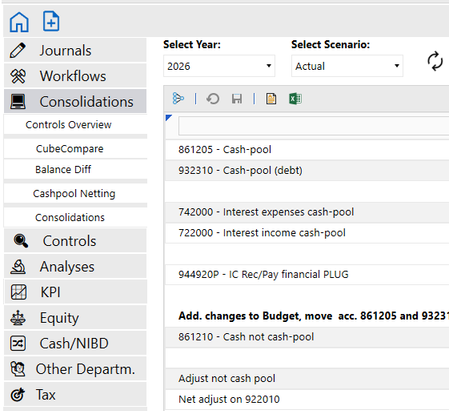
Hi If/when we are going to move to the browser solution, I would like to have my dashboard menu to be align to left. This is how it looks in the app: This is how it looks in browser. It is OK that icons are in colors, but I can't align the text to left. Component properties are the following (with no effect) Any suggestion on how to align it? Regards OleOle_S_P2 days agoNew Contributor III12Views0likes0Comments
Excel Addin - Calculate
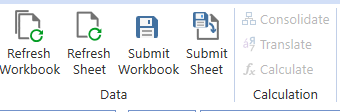
Hi, I am using OneStream version 8.2 and the Excel Add-In with a workbook that contains XFGetCell formulas. The workbook retrieves data successfully, and Refresh Workbook works as expected. However, the Calculate, Translate, and Consolidate buttons in the OneStream ribbon are disabled (grayed out). I am logged in successfully and can retrieve data through XFGetCell formulas, but I cannot perform any processing actions from Excel. Could anyone help me understand: What conditions must be met in OneStream 8.2 for the Calculate, Translate, and Consolidate buttons to become enabled? Is there any way to trigger Calculate, Translate, or Consolidate from Excel when working with XFGetCell-based templates? Thank you!Manju3 days agoNew Contributor II34Views0likes1Comment
Environment Application Count Dashboard
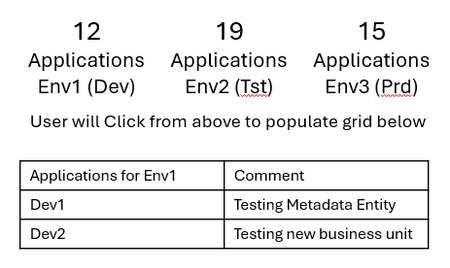
Our users are wanting to know how many applications are in each environment, then show the applications under each environment by clicking on the environment, plus the ability to enter a comment next to the application. Similar to the Cloud Admin Tool, Applications on top, user would click the environment, the grid would then show the applications. A text field next to the application name where they could input a comment. Any thoughts on how this could be done? Appreciate it in advance!jayaleck3 days agoNew Contributor III33Views1like1Comment
Updated Golfstream app?
Hi, is there a way to download an updated GolfStream version? I like to use it to reference different formulas, dashboards, features etc. but things break every time we upgrade our version....Rather than filing a ticket and modifying rules manually behind the scenes, I think it would be helpful to have an updated one issued by OneStream. I reviewed this forum and checked the Solution Exchange to no avail. Sometimes I just need help "getting started" with an idea that I've seen in a demo or solution and using Golfstream is a solid reference.m_b_b_156 days agoNew Contributor III35Views1like0Comments
Genesis Home Page, Navigation to File or Website
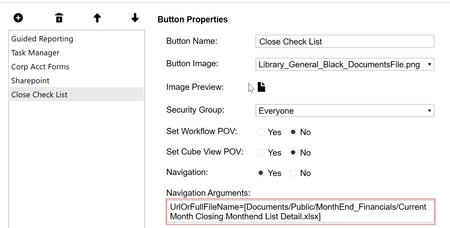
Hello everyone! Not sure if this is the right forum or not, but I am creating a very simple home page using the Genesis Home Page. Creating buttons to go to Dashboards or Workflows was not an issue, but I cannot figure out how to get the buttons to work to navigate to a document or website. Below is how I was attempting to do it. If anyone has any advice on what I am missing, it would be greatly appreciated, thank you.KevinEvange7 days agoNew Contributor II68Views0likes1Comment
How to Export a Dashboard
Hi Team, Generally we can export the cube view to an Excel. But when we attached the Cube view to the Dashboard through cube view component. at the time we wont find the export option. Can you please advise us. how export a dashboard(Cube view attached to dashboard).ShivaPrasad8 days agoNew Contributor III41Views0likes1Comment