Recent Discussions

Managing Group Company Exits in the User Workflow View
Hello everyone, We have several companies that have been sold or dissolved. To simplify users’ work, we would like to stop displaying workflows for these entities for periods when they no longer exist within our group. I’m not sure if this is the recommended approach, so please feel free to share your best practices with me. For my part, I have several ideas: Revoke access to the workflowProfile of the relevant entities via the access permissions of the users responsible for importing the data. Use a Business Rule to retrieve the name of the entity linked to the user’s workflow and, using its Entity ID, retrieve the date the company left the group, which is stored in Text6. This way, I could either display no periods (meaning there would be no workflow), display all 12 periods, or display only the X months of the year the user was in the group. I can retrieve the ID of the entity assigned to the workflow, but I can’t retrieve the data in Text6. I get the error “Object reference not set to an instance of an object.” If args.MemberListArgs.MemberListName.XFEqualsIgnoreCase("IsFormValidForEntity") Then '-- Usage: T#Root.CustomMemberList(BRName=JR_MemberList, MemberListName=IsFormValidForEntity, CVName=[RLS010 Local - Compte de résultat]) 'T#|WFTime| Dim WfGUID As guid = si.WorkflowClusterPk.ProfileKey 'obtient la clé de profil du workflow actuel de l'utilisateur Dim EntityList As List(Of WorkflowProfileEntityInfo) = BRApi.Workflow.Metadata.GetProfileEntities(si, WfGUID) Dim entityId As Integer For Each eInfo As WorkflowProfileEntityInfo In EntityList api.LogMessage("Workflow Entity:" & eInfo.EntityName) entityId = BRApi.Finance.Members.GetMemberId(si, DimType.Entity.Id, eInfo.EntityName) api.LogMessage("entityId :" & entityId) Next Dim entityText6 As String = api.entity.Text(entityId,6).ToString '<-- Error Object reference not set to an instance of an object. api.LogMessage("entityText6 :" & entityText6) Do you have any advice on the best way to handle an entity’s departure from the group, while retaining or not retaining the ability to access its previous workflows? Sincerely,JérémyRenard13 hours agoNew Contributor II9Views0likes0Comments
Scheduled tasks not running
Hi, I have 12 separate schedule tasks that is set to run monthly on calendar days 1-15. It runs every 2 hours starting from 12AM. (Next is 2AM, 4AM, and so on) I am encountering inconsistent issues with 6PM and 12AM where it does not kick off at all on random days. I've checked the configurations and can confirm it is set up right. Any idea what's causing the inconsistent failure to run? I'm in central time if that helps.8Views0likes0CommentsIncluding Journal Entries from Different Origin Member in Account Reconciliation Discovery
Hi Community, I’m working on an Account Reconciliation solution where I need to ensure posted journal entries balances are also included in the Account Reconciliation discovery process. Currently, by design the Discovery process only pulls trial balance information already imported and validated in the Stage. Therefore, I wanted to check if there’s a recommended, or best practice approach, to accomplish this requirement. Any guidance or examples would be greatly appreciated, thanks in advance for your help!shivani3804 days agoNew Contributor II87Views1like3Comments
Unable to Complete Workflow due to Security Access
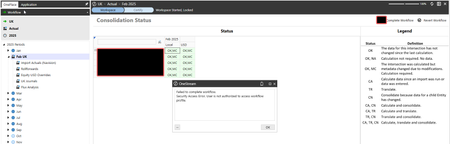
Hello OneStream Community, I am running into an issue with the ability to complete a workflow with a dashboard button as a test security user. Any help would be greatly appreciated. I have a consolidation status dashboard, which is attached to the top-most workflow node for a given month. My issue is as a test end-user I keep receiving the following error message when attempting to complete the Workspace chevron and move on to the certify step of the workflow. The security settings for the workflow are very simple, so it's not clear what could be the issue here. Is there another way I could get around this?Solvedjackwagner1111 days agoNew Contributor82Views0likes2Comments
Import with Vertical Extensibility or Extensible Dimensions
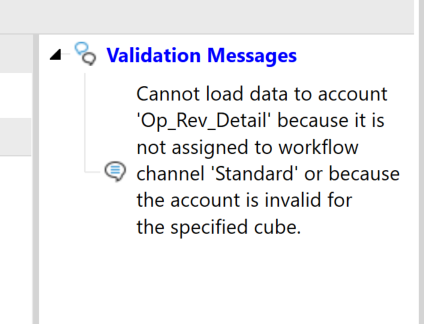
Hi, I can’t get my data import to work with vertical extensibility, and I’d like to understand how this situation is supposed to be handled. In short, the import validation fails on accounts that are extended for an entity. The entity belongs to a cube that is vertically extended from the primary workflow cube. Detailed situation I have extended dimensions and two cubes that use those dimensions. CubeParent contains a parent entity with dimensions applied. The parent entity resides in the parent entity dimension. CubeChild has dimensions that are extended from the parent’s dimensions. The child entity resides in the child entity dimension. As a result, each cube has its own unique entity dimension containing its respective entity. Additional configuration details: CubeChild has Is Top Level Cube For Workflow set to False. CubeParent is the top-level cube and has the Workflow Profile created from it. The child entity has been added as a child of the parent entity in the parent’s entity dimension (see screenshot). CubeParent has the Cube References tab configured correctly. Data import issue I have configured a data source that reads from a CSV file. The data source successfully loads the CSV into the staging area. However, the transformation step fails. The failure occurs only for the child entity’s extended account, not accounts in the ParentCube account dimension. The transformation rules when created are associated with a cube. If the cube is not that of the workflow profile the transformation rule does not appear in the import configuration step. Question How should data be imported for an entity that exists in a workflow that has different dimensional detail than the cube it belongs to because it is using vertical extensibility?Solved75Views0likes4Comments
Data Import Step - Load validated records
We are looking for a load into a financial cube. Mappings are already done in the source system. Is there a way to load records that pass the validation and write the other records to an error protocol. The idea would be that not the whole load is rejected but only records that contain errors, those being written to an error protocol. Many thanks for your supportjuergzbinden14 days agoNew Contributor II37Views0likes2Comments
Add Reminder for Flip Sign Flag on Account Mapping During Load
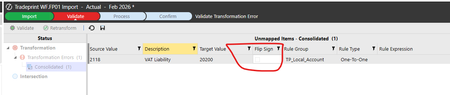
Our income, liability, equity accounts need to have the flip sign flag checked but our users always forget. Is there a way to add a pop up when they first get to this screen (after they save it is too late).mgreenberg15 days agoContributor II36Views0likes2CommentsMapping IC based if account is IC
We want to set the IC value to none if an account is not IC. We are currently doing this in the IC dimension in the datasource and looking up the account, getting the target and then checking If IC. If it is not IC we pass None as the source value. This works fine unless they upload a new account because it has not been mapped yet it doesnt know its IC and maps to None. The user has to reupload the same file after they map the account so that they get an IC value in the source. I was thinking that I could put a BR on the IC transformation rule but the problem is it reads the 1:1 (where I have the None->None) before it gets to the section for BRs. I guess I could remove the 1:1 None rule and then in the BR check to see if the account is IC and if so then get the IC target. I am just curious if there is a better way to handle this that I have not thought of. We have a similar issue as we store function in a user field but we only want it populated for specific expense accounts otherwise it should be none. When they have a new expense account we have the same problem that they have to reload the import file after they map the expense account.mgreenberg15 days agoContributor II49Views0likes2CommentsNo valid DataKeys (Scenario / Time) found in data source.
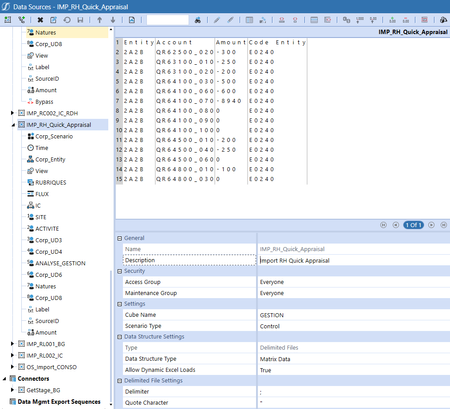
Hello everyone, I'm trying to create my first import from scratch. Unfortunately, it always gives me the same error : No valid DataKeys (Scenario / Time) found in data source. Review the source data load processing log and check one-to-one transformation rules to ensure that you have created proper Scenario and Time dimension rules for this data source. And no line is imported or displayed in the logs. However, I've gone down each parameter and everything seems correct and consistent with what I have on other import files. Could you help me investigate? My settings : All the UD1 to UD8 are on None. And the log :SolvedJérémyRenard16 days agoNew Contributor II378Views0likes9Comments
Connect MS Fabric Lakehouse?
Hi all, I'm currently exploring ways to extract data from a Microsoft Fabric Lakehouse into OneStream. The obvious way would be to connect to the SQL endpoint just like any other DB. In this case, what would be the best authentication method? I've been testing it out with my own user on MS SQL Server Management Studio using MFA, and I have no idea what the best way would be to create credentials for the connection string in OneStream. In case connecting to the SQL endpoint with a connection string isn't a good idea, what would be a better practice? Thanks.mireles20 days agoNew Contributor III59Views1like1Comment