Recent Discussions

Monthly Data from D365 into OneStream
Is there an interface from Dynamics 365 into OneStream? I have seen some comments mention direct connection with D365 using oData API. We have several business units across the world that will need to push month end data from D365. Is there a way they can just push the data from their end or would it have to come from OneStream to get the data?daylaking3 days agoNew Contributor II33Views0likes3Comments
REST api and breaking changes for authentication in v8
We have been using the onestream REST api for a couple years now. In the past we had been using Open-ID-connect (OIDC) to authenticate against an Azure AD ("Entra") directory, and then generate reports from cubeviews or data adapters. During our current upgrade to v8, we started receiving lots of mixed messages from onestream employees about whether OpenID is still supported. I'm assuming that the OS support team knows what they are talking about, but it seems to contradict the docs in substantial ways. Moreover, it contradicts common sense. What they are telling me is that in the "hosted" version of Onestream v8 on Azure, we are NO LONGER allowed to use OIDC to authenticate a service principal (app registration) and connect to the REST api. Instead, they are saying that a new engineering team at onestream (called "OIS" team?) have rebuilt the authentication layers and they removed OIDC support in favor of PAT tokens. Supposedly the PAT tokens are the only way to use the REST api in onestream going forward. This seems to be a massive step backwards - we lose our ability to connect with a normal service principal from Entra ID, and we must start using a custom login that originates in onestream (one that will not have consistent governance as various other services that are managed by our security team.) NOTE: The docs talk a lot about both OIDC *and* PAT tokens, so it seems like both are allowable.... Whenever the terms are contrasted or are used in close proximity to each other, the docs will say that customers "may use" PAT tokens. They never say we "must use" PAT tokens. Can anyone provide some more color to help customers understand this change? It feels like a regression. I suspect it may not have been intentional. In my opinion, these PAT tokens aren't appropriate for the back-end service integrations, and we would rather continue using our old service principals originating in Entra ID. Any additional information would be very much appreciated.dbeavon3 days agoContributor944Views0likes6Comments
Annotations Extraction via CubeView
Hi All, I am trying to extract the annotations uploaded by our entities by creating a cubeview. I entered all relevant POV information in the cubeview, however, no annotations show. Does any of you have experience with extracting annotations via a cube view?jzubler3 days agoNew Contributor30Views0likes0Comments
IC Matching Reports/Dashboards not showing Parent currency adjustment values
Hello Everyone. We are having some issues with IC Matching Standard Dashboards and unable to find a root cause - not sure if this is a Bug. Intercompany Matching criteria is Set to Parent currency and all other dimensions at Top, However when we post a journals in Parent currency with a partner this matching Dashboard does not consider this Journal line Item for IC matching and none of the Dashboards shows that. Please help with any insight you have or if you had seen any workaround for the same. Thanks in Advance ! SatishSKMundra5 days agoNew Contributor III1.8KViews0likes3Comments
Automated email notifications on workflow status changes
I’m exploring ways to configure OneStream to send automated email notifications when a workflow status changes. Specifically, the requirement is something like: When a workflow transitions from Not Started --> In Progress, or From In Progress --> Completed (or similar workflow status changes), the system should automatically send an email notification to a defined user or user group to inform them of the status change. If anyone has implemented something similar or can point me to the right framework (or limitations) around workflow-driven notifications, I’d really appreciate any guidance or examples. Thanks in advance!felixsty8 days agoNew Contributor42Views0likes1CommentManage Workflow Issues
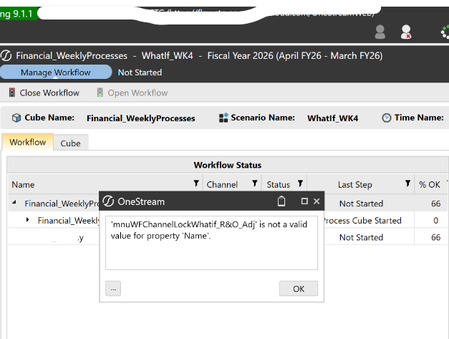
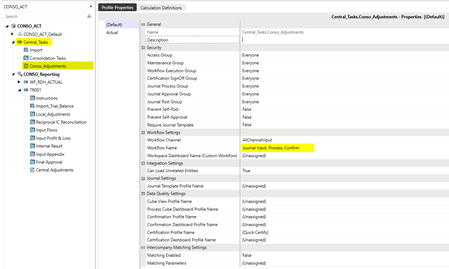
Hi Team, In Manage Workflow initially i have faced an issue, we thought Workflow channel name "Whatif_R&O_Adj" contains special character &. is this really because of '&' symbol. or is there any other issue. Could you please advise on this. and after clicking on the 'ok'. it is not showing unlock and Unlock Descendent options. Please help to resolve the issue. Below are my workflow settings. Thank you, Shiva Prasad.ShivaPrasad9 days agoNew Contributor III58Views0likes1CommentWhy 2+ Import of a Matrix Flat File of One Workflow Profile to Load Certain Months into a Data Cube?
For the first Import of a Workflow Profile, data in certain months in a "Matrix flat file" failed to be loaded into a Data Cube. For the second+ Import of that Workflow Profile, data in those months in that "Matrix flat file" could be loaded into a Data Cube. - In summary, data in certain months in a "Matrix flat file" must be Imported > 1 time of a Workflow Profile to be loaded into a Data Cube. Please share the root causes for v9.2. Thank you, SMEs.SolvedKH110 days agoContributor III114Views0likes2CommentsUnable to Post Journals to Locked Entity Despite Central Journal Input Step
Hello Everyone, I’m encountering an issue in OneStream when trying to post a journal via central workflow to an entity whose workflow is locked. Normally, central journal input steps are designed to allow journal postings even when the entity’s workflow is locked. In my case, I have configured a central journal input step within the workflow profile of the entity, so I would expect journal entries to still be accepted despite the lock. However, when attempting to post the journal, I receive an error indicating that the entity is locked. Has anyone experienced a similar issue where central journal input steps do not bypass the workflow lock as expected? Are there specific configuration points or workflow setup details that could explain this behavior?Hatim_Elhaouma10 days agoNew Contributor II26Views0likes0CommentsNeed to send data from OneStream to Snowflake using an existing SIC ODBC connection
Hello, What is the best way to send data from OneStream to Snowflake using an existing SIC ODBC connection? Currently I am using SIC ODBC connection to query data from Snowflake and now I would like to send data back to Snowflake.TyeshaAdams11 days agoNew Contributor III67Views0likes2Comments
Security - Posting an auto-reversing journal entry
A user approves an auto-reversing journal entry - security also allows the user to post. The user is unable to post. HOWEVER, in the subsequent period, the user is able to post the auto-generated reversal journal entry. Has anyone seen this and thoughts on resolution?WCHeceta11 days agoNew Contributor III777Views1like3Comments