MergeAndCenterColumnHeaders in Cube Views
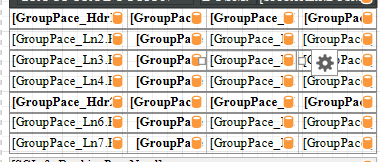
Hi, Anyone on Version 8 who's actually tried to use this 'enhancement' feature in Cube Views? We requested this on Ideastream a long time ago with a lot of support. I can see this command is now available in the header format dialog; however, it would appear that the only thing it does is change the header from left justified to center view. There does not seem to be a way to actually 'merge' column headers, despite the fact that it's called "MergeAndCenter". Even the system documentation appears to confirm this behavior. Someone please tell me I'm missing something here and it actually is possible to merge column headers, because we really really wanted this feature. Thanks740Views2likes11Comments
Balance Sheet report: displaying two CubeViews in a two-column layout
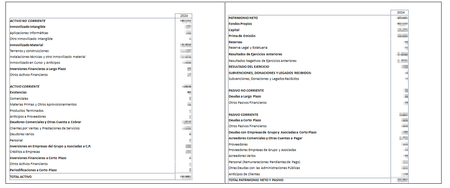
Hi everyone, I'm building a Balance Sheet report in the Text Editor. For various reasons, I have two separate CubeViews: one for Assets and another for Liabilities & Equity. I've placed both CubeViews inside a table within the Text Editor (one per cell, side by side), trying to display them in the classic balance sheet layout — Assets on the left, Liabilities & Equity on the right. However, I'm having trouble getting them to render correctly next to each other. Has anyone done this before? Is a two-cell table in the Text Editor the right approach, or is there a better/recommended way to place two CubeViews side by side in a single report? Any tips or examples would be greatly appreciated. Thanks!26Views0likes0Comments
Extensible Documents Cubeview margins
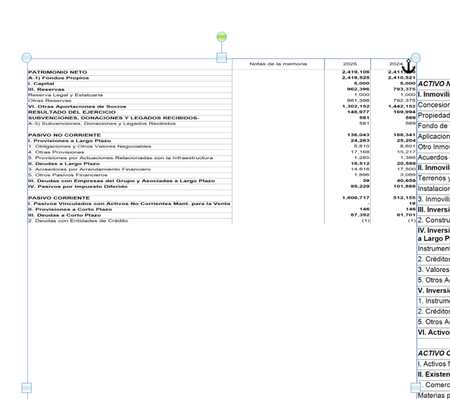
Hi Everyone!, I have been unable to set margins in a cubeview in a extensible document. Even though, the report margins in the cubeview settings are set and the argument IncludeReportMargins is set to true as can be seen in the attached images. But no margins are shown. Thanks for you help.31Views0likes0Comments
Security Report - Dashboard for Admin- Access
Good day to you. Currently, we are working on a Dashboard for User Access. We have successfully implemented the logic to retrieve Security Group Unique IDs along with their corresponding Security Group details. As part of this dashboard, we now need to retrieve Workflow Profile–level details, specifically: Entity assigned to the Workflow Profile Access Group Maintenance Group Workflow Execution Group Certification / Signoff Group So far, we have been able to retrieve details for points (1), (2), and (3). However, we are unable to fetch the Workflow Execution Group and Certification / Signoff Group details using either Business Rules or SQL queries. Could you please help us by suggesting: The appropriate Business Rule method/API, or A supported SQL approach, to retrieve these remaining Workflow Profile security details? Your guidance on the recommended approach would be greatly appreciated.Solved99Views0likes2CommentsBook Viewer / Book Publishing Best Practices
Good afternoon, I'm curious to see how other companies handle this situation. We've recently launched a Dashboard allowing the vast majority of our user base, ~800 users, the ability to interact with and drilldown on their financials. One of the growing pains we're experiencing with this change is that the users have the ability to create a PDF Book for their selected Locations + Children on whatever Cube View they're currently on. So it could be one PDF or a lot (50+ locations). Opening the Book Viewer creates a background server task which on its own doesn't seem to be an issue. However, we have a couple of "triggering" events that cause an influx of our user base to all access the system for financial review and book publishing at the same time. Prelim financials are ready to review, financials are closed, etc. The problem we're experiencing seems to be when we have a lot of users all trying to create books at the same time it appears that their tasks are stepping on each other. So either the process is taking longer than normal or the user is receiving a "Cannot access the file filepathandfilename.pdf because it is being used by another process." And maybe the last error is something the user did but I don't know what that could have been honestly. Just trying to get a feel if any other companies / users experience this kind of influx on Book Viewer all at once and how they handle. Thanks, Brandon75Views0likes2Comments
Save Offline Copy
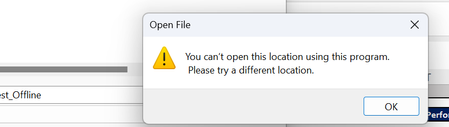
I'm getting the below error message regarding location when trying to save a file with multiple XFGetCell formulas offline. I've updated my preferences that an earlier question showed as a solution and refreshed the workbook (again) before attempting to save...but am unable to save the file without the formulas. I've tried directly to my desktop, various folders, where downloads go.... I can't find an acceptable location. Any help would be appreciated.518Views0likes5CommentsError exporting Cube View to Excel/PDF when using CVRC
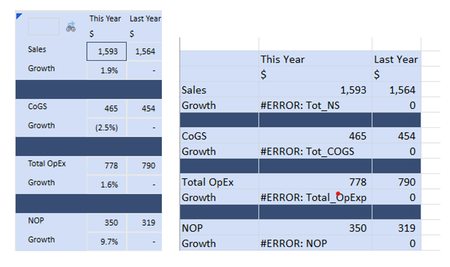
Hi, I’ve created a cube view containing a Row Override GetDataCell CVRC formula that is throwing an error when exported to Excel or PDF. I believe it’s because I’m using CVRC which requires the use of an index which Excel/PDF don't know how to handle. I’ve tried simple GetDataCell formulas and they all export fine. I’ve read that this can happen when Excel doesn’t know how to handle the index but the formula doesn’t calculate without the index. Has anyone experienced this and how did you resolve it? Would it work if the calculation was done via business rule instead? Below are screenshots from the desktop app and Excel, as well as the row override formula46Views0likes0Comments
Publish a Document in Narrative Reporting
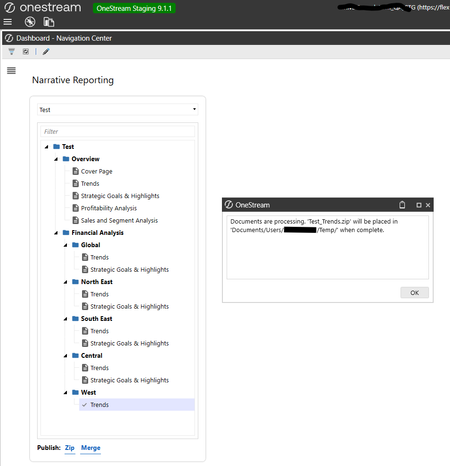
Hi Team, We have an issue in publishing the document in the Narrative Reporting. while Publishing the document, it is saving under respective user folder. how to publish a document in share folder or any group folder. Can you please help us resolve the issue. Thank you, Shiva Prasad29Views0likes0Comments
Create Single Formatting Rule
Good morning, So, I am creating a Report Component with, at least, 75 different data cells from Data Adapters. When it comes to a Formatting Rule, I am looking for a single rule where the condition is dynamic based upon the value of the cell it is applied to. This is just a small portion of the cells. I would like to format all of them as ($##,###) in Red if it is negative. I have tried using [Value] < 0 in the condition but everything is turning red. I have created calcualted cells to turn any text into Decimal. I don't want to have to create a rule for every cell. Also, when it comes to the Format String, what is the syntax to make negative number show in parenthisis?31Views0likes0Comments