Genesis when in client - Taskbar excel etc
Below is a screenshot of how the genesis dashboard look like when it is used inside the client. The report on the left is the source cv and report on the right is the drill down details when a cell is clicked on the left. You can see that there is no taskbar for excel download etc in the left report, even though I have set cv default header to be visible. Both the left and right reports, I am using cv advanced embedded, but the left one is the one with user action "refresh" with click. I used the source cv of the left report as content cv with comments in another page and there is taskbar for excel download. The only difference between the two of them is content block type and user action. I checked the user guide for cv with advanced embedded, there is nothing written that when user action is selected, the taskbar for excel download etc will be gone within client. How do I get the taskbar for excel etc to appear when using genesis within the client?Solved10Views0likes1CommentGenesis - No moveable splits in Dashboard Layout
I cannot find any setting for moveable splits in dashboard layout or advanced dashboard layout. Is it not possible in Genesis? Does it means I should just create the dashboard in the client first and then link it into Genesis?Solved21Views0likes2Comments
Data Adapter SQL Query to view data submitted through Excel
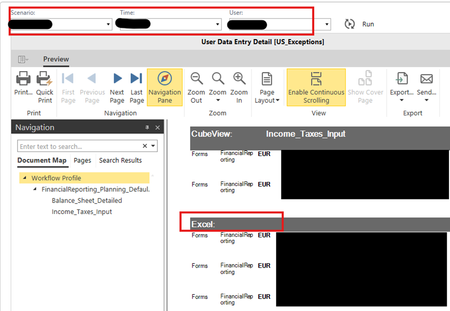
I am here with one of my typical requests to see if anyone has (SQL query) code I can borrow 🙂 We had an issue with two users who discovered how to submit data through Excel and circumvent the workflow forms. As a result they are inputting data to intersections where we do not want forecast data. I would like to have a dashboard I can run where I can select a specific scenario and it will return a list of intersections that were modified through an Excel submit. Or just a list of users and then I can run the ONC application report User Data Entry Detail to get the details of the intersections. I know the data lives in a table somewhere but I am not sure the table name and the fields to filter on and return. In the ONC User Data Entry Detail report I am able to select a scenario, WF time and user name and can see data they changed via forms and data that was changed via Excel. But, there is no option to see all Excel edits for all users and I am trying to catch the rule breakers 🤫. Any help with a SQL query would be greatly appreciated so I can create a data adapter, and display it via a grid view in a dashboard. Thank you, Denise16Views0likes0CommentsGenesis - User action to refresh another cv basic
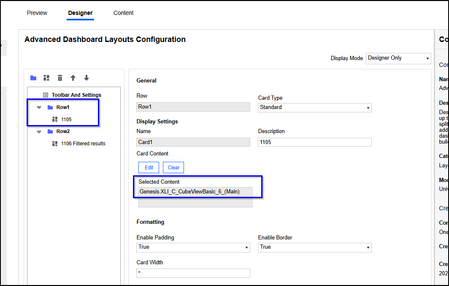
Hi, I am trying to create a genesis dashboard that will have a main cv (1105) which shows overview and then when user click on the cell, it will filter another cv (1106) (probably cv basic since it will have navlinks on most dimensions). In client dashboard, it requires the config of setting of user actions in 1105 cv component but I could not find this setting in content block CV Advanced. I can find it in CV adv embedded. I assume this is the correct content block to use. I managed to get this function to work when 1105 and 1106 are on different pages. This means the cv are both setup correctly with navigation links dynamically set up correct. But they cannot be in different pages in Genesis because that means user need to click on cell in 1105 in page 1 and then go to page 2 to see filter results in 1106. That is too much work for user. , Thus, I created a dashboard advanced layout and try to insert cv advanced embedded of 1105 in row 1 and then cv basic of 1106 in row 2. for user action in 1105, it is very difficult to select the right component to refresh. I chose the name that is closest to the genesis given name for the basic cv 1106. but this did not work. When I clicked on the cell in 1105 in row 1, nothing changes in 1106 that is in row 2. See below. What is wrong? The list of "component" in the dashboard selector is sooo long. I trial and error a few and some seem to be just a filter selection page in a content block created. Is there any documentation that will explain which one or type to choose? I checked the user documentation for cv advanced embedded and it does not mention much.11Views0likes1CommentGenesis - CV with comments - red flag on top right
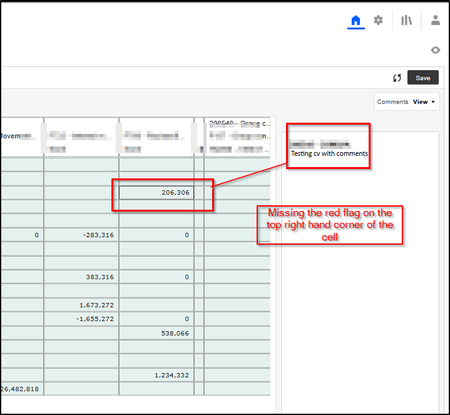
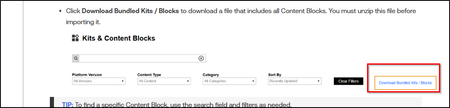
I have created a cv with comments for comments input and review. The comments are saved and viewed with success but I am missing the red flag on the cell where there is comment in the cells. See below. According to feature video for cv with comment, there should be a red flag see below screenshot: What could be the reason it is missing?44Views0likes4Comments
Drill-Down to Stage with Attribute Dimension
Hi everyone, I have two attribute dimensions in my model that I use to filter Cost Centers by Region and Line of Business. The issue is that when I try to drill down on those cells to reach the Stage data using “Load Results for Imported Cells”, I’m not able to get to the maximum level of detail. I assume this happens because the system is filtering by attribute members, which do not exist in the Stage tables. Has anyone experienced something similar or found a solution/workaround for this? Thanks in advance!19Views0likes0CommentsNaming Conventions for Genesis WS, MU and DB
In the basic dashboard courses, there are documentation suggesting the recommended naming conventions for the workspaces, maintenance unit and the respectives sub folders. But in Genesis, I cannot find any. I wish to get some idea for it for better structure and administering before starting using Genesis in our application.Solved30Views0likes1Comment
BI Viewer Pie Chart Labels Not Displaying Properly in Dashboard – Any Workaround?
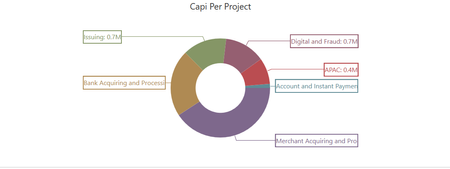
Hello Everyone, I created a pie chart using the BI Viewer in OneStream. The chart displays correctly when viewed directly in BI Viewer. However, once I add the pie chart to a dashboard, the labels are not fully displayed as expected. Has anyone experienced the same issue? Is this a known limitation when embedding BI Viewer components into dashboards? Is there a setting I might be missing? Do you know of any workaround to force labels to display properly? Any feedback or suggestions would be greatly appreciated. Thank you!17Views0likes0CommentsMicro Courses - Genesis
Hi, I see a lot of micro courses of genesis but I could not see any documentation on the sequence to take them in order not to get confused. Does anyone has any suggestions? Creating a Genesis Instance Administering Genesis Branding the Genesis User Interface Building a Reporting Analysis Dashboard in Genesis Building a Form Using Genesis Building a Report with Commentary Using Genesis Building the Structure of a Genesis Instance Genesis Overview and Installation (I assume this should be the starting point) Foundation series - OneStream Genesis (Starting point? or is it out dated?)Solved43Views0likes1Comment