The OneStream Community is temporarily frozen until June 29th due to the ongoing maintenance. Please read the blog post here to learn more.
Excel Add In
307 Topics
The report displays data for the developer but remains blank for other users.
Issue Description: The report displays data correctly for the user who developed it. However, when accessed by other users, the report appears blank and does not return any data. The following validations have been performed: The affected user has Administrator security access. Access to all dimensions used in the report, including the Cube View report, has been granted to Everyone. Relevant data is available for FY2027. Despite the above validations, the report continues to display data only for the developer and remains blank for other users. Further investigation is required to identify the root cause. Attached the screenshots for reference. Kindly suggest a workaround. Thanks!32Views0likes2Comments
Excel Addin- Unable to log on.
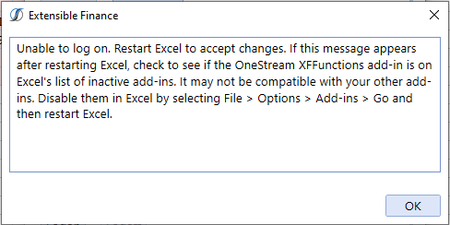
I installed the wrong Excel add-in on my new computer (7.0.1 when our tenant is only compatible with 6.6.0 or lower). Now, when I open Excel and try to logon, I get the below error message. I have figured out that if I manually disable the OneStreamExcelAddin.XFFunctions and completely close out of Excel then, when I restart it, I'm able to logon. The annoying part is, if I forget to disable it and close out of Excel, the next time I use Excel I have to go through that whole process of saving and closing all my workbooks, disabling the add-in, restarting Excel, just to use the add-in. I'm thinking there must be something leftover from the previous install that is causing this and I've tried to completely wipe everything from the initial install before installing the correct version but to no avail. Has anyone else experienced this and know what steps I can take to remediate? (I should also note that I made the same mistake on my old computer and had the same issue, so this does not just seem like a one-off issue with a specific PC) Thanks in advance! (Will leave the text of the error here for anyone else who might be searching for this error message) "Unable to log on. Restart Excel to accept changes. If this message appears after restarting Excel, check to see if the OneStream XFFunctions add-in is on Excel's list of inactive add-ins. It may not be compatible with your other add-ins. Disable them in Excel by selecting File > Options > Add-ins > Go and then restart Excel."6.5KViews0likes5Comments
Excel Addin - Calculate
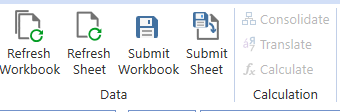
Hi, I am using OneStream version 8.2 and the Excel Add-In with a workbook that contains XFGetCell formulas. The workbook retrieves data successfully, and Refresh Workbook works as expected. However, the Calculate, Translate, and Consolidate buttons in the OneStream ribbon are disabled (grayed out). I am logged in successfully and can retrieve data through XFGetCell formulas, but I cannot perform any processing actions from Excel. Could anyone help me understand: What conditions must be met in OneStream 8.2 for the Calculate, Translate, and Consolidate buttons to become enabled? Is there any way to trigger Calculate, Translate, or Consolidate from Excel when working with XFGetCell-based templates? Thank you!51Views0likes1Comment
Excel Add-in - Quick view - Style for dates
Hi everyone ! We'd like to recover data in a date format using Quick Views. First step is to setup a CubeView that can recover this data. To do so, the CubeView setup is done in "Cell Type = Date " in the Data tab of the given line on the CubeView definition. Then data can be correctly input in the CubeView: . This particular date is saved as 639,160,344,000,000,000 (numeric value) in the data base. Next step it to recover this data using the quickview, but I can't get the correct style. It seems that the data in Onestream is different to that of the Excel date style (Excel starts from 1/1/1900 as day 1). Does anyone know how to properly set up the style to recover dates using a QuickView? Thank you Carlos15Views0likes0Comments
Excel Add-in and Task Activity Log
Hello, I'm responding to audit requests regarding user task activities and found an active user which has no task activity logged. The user uses the Excel Add-in. What Excel activities are/aren't recorded on the Task Activity log? Is there a way to capture the Excel activities? Thanks!43Views0likes1Comment
Quickview Template Formatting Error
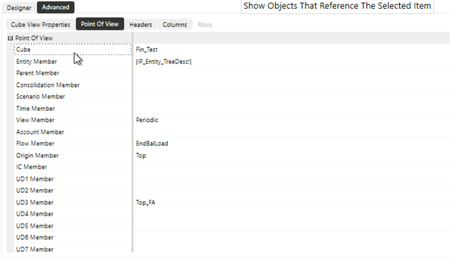
I have created a quick view template file, but each time I launch it, the font gets changed to a light gray. This obviously makes it difficult to see and I need to reformat it afterwards. Here is a sample: My QV has "preserve excel formatting" enabled, so I am uncertain what is causing a formatting override. I have tried different primary styles, but it does not stop the format from overriding after closing and reloading the spreadsheet. Here are my options: Has anyone else experienced the same issue or have any insight into how I may fix it?91Views0likes4CommentsSubmitting zero in excel
I am trying to submit zero via excel add-in using XFGetCell formula into MTD/periodic view. Excel/Spreadsheet does not seem to allow it. I can put in zero into the same POV via a data form. The only workaround I have is to submit a 0.0001 record into OS via excel XFGetCell formula instead. Is there any proper change in setting that would allow me to do this?Solved101Views0likes3CommentsSaving Offline Copy
My team has recently been unable to save offline copies of Excel files that contain XFGetCells + CubeViews. Prior to this, we had no issues and had saved 100+ files offline as part of quarterly reporting. I have seen prior threads where this has been discussed some time ago, and our team has tried updating preferences, saved elsewhere, etc. with no luck. Is anyone else currently having this issue?198Views2likes3Comments
Linking external Excel Spreadsheet to cube view input spreadsheet
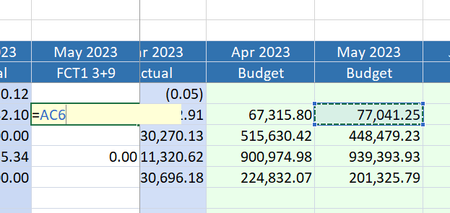
Hi all, I'm building a cube view which includes pre-filled columns including 12 months for CY budget, PY actuals and columns for YTD actuals. Additionally, I have included all future months in the year to be for the Forecast scenario for users to input. I have embedded this cube view into a spreadsheet form, so that users can either directly enter their forecast numbers into the spreadsheet in OS app, or it can be opened in Excel for users to complete outside the system. When I open the file in Excel, the CV correctly works and refreshes, and submission correctly writes the cells back to Onestream when FCT1 numbers are entered. However, I am stuck on one thing - is there a way to update the Cube View form cells by referencing other cells in another spreadsheet, or in the workbook? I can link 1 cell individually, but once I reference the cell, it automatically converts to a number and I cannot autofill any formula link to the remaining cells. Most users will either be wanting to link to the budget numbers and adjusting those, or workings they have in their own spreadsheets. I know another option is to use setcells, but I am trying to avoid this method if possible for this purpose. Happy to hear of any thoughts, maybe I'm missing something simple. Able to link 1 cell: Converts immediately to a number and unable to drag cell reference down: Thanks AndrewSolved3.3KViews0likes4Comments
Excel add-in V9: Not able to drilldown
We recently upgraded from V7.4 to V9.1 and we’re seeing an issue with the Excel Add-In. A small group of users (about five) are unable to use the Drilldown feature (the option is completely greyed out), while the rest of our users can access it without any issues. All users have been upgraded to the 9.1 Excel Add-In and every other function appears to be working correctly. Has anyone else run into this? Any ideas on how to fix it?392Views0likes10Comments