Balance Sheet report: displaying two CubeViews in a two-column layout
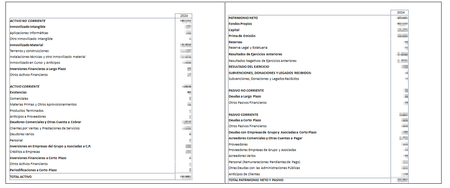
Hi everyone, I'm building a Balance Sheet report in the Text Editor. For various reasons, I have two separate CubeViews: one for Assets and another for Liabilities & Equity. I've placed both CubeViews inside a table within the Text Editor (one per cell, side by side), trying to display them in the classic balance sheet layout — Assets on the left, Liabilities & Equity on the right. However, I'm having trouble getting them to render correctly next to each other. Has anyone done this before? Is a two-cell table in the Text Editor the right approach, or is there a better/recommended way to place two CubeViews side by side in a single report? Any tips or examples would be greatly appreciated. Thanks!17Views0likes0Comments
Excel Add-in and Task Activity Log
Hello, I'm responding to audit requests regarding user task activities and found an active user which has no task activity logged. The user uses the Excel Add-in. What Excel activities are/aren't recorded on the Task Activity log? Is there a way to capture the Excel activities? Thanks!25Views0likes1Comment
Genesis error when trying to edit new blocks: Unable to find 'WSMU'
hi folks, When trying to edit some new blocks I've added in Genesis, I'm getting the error "Unable to find the Workspace Assembly Service Factory class for name 'WSMU' in Workspace 'Genesis' and Maintenance Unit 'X'" any idea why? I'm getting the error when i try to load a 'cube view basic' or 'embedded label' so far, in a card in a row in an advanced formatting blockSolved78Views0likes3Comments
Navigation behavior
Hi everyone, I’ve developed a report using Cube Views and noticed the following behavior with keyboard navigation: The Tab key moves right and then wraps to the next row The Arrow keys move in their respective directions and wrap at the boundaries When navigation reaches the end of the report, it continues by jumping back to the beginning and starts again from the top. Is there a way to stop this wrap-around behavior at the report boundaries? Is there any property setting to control or disable this? Thanks in advance, ArchanaSolved58Views0likes3Comments
Report (PDF) Header Background Fill Color Not Extending to Bottom of the Space
The background fill color on the header is not filling the entire space when viewed in PDF. You can see on four of the six columns there is white space where the text is shorter. I need the teal color to fill to the bottom of the header space, and not just exist where the text is located. It works fine in excel and cube view. The issue only exists in report PDFs. Does anyone know of a way to accomplish this? Report/PDF: Excel: Cube View: Here's an example of a PDF that looks good because the length of the header text is more comparable across the columns: I'm sure there's a way to accomplish this through a Custom Report Formatting rule or formula. I'm trying to avoid this, as I feel the formatting should already default to what I want. But, if I have to go this route, I will. Thanks in advance!2KViews0likes6CommentsCVR and GetDataCell Issue in cube views
Hello, I currently have a cube where I am having an issue calculating variances. The row has GetDataCell(CVR(Row1)+CVR(Row2)) and Column is has T#POV, T#POVPrior12, GetDatacell(T#Pov-T#POVPrior12). When I run the report, the first two columns run correctly for T#POV and T#POVPriorYear, but the third column where the two get data cells meet does not calculate correctly. I can't get it to work on a column override either as I know there is a order of operation for the GetDataCell. I want to keep the report as dynamic as possible, is there a way this can be achieved without breaking the columns out and manually doing the overrides?70Views0likes1CommentSaving Offline Copy
My team has recently been unable to save offline copies of Excel files that contain XFGetCells + CubeViews. Prior to this, we had no issues and had saved 100+ files offline as part of quarterly reporting. I have seen prior threads where this has been discussed some time ago, and our team has tried updating preferences, saved elsewhere, etc. with no luck. Is anyone else currently having this issue?159Views2likes3CommentsReportBackgroundColor not filling the entire cell when viewing the report as a PDF
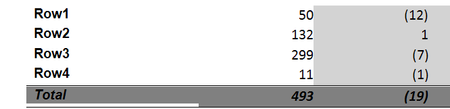
Hi, I am encountering an issue with the header format of the 'Total' row below where the ReportBackgroundColor is not filling the entire cell when viewing the report as a PDF. There is no issue when viewing view the cube view or Excel. Below is the header formatting we're suing: ELSE IF (RowName Contains ':Total:') THEN ExcelBottomBorderColor = Black, ExcelTopBorderColor = Black, ExcelTopBorderLineStyle = Thin, Italic = True, ReportBackgroundColor = Gray, ReportUseBottomLine1 = True, ReportUseTopLine1 = True I'm using the same formatting for Header and Cell Format but as you can see from the screenshot below, there is a blank space below Total. Has anyone encountered this?37Views0likes1Comment