Best Practice for Managing Outdated Members in Transformation Rules?
We have recently received feedback from several entities regarding outdated account members that still exist within our Transformation Rules. Before making any changes, I wanted to gather input on best practices for handling these scenarios. Specifically, I’m unsure whether it is appropriate to remove or delete these members, or if they should be retained and continue to be mapped for historical reporting purposes. If anyone has guidance or experience with managing outdated members in Transformation Rules, your insight would be greatly appreciated.70Views0likes3CommentsBusiness Rule | One-to-One Transformation - E# Parent to its first E# Base
We need your help to Import flat files: 1. > 100k Rows by 1,000s of E# Parent Members 3. E# is extended We've been fortunate to be advised to build a BR to generate a one-to-one Transformation Rule file. - E# Parent to its first E# Base Is it possible for you to be generous enough to share with us/Community: - a sample BR to look up its first E# Base Member of an E# Parent Member - how to call that BR in an Import Workflow Thank you, OS SMEs.Solved232Views1like2Comments
loading sub-ledger data into OneStream
Hi Community :) We are currently in development with regard to loading sub-ledger data into OneStream, but the balance specifications are so granular that we currently have them split into about 10 distinct loads. Because of this setup, our end users are being forced to manually click "Load and Transform" 10+ times to get a complete sub-ledger balance loaded for the period. Obviously, this is tedious, creates a poor user experience, and introduces a lot of room for human error. We want to streamline this. What is best practice to do this?108Views0likes2Comments
Import with Vertical Extensibility or Extensible Dimensions
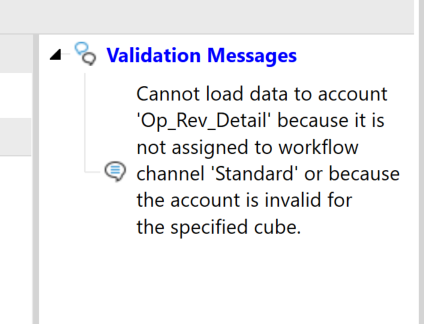
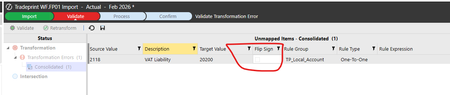
Hi, I can’t get my data import to work with vertical extensibility, and I’d like to understand how this situation is supposed to be handled. In short, the import validation fails on accounts that are extended for an entity. The entity belongs to a cube that is vertically extended from the primary workflow cube. Detailed situation I have extended dimensions and two cubes that use those dimensions. CubeParent contains a parent entity with dimensions applied. The parent entity resides in the parent entity dimension. CubeChild has dimensions that are extended from the parent’s dimensions. The child entity resides in the child entity dimension. As a result, each cube has its own unique entity dimension containing its respective entity. Additional configuration details: CubeChild has Is Top Level Cube For Workflow set to False. CubeParent is the top-level cube and has the Workflow Profile created from it. The child entity has been added as a child of the parent entity in the parent’s entity dimension (see screenshot). CubeParent has the Cube References tab configured correctly. Data import issue I have configured a data source that reads from a CSV file. The data source successfully loads the CSV into the staging area. However, the transformation step fails. The failure occurs only for the child entity’s extended account, not accounts in the ParentCube account dimension. The transformation rules when created are associated with a cube. If the cube is not that of the workflow profile the transformation rule does not appear in the import configuration step. Question How should data be imported for an entity that exists in a workflow that has different dimensional detail than the cube it belongs to because it is using vertical extensibility?Solved193Views0likes4Comments
Mapping IC based if account is IC
We want to set the IC value to none if an account is not IC. We are currently doing this in the IC dimension in the datasource and looking up the account, getting the target and then checking If IC. If it is not IC we pass None as the source value. This works fine unless they upload a new account because it has not been mapped yet it doesnt know its IC and maps to None. The user has to reupload the same file after they map the account so that they get an IC value in the source. I was thinking that I could put a BR on the IC transformation rule but the problem is it reads the 1:1 (where I have the None->None) before it gets to the section for BRs. I guess I could remove the 1:1 None rule and then in the BR check to see if the account is IC and if so then get the IC target. I am just curious if there is a better way to handle this that I have not thought of. We have a similar issue as we store function in a user field but we only want it populated for specific expense accounts otherwise it should be none. When they have a new expense account we have the same problem that they have to reload the import file after they map the expense account.113Views0likes2Comments
Transformation Event Handler Guidance
Hi, I have created a transformation event handler where it throws an error when an user tries to "Clear" file/s. in Import step. Now, the error comes when user tries to delete his/her file or "All" files. I only wanted it to throw error when user (mistakenly) selects "All" imported files and click on "Clear" Is there a way to achieve this by some conditions or checks? Thanks in advance, PM49Views0likes0Comments
Derivative logical operator issue
Trying to create simple rule based on value greater than or less than zero, however only my Negative rule successful. A#[ACC1]=ACC1_POS | Create If > x | Final and A#[ACC1]=ACC1_NEG | Create If < x | Final On the above stated expression type, I first tried to specify the Math Value only as 0, however nothing happened. Only when I changed it to 0.01, did the logic start to work. Now, if the source value is a negative, the second derivative rule works (returning ACC1_NEG), but if I put through a positive source value, it does not create ACC1_POS a bit stumped on this one now. Any suggestions someone can perhaps suggest? cheers, JacquesSolved1.1KViews0likes5Comments
Multiple source columns to a single target dim based on hierarchical relationships - Mapping
Hello Experts, Here's the scenario: We have a flat file coming from the client's source with multiple source columns. We need "Region", "Cost Center", and "Business Unit" in this case from the file to build the solution. We have developed an unique UD2 dimension in the app which will act as a target dimension for these 3 source columns(Region, CC, & BU). Creating a one to one mapping for all the possible combinations for (Region, CC, & BU) would be tedious. Currently, we are thinking of writing a Complex Expression in the UD2(target) transformational rule, that would first lookup the parent values of all the base members from the 3 columns combination and return the respective value of it's target. Something like the below snippet. Any sample code or alternative solution would be really helpful. Thanks! Dim U1 As String = args.GetTarget("U1#") Dim U3 As String = args.GetTarget("U3#") Dim U4 As String = args.GetTarget("U4#") Dim objDimPk As DimPk = BRApi.Finance.Dim.GetDimPk(si, CostCenter) Dim sValue As Integer = BRApi.Finance.Members.GetMemberId(si, dimTypeId, memberName) Dim eValue As Integer = BRApi.Finance.Members.GetMemberId(si, dimTypeId, memberName) Dim bValue As Boolean = BRApi.Finance.Members.IsDescendant(si, objDimPk, sValue, eValue, dimDisplayOptions) If (U1 = "ABC" And IsDescendant(U4, "CostCenter", "XYZ")) Then Return "TARGETUD2" Else Return "" End If50Views0likes0Comments