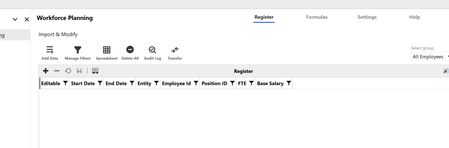
Issue in adding data to LIM WF model
In LIM WF model, I have created register with only 7 fields, Start Date, End Date, Entity, Employee id, Position id, FTE and Base Salary. Created two accounts FTE and Base Salary to copy data to people cube. Now when I am trying to add row, it is not adding any data in but its not showing in register. If i check database table I can see data. Earlier I have uninstalled LIM and WF multiple times to check if the issue gets resolved but still in same place. Any help will be good.20Views0likes0Comments
List of User Default Home Pages
Hi Folks, Wondering if anyone has built a BR or query to compile a list of Users and their Default Home Page. I know its in the UserAppSettings.xml File within File Explorer under Internal/User, and you can set individuals through the Admin Solution Tools, however I have not found a good way to See what is already set without going to each user individually (that would not be very practical). Appreciate any help! Stephanie52Views0likes3CommentsList of User Default Home Pages
Hi Folks, Wondering if anyone has built a BR or query to compile a list of Users and their Default Home Page. I know its in the UserAppSettings.xml File within File Explorer under Internal/User, and you can set individuals through the Admin Solution Tools, however I have not found a good way to See what is already set without going to each user individually (that would not be very practical). Appreciate any help! Stephanie31Views0likes1CommentPerformance/Load/Concurrency testing tool for OneStream desktop/cloud application
Hi All, We are using the OneStream 'cloud' solution with the desktop application required to be installed to access the OneStream functionalities. We would like to perform load/performance testing for the application with 250+ users to check its performace under the load. Have anyone done performance or Load or Concurrency testing for OneStream cloud application which is accessed through OneStream desktop application? If you have done this testing before, please share the performance or load testing tool and protocol used for testing the desktop application of OneStream with cloud solution. Your help will be much appreciated. Thanks!1.9KViews0likes8Comments
Problem With DM Sequence Parameter Resolution Order
Good afternoon, I'm encountering an issue and hoping someone could share how they've worked around this in the past. We have a task that runs over a finite number of Entities. Historically the underlying Business Rule was kicked off via DM Step with Entity: E#Top.Base. It's not exactly "Top" but something similar to hopefully capture all relevant Entities to this particular task. The runtime was always a consideration as it also runs for all remaining periods within our current year. In an effort to reduce runtime we introduced a "Unique Entity" parameter. This is defined by a Business Rule that runs and queries a source table to determine only the Entities that this particular task needs to be run on. In practice this has greatly reduced runtime on the task. Runs more than 2x faster. The problem: The source table that populates the list of "unique entities" is also updated within the same Data Management Sequence. Something like: 1) Update source table 2) Run task described above Because both Steps are within the same Sequence, the "Unique Entity" business rule is being executed before #1 Update source table happens. So any changes to the source table versus a previous run could cause an Entity to be missed. I wish the Filter would get resolved when the Step is executed instead of when the Sequence is executed. Hopefully that makes sense to everyone? The only workaround that I'm aware of is to kick off the 2nd Step at the end of the 1st step. This removes a lot of the visibility and, as part of our current process, Step 1 is sometimes executed on its own to preview Stage data before the full Cube posting takes place. I appreciate anyone who can provide guidance on this matter. Thanks, BrandonSolved81Views0likes5Comments
Reorder Register Columns in LIM
Is there an ability to organize a default order for the columns in LIM? I understand the user can customize the order, but we'd like to determine a starting order. Register Definition doesn't give the traditional arrows available to reorder.Solved199Views1like3Comments
Another user is already logged into the application on this client - Anyone else experiencing this?
Hi OS Community. has anyone encountered this error when logging into OneStream? "Another user is already logged into the application on this client. That user must log out of their external identity provider before you can log in." I ran into this issue today with a user and wanted to see if anyone has experienced the same thing and found a fix. Any help or suggestions would be greatly appreciated. Thank you! Edit: I found a similar post from past [ Unable to Login into OneStream] where it was suggested to log out of the organizational SSO account, but just wondering if there's a permanent fix or root cause of this.73Views1like1Comment
Inconsistent File Opening from Dashboard → File Explorer (Windows Client)
Hi everyone, I’m hoping to check if anyone has experienced something similar. We have a dashboard that directs users to folders in File Explorer. The navigation itself works as expected and correctly opens the folder location. However, users are experiencing inconsistent behavior when trying to open files from there — sometimes the files open normally, and other times nothing happens (no error message). If users navigate directly through File Explorer and open the same file, it works without any issues. This is happening in the OneStream Windows desktop application (not browser), and permissions don’t appear to be the issue since access works normally outside the dashboard. Has anyone encountered similar behavior when launching files from a dashboard? If so, was this a known issue or did you find an effective workaround? Appreciate any insights — thank you!51Views0likes1Comment
Rename folder under Application Database in FileShare
I have created a folder under application database in File share, I am trying to rename the folder because of some requirement changes, is it possible to update the folder name? Or even update the file name inside that folder?51Views0likes2Comments
Row suppression not working with dynamic cube?
Hi folks, My suppression in my cubeview doesn't work. If I turn on any suppression (including 'invalid') the cubeview returns blank (no rows at all). It's a cube that's been loaded with dynamic data services and the data is showing as NotStored. I wonder if that could be the cause? Anyone else observe this or have any tricks? I've tried every combo of suppression option I can think of... I'm surprised it would return nothing even with only 'suppress invalid' checked..25Views0likes0Comments