Bi-Viewer - Title and Legend
Bi-viewer appears to be limited on font size and type in version 8.5. So, what I've done is created anpng file through paint and chose the Load option in my Title in my bi-viewer to work around the original legend that is too small. What this allows me to do is have the font whatever size I want and I can make my legend line up with my bar chart. Looks beautiful on the client, but as always, the browser requires something "special". Is there anyway that I can use this thought pattern to make it appear on the browser. The Load function only looks at my cdrive which will not work on the browser. I tried uploading it to Data Explorer to get it on Onestream and then using that url in my image, then attaching my image to the same dashboard where my bi-viewer runs but it doesn't embed it into my chart so browser doesn't like that either. Regardkess if what I try, I just get the picture icon where my Title should be. Any ideas? ....even if it's something I've not mentioned here? Thanks ahead of time.26Views0likes0CommentsPowerBI Custom Data Adapter
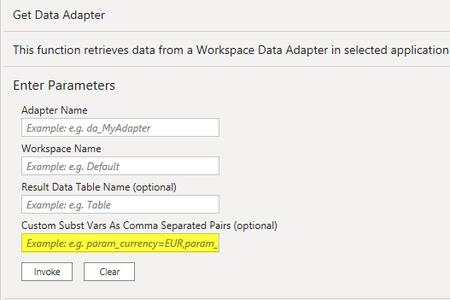
I have built a OS data adapter off of a cube view that has a parameter that prompts for entity. I subsequently built PowerBI query to pull data via this data adapter. I can get the PowerBI query to pull data if I hardcode the Entity parameter value in the Custom Subst Vars in PowerBI. What I would like to do is replace hardcoding the Entity value with list prompt for the user. That will let the user decide which entity they want to pull when they refresh the query. Any ideas on how to create this functionality? #PowerBI166Views0likes2Comments
Genesis: BI Viewer Configuration, Data Source, Excel
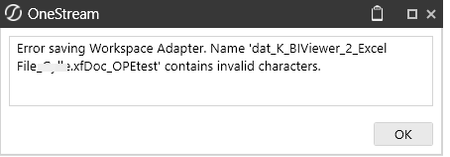
Currently I get the following error when trying to make a data source from an Excel sheet: As I have tried to narrow the information down due to endless error messages the file looks like this My question is: Where do I find a description of how to set up a data adapter in Genesis to an Excel sheet.Solved48Views0likes2Comments
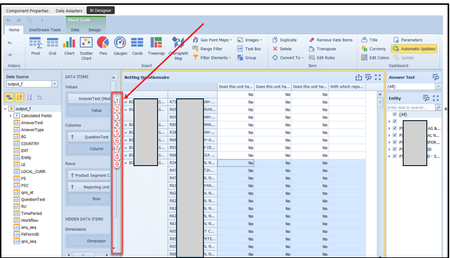
BI Viewer drill down without hidden data items
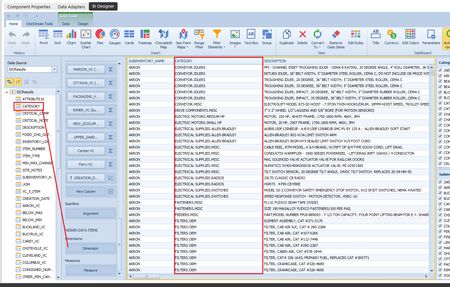
I'm trying to create a drill down in a BI Viewer dashboard using only a data set return. I can add a column (in this case "category") to both the Dimensions and Measures area. I then enable the drill down under Data > Drill Down, however, once the drill down is active, the Category column is hidden on the output and won't show until you drill into a row. I want to ability to drill into a row, but a user needs to see the Category column first before drilling. Is there a way for me to drill into a dataset without using "hidden" dimensions and measures for a column? Also - what is the difference between "Dimension" and "Measure"? Thanks!17Views0likes1CommentNaming Conventions for Genesis WS, MU and DB
In the basic dashboard courses, there are documentation suggesting the recommended naming conventions for the workspaces, maintenance unit and the respectives sub folders. But in Genesis, I cannot find any. I wish to get some idea for it for better structure and administering before starting using Genesis in our application.Solved36Views0likes1Comment
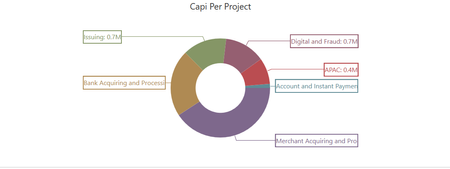
BI Viewer Pie Chart Labels Not Displaying Properly in Dashboard – Any Workaround?
Hello Everyone, I created a pie chart using the BI Viewer in OneStream. The chart displays correctly when viewed directly in BI Viewer. However, once I add the pie chart to a dashboard, the labels are not fully displayed as expected. Has anyone experienced the same issue? Is this a known limitation when embedding BI Viewer components into dashboards? Is there a setting I might be missing? Do you know of any workaround to force labels to display properly? Any feedback or suggestions would be greatly appreciated. Thank you!21Views0likes0Comments
Workflow Status Details including user names
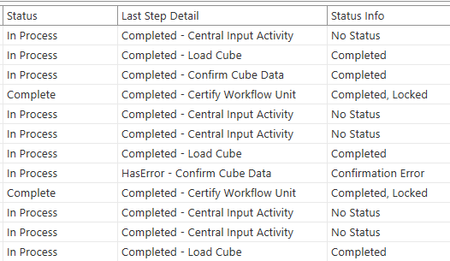
I'm looking to add user names to the workflow status report we've already created but I can't seem to find where in the database tables that info is tracked. We've manipulated the WorkflowStatus method query to pull in the WF steps and the status of each. For example: I reached out to OS support and they pointed me to these two posts, one of which mentions CertifySignOffInstances. Workflow Confirm and Certify Users Info | OneStream Community Displaying user names on the workflow status report | OneStream Community I can also see WorkflowLockHistory as a table but any thoughts on which other tables store workflow status by user info? Appreciate any direction you're able to provide! Thanks!28Views0likes0Comments
Narrative Reporting Issue
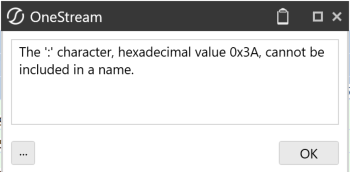
Hello! Has someone tried Narrative reporting in 9.1 version? I am currently experiencing issues: 1.- Inserting charts/Advanced Charts / Reports if someone could insert an exaple on how they have done it. 2.- I cannot vie the artifacts and acces them, this message keeps popping up (and the names are fine) Thank you so much for the help!!190Views1like2Comments