How to call Data Adapter in a Business Rule?
I'm working with a BI Viewer and working out how to sort the dates within the Time data set. Is their an API that allows to call the data adapter used within a dashboard? Currently the dates on the X-Axis are disorganized and are being sorted based on M1x, M2x which causes October (M10) to precede after January (M1).Solved7KViews3likes8CommentsBI Viewer - Font Sizes
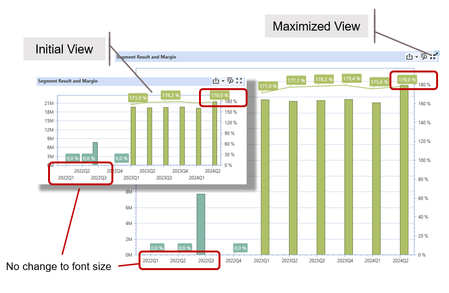
Hello, We have a use case that makes extensive use of dashboards. The BI viewer component seems like an attractive solution for this. However, we have been struggling to fully adapt it to our needs. One problem is the (seemingly) fixed font size for table content and axes. A particularly surprising effect is that there is no change in font size when maximizing a specific component. This could be a very smart feature, e.g. during a beamer presentation. Unfortunately it only increases the white spaces, while the fonts are identical. This seems almost like a bug - or am I missing something? (screenshots are original scale!) Thanks, Frank.4.3KViews3likes7Comments
Advanced chart formatting
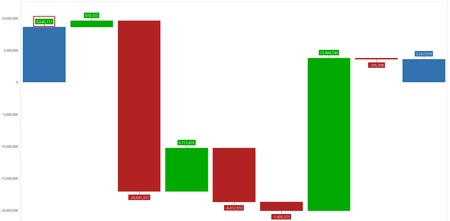
Hello everyone, We have a few dashboard chart questions. 1. Waterfall chart Does anyone know if there are ways to change the data label text and background color? For example, change all the data labels to black text and remove all the red, green, and blue background colors. 2. Bar/Stacked Bar chart Is there a way to make the data label within the bar more readable? For example, have the data label in text color black with a white background. Any tips or advice are much appreciated!2.9KViews3likes3Comments
Bridge Origin Import to BeforeElim/Top with journal entry details
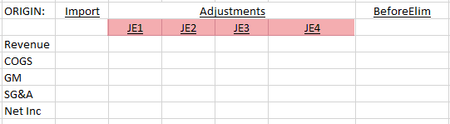
Hello! A user has requested a CV/report that starts with imported data and layers on journal entry details by each specific JE. High level it would look something like this with the pink highlights representing the detailed balances of each individual journal entry: Have any of you built something similar? Is there an easy way to get the journal entry name details into a CV? I’m guessing I can get them from the JournalHeader and JournalLineItem database tables but wondering if you’ve ever worked on a request like this. I've also submitted a support ticket so we'll see. Thanks!1.4KViews2likes2Comments
SQL Table Editor - Query - External DataBase
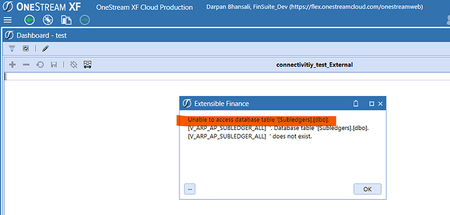
SOURCE: ONESTREAM CHAMPIONS Hi Team, do we need to put some specific settings to connect the External DataBase… when we are connecting it via SQL Table Editor. i am getting the below mentioned error ( where as the same connection works via Data Adaptor ) Subledgers _ External.png977×467 21.7 KB Regards and Thanks Darpan Bhansali6KViews2likes10Comments
MergeAndCenterColumnHeaders in Cube Views
Hi, Anyone on Version 8 who's actually tried to use this 'enhancement' feature in Cube Views? We requested this on Ideastream a long time ago with a lot of support. I can see this command is now available in the header format dialog; however, it would appear that the only thing it does is change the header from left justified to center view. There does not seem to be a way to actually 'merge' column headers, despite the fact that it's called "MergeAndCenter". Even the system documentation appears to confirm this behavior. Someone please tell me I'm missing something here and it actually is possible to merge column headers, because we really really wanted this feature. Thanks764Views2likes11Comments
SQL query to retrieve base members of a hierarchy
Hi, All Just wanted to share a SQL query I wrote to retrieve base members and parent of a given hierarchy from within a dashboard grid. (Note that the parameter supplies the member ID of the top member in the chosen hierarchy.) Any thoughts on how to improve are welcome! With TEST AS (SELECT childid, parentID, dimtypeid, 0 AS level FROM relationship WHERE parentid = |!SelectDimension!| UNION ALL SELECT ft.childid, ft.parentID, ft.dimtypeID, level + 1 FROM relationship ft JOIN TEST d ON ft.parentid = d.childid ) SELECT m.name As Child_Name, m.description as Child_Description, P.name AS Parent_Name, Description as Parent_Description FROM TEST d JOIN relationship a ON d.parentid = a.parentid JOIN member AS M ON a.childID = m.memberid JOIN member as P on d.parentid = p.memberid where NOT EXISTS ( SELECT NULL FROM TEST d WHERE d.parentID = m.memberID ) group by m.name, m.description, P.name, p.description8.3KViews2likes12Comments
SQL Editor - How to enable access to end user to allow them to Insert/Delete/Save in the SQL table
Hello Experts, I have simple SQL editor component in a DB. as Admins we can use the toolbar to Insert/Delete/Save in the SQL table behind the scene. for end users it is disabled is there any other setting that needs to turned on? Appreciate the help.Solved3.4KViews2likes3Comments
Dependent parameters in a spreadsheet having cube view connection
Hi All, We have a technical blocker for one of the report in our planning application. This report has UD2, UD3 and account as parameters. On the dashboard, this report appears fine when user seamlessly selects the parameters from the interface. There is some dependency between these user selection options which is handled through XFBR rule. For a specific UD3 member, a certain list of UD2 members will appear for selection, for another UD3 member a different set of UD2 members will show up and so on. We have the same report available as an offline report having the same cube view connection. In the spreadsheet, this dependence is causing a blocker and parameter pop up for UD2 appears blank showing no options for user to select values. Kindly guide us on how this dependence of parameters can be handled in the spreadsheet having the same cube view connection.1.8KViews2likes2CommentsBI Viewer component in Powerpoint extensible document
Hello, Does anyone have experience linking a dashboard chart built with BI Viewer in Powerpoint via alt text? We tried including it as a BI Viewer or Chart component, but the chart does not appear in the Powerpoint. {XF}{Application}{BI Viewer}{MyComponentName}/{XF}{Application}{Chart}{MyComponentName} PageNumber=1, CropLeft=0, CropTop=0, CropWidth=0, CropHeight=0, Zoom=100, MaintainAspectRatio=True, FillMode=Width, Anchor=TopLeft, IncludeBorders=False Much appreciate it if anyone could share some tips!2KViews2likes2Comments