The OneStream Community is temporarily frozen until June 29th due to the ongoing maintenance. Please read the blog post here to learn more.
dashboards
655 Topics
Error in Navigation Center
I get the following error on version PV910 SV100 on a 9.2.0 install when running the Dashboard Maintenance Audit reports for Parameters, this one is for the Updated report. There was an error processing report 'rpt_DashboardMaintenanceUpdated_ONC'. Error processing DataSet ‘DashboardMaintenanceUpdated’. Error executing Workspace Assembly Service class ‘Workspace.ONC.Assembly_ONC.ServiceFactory.The conversion of a nvarchar data type to a datetime data type resulted in an out-of-range value. And the Assembly is encrypted, so can't take a look under the bonnet. Any ideas?Solved31Views0likes1CommentIssue in Web Content and File Viewer component to directly open a HTML file in a browser
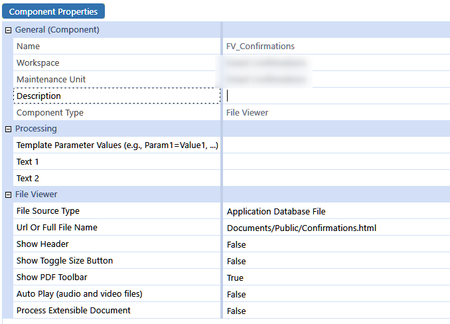
Dear community, I currently have an html document which is located in the file Explorer under "Documents/Public" folder. I am trying to get this HTML document to be presented into the components, embedded in a dashboard. However, with either a Web Content component or a File Viewer component (which will pinpoint to this specific file in Application Database File, as soon as I open the dashboard, it will load the html page into my default browser... I am using OS v8.1 ... is it a known bug or the expected behaviour ? What is even more strange, directing the Full File Name to a URL will correctly open a document in a dashboard ... Regards,3.4KViews0likes16CommentsT-Doc for Account Reconciliations
Hello, our company recently adopted OneStream for our account reconciliation tool. Our current process is that the account reconciliations are tracked within excel. My current issue is that for one account, I am reconciling multiple entities within one excel document. I want to be able to integrate these T-docs within my excel file for easy upload to OneStream. Whenever I do this for one entity, it seems to work well. However, if I add multiple T-Docs, OneStream seems to only pull the first T-Doc within the file instead of looking at the unique identifiers to pull the correct T-Doc. Is there a solution to this? Thanks!19Views0likes0Comments
Need help on Clear Specific member data
Hi Team, I need your support regarding an issue I am facing with the dashboard-driven data clearing logic. Requirement: When specific Dimension/Members are selected in the dashboard, the attached code is expected to execute in Preview and Clear modes to remove the corresponding data. Issue Observed: The code runs successfully during execution. I can see the log message indicating that the data is “cleared.” However, the actual data is not getting cleared from the system. This suggests that while the process is triggering correctly, the clearing operation is not impacting the underlying data as expected. Could you please review and provide your suggestions on what might be causing this issue or any potential gaps in the approach? Let me know if you need additional details or logs from my end. Thanks in advance for your help. api.Data.SetDataCell(memberScript, amount, isNoData, isDurableCalculatedData) Imports System Imports System.Collections.Generic Imports System.Data Imports System.Data.Common Imports System.Globalization Imports System.IO Imports System.Linq Imports Microsoft.VisualBasic Imports OneStream.Finance.Database Imports OneStream.Finance.Engine Imports OneStream.Shared.Common Imports OneStream.Shared.Database Imports OneStream.Shared.Engine Imports OneStream.Shared.Wcf Imports OneStream.Stage.Database Imports OneStream.Stage.Engine Namespace OneStream.BusinessRule.Finance.EPM_Clear_Specific_Scenarios Public Class MainClass Public Function Main(si As SessionInfo, globals As BRGlobals, api As FinanceRulesApi, args As FinanceRulesArgs) As Object Try '======================================== ' VALID FUNCTION TYPE '======================================== If api.FunctionType <> FinanceFunctionType.CustomCalculate Then Return Nothing End If '======================================== ' PARAMETERS '======================================== Dim entityName As String = GetParam(args, "Entity") Dim scenarioName As String = GetParam(args, "ParamSScenario") Dim timeName As String = GetParam(args, "Time") Dim con as String="Local" Dim accountName As String = GetParam(args, "Account") Dim flowName As String = GetParam(args, "Flow") Dim originName As String = GetParam(args, "Origin") Dim icName As String = GetParam(args, "IC") Dim ud1 As String = GetParam(args, "UD1") Dim ud2 As String = GetParam(args, "UD2") Dim ud3 As String = GetParam(args, "UD3") Dim ud4 As String = GetParam(args, "UD4") Dim ud5 As String = GetParam(args, "UD5") Dim ud6 As String = GetParam(args, "UD6") Dim ud7 As String = GetParam(args, "UD7") Dim ud8 As String = GetParam(args, "UD8") Dim mode As String = GetParam(args, "Mode", "EXECUTE").ToUpper() Dim confirmDelete As String = GetParam(args, "ConfirmDelete", "NO").ToUpper() api.LogMessage("=== DATABUFFER CLEAR START ===") api.LogMessage("Mode=" & mode & " | ConfirmDelete=" & confirmDelete) '======================================== ' VALIDATION '======================================== If String.IsNullOrWhiteSpace(accountName) Then Throw New Exception("Account parameter is required.") End If '======================================== ' BUILD FILTER '======================================== Dim filter As String = "E#" & entityName & ":S#" & scenarioName & ":T#" & timeName & ":A#" & accountName If Not String.IsNullOrWhiteSpace(flowName) Then filter &= ":F#" & flowName If Not String.IsNullOrWhiteSpace(originName) Then filter &= ":O#" & originName If Not String.IsNullOrWhiteSpace(icName) Then filter &= ":I#" & icName If Not String.IsNullOrWhiteSpace(Con) Then filter &= ":C#" & "Local" If Not String.IsNullOrWhiteSpace(ud1) Then filter &= ":U1#" & ud1 If Not String.IsNullOrWhiteSpace(ud2) Then filter &= ":U2#" & ud2 If Not String.IsNullOrWhiteSpace(ud3) Then filter &= ":U3#" & ud3 If Not String.IsNullOrWhiteSpace(ud4) Then filter &= ":U4#" & ud4 If Not String.IsNullOrWhiteSpace(ud5) Then filter &= ":U5#" & ud5 If Not String.IsNullOrWhiteSpace(ud6) Then filter &= ":U6#" & ud6 If Not String.IsNullOrWhiteSpace(ud7) Then filter &= ":U7#" & ud7 If Not String.IsNullOrWhiteSpace(ud8) Then filter &= ":U8#" & ud8 api.LogMessage("Filter used: " & filter) '======================================== ' GET DATABUFFER '======================================== Dim dataBuffer As DataBuffer = api.Data.GetDataBufferUsingFormula(filter) If dataBuffer Is Nothing _ OrElse dataBuffer.DataBufferCells Is Nothing _ OrElse dataBuffer.DataBufferCells.Count = 0 Then api.LogMessage("No data found for given filter.") Return Nothing End If Dim totalCells As Integer = dataBuffer.DataBufferCells.Count api.LogMessage("Cells found: " & totalCells) '======================================== ' SAFETY LIMIT '======================================== If totalCells > 500000 Then Throw New Exception("Too many records selected (" & totalCells & "). Reduce filter.") End If '======================================== ' PREVIEW MODE '======================================== If mode = "PREVIEW" OrElse confirmDelete <> "YES" Then Dim previewCount As Integer = 0 For Each kvp As KeyValuePair(Of DataBufferCellPk, DataBufferCell) In dataBuffer.DataBufferCells api.LogMessage("PREVIEW: " & kvp.Value.CellAmount) previewCount += 1 Next Dim preview As New StringBuilder() preview.AppendLine("DATA SELECTED FOR CLEAR") preview.AppendLine("====================================") preview.AppendLine("Filter :") preview.AppendLine(filter.ToString()) preview.AppendLine("") preview.AppendLine("Total Cells : " & totalCells.ToString("N0")) 'preview.AppendLine("Total Amount: " & Kvp.value.cellamount.ToString("F2")) api.LogMessage("Total PREVIEW cells: " & previewCount) BRApi.Dashboards.Parameters.SetLiteralParameterValue( si, True, "ETPreviewData", preview.ToString()) Return Nothing End If '======================================== ' CLEAR MODE '======================================== Dim clearedCount As Integer = 0 Dim skippedCount As Integer = 0 For Each kvp As KeyValuePair(Of DataBufferCellPk, DataBufferCell) In dataBuffer.DataBufferCells Try Dim cellPk As DataBufferCellPk = kvp.Key Dim memberScriptBuilder As New MemberScriptBuilder() api.Data.ApplyDataBufferCellPkToMemberScriptBuilder(memberScriptBuilder, cellPk) Dim writeScript As String = memberScriptBuilder.GetMemberScript.ToString api.LogMessage("WriteScript" & writescript.ToString()) api.Data.SetDataCell(writeScript, 0D, True,True) clearedCount += 1 Catch exInner As Exception skippedCount += 1 api.LogMessage("SKIPPED: " & kvp.Value.CellAmount.ToString("F2") & " | Error: " & exInner.Message) End Try Next '======================================== ' SUMMARY '======================================== api.LogMessage("=== CLEAR SUMMARY ===") api.LogMessage("Script :" & filter ) api.LogMessage("Total Cells : " & totalCells) api.LogMessage("Cleared : " & clearedCount) api.LogMessage("Skipped : " & skippedCount) api.LogMessage("=== DATABUFFER CLEAR END ===") Return Nothing Catch ex As Exception Throw ErrorHandler.LogWrite(si, ex) End Try End Function '======================================== ' PARAM HELPER '======================================== Private Function GetParam(args As FinanceRulesArgs, name As String, Optional def As String = "") As String Try Dim v As String = args.CustomCalculateArgs.NameValuePairs.XFGetValue(name) If String.IsNullOrWhiteSpace(v) Then Return def Return v.Trim() Catch Return def End Try End Function End Class End Namespace85Views0likes2Comments
Modifying SQL Editor component in Dynamic Dashboards not working
Hi there, I'm working on a client using the version 8.5.2 and I'm trying to use the Dynamic Dashboards functionallity to modify a property from a SQL Editor Component. The purpose of this logic is to set a dashboard in "ReadOnly" mode when the parameter is set, and in this case, the read only mode I want to achieve is by setting "ShowDataManipulationButtons = False". The BR logic used is the following: If Component.DashboardComponentType = DashboardComponentType.SqlTableEditor Then Dim sqlDefinition = XFSqlTableEditorDefinition.ReadXmlString(si,Component.XmlData) sqlDefinition.ShowDataManipulationButtons = False Component.XmlData = sqlDefinition.WriteXmlString(si) End If I have checked that after this point the component XmlData has changed, however, despite returning the modified component, the changes as not being displayed in the dashboard. If instead of modifying an SqlEditor component, I change any property on a Button component, the changes are being displayed correctly. Is this a known issue for the version 8.5.2 or is there any specific thing I might be missing for the SqlEditor component? PD: I know I can achieve creating a copy of the component, but it doesn't makes sense to do something twice (or ten times) when there is a way to solve it dynamically once for all. Thank you in advance!103Views0likes4CommentsTitle: Genesis Error Occurring for Some Users with Identical Access Rights
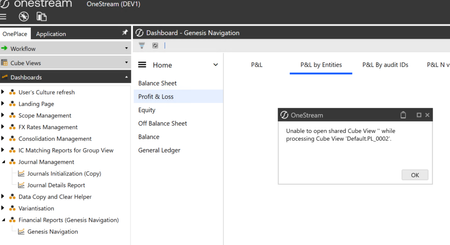
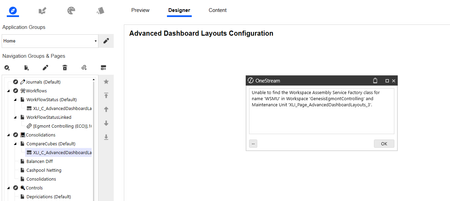
Hello, We are experiencing an intermittent Genesis error. All default values appear to be correctly configured, but the error is triggered for some users and not for others, even when they have the same security roles and access rights. The issue is also not tied to a specific report, as it can occur on different reports depending on the user. Has anyone encountered a similar issue? Example error message: We also noticed that when we remove the link between the Content and Main workspaces, the issue is resolved. However, this workaround does not work for all affected users. Thank you for your help.87Views0likes2Comments
Buttons: Does not aling when using browser.
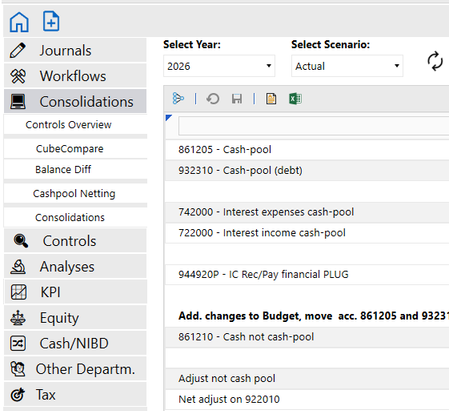
Hi If/when we are going to move to the browser solution, I would like to have my dashboard menu to be align to left. This is how it looks in the app: This is how it looks in browser. It is OK that icons are in colors, but I can't align the text to left. Component properties are the following (with no effect) Any suggestion on how to align it? Regards Ole40Views0likes1Comment
Scheduled Monthly Reports
Does anyone know where I can look to start getting a better understanding of automatically scheduled monthly reports or packages? We have several Business Units that all look at the information a bit differently. Any suggestions on what has worked for your Business Leaders in regards to what they see each month?46Views0likes1Comment
Environment Application Count Dashboard
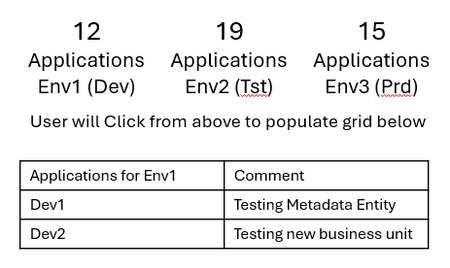
Our users are wanting to know how many applications are in each environment, then show the applications under each environment by clicking on the environment, plus the ability to enter a comment next to the application. Similar to the Cloud Admin Tool, Applications on top, user would click the environment, the grid would then show the applications. A text field next to the application name where they could input a comment. Any thoughts on how this could be done? Appreciate it in advance!38Views1like1Comment