Create Excel spreadsheet from Business Rules
Does anyone know if you can create an Excel spreadsheet from Business Rules? I do not mean a csv file - I need to create multiple sheets. The OpenXMLBuilder object doesn't seem to have anything with writing files. I don't want to use a third-party object as that would require an installation or download. Thanks for any suggestions.Solved13KViews0likes31Comments
TableView - Setting data type to TableView columns
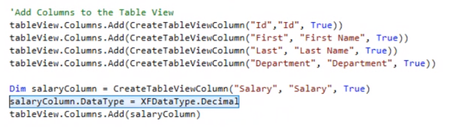
Hey all, I'm struggling to figure out how to define a TableViewColumn to be of type Decimal instead of the default type being Text. I'm in the section where I create a TableViewRowHeader and adding TableViewColumns to it. I can create a new column: Dim myTableViewColumn As New TableViewColumn myTableViewColumn.Name = "Col1" But when I try to set the type to this column, I get an error " Input string was not in a correct format." when trying to retrieve the table: myTableViewColumn.DataType = XFDataType.Decimal Is this syntax correct? I'm assuming that it's in the column definition where I should be defining the datatype but now not so sure. Hopefully someone can point me in the right direction. As a side note, page 15 in the Table Views User Guide makes reference to a function called CreateTableViewColumn. Is this a custom function or part of the OS library. The compiler doesn't recognize this function.Solved6.3KViews0likes13CommentsGet selected value from Combo Box and use it in a Table View
I have a dashboard that has 2 components,. 1. A Combo Box that is populated with a sql query in a Bound List Parameter. 2. A Spreadsheet that is populated with a Table View. The table view is generated using a Spreadsheet Business Rule. How do I pass the selection from the combo box to the table view? Thank you for any suggestions.Solved4.6KViews1like7Comments
Can you add records to a table via an Excel Table View?
Hi everyone, I am trying to add records to a table via an Excel Table View. Using the example in the Table Views documentation, I am able to update existing records; however, any new records added are cleared once I submit the sheet. Is there additional code I can add to allow the Table View to write new records to the table? Thanks! MollySolved3.9KViews1like4Comments
Create CSV FILE
Hi Everyone. I am creating a CSV file with the information from a datatable. The problem is that it generates the file with the columns but without the datatable information. I wanted to know if there is another way to create a CSV file correctly. Dim strFilePathFull_AllocationDetails As String = strFilePath & "/" & strModelName & "_" & strScenarioName & "_" & strTimeName & "_" & dtAllocationDetails.TableName & ".csv" Dim xfeFile_AllocationDetails As XFFileEx = dtbSH.DataTableToFile(si, dtAllocationDetails, strFilePathFull_AllocationDetails, Nothing) And my function: Public Function DataTableToFile(ByVal si As SessionInfo, ByVal dt As DataTable, ByVal strFilePath As String, ByVal listColToSkip As List(Of String), ByVal Optional strSeparator As String = ",") As XFFileEx Dim strDt As String = Me.PrintDataTable(si, dt, strSeparator, 0, False, listColToSkip, """") Dim bytes() As Byte = System.Text.Encoding.UTF8.GetBytes(strDt) Dim fileinfo As New XFFileInfo(fileSystemLocation.ApplicationDatabase, strFilePath) Dim xfFile As New XFFile(fileinfo, String.Empty, bytes) BRApi.FileSystem.InsertOrUpdateFile(si, xffile) Dim xfeFile As New XFFileEx(xffile, DataAccessLevel.AllAccess, False) Return xfeFile End FunctionSolved3.3KViews0likes5Comments