The OneStream Community is temporarily frozen until June 29th due to the ongoing maintenance. Please read the blog post here to learn more.
training
48 TopicsAnd the winner is...
:party_popper::trophy: Attention, valued customers! We're thrilled to announce that we've won the prestigious Computer Education Management Association - CEdMA Enterprise Impact Award for 2024! :sports_medal: This isn't just a win for us—it's a win for you. It reaffirms our commitment to delivering top-notch training that drives real results for your organization. This award validates the quality and effectiveness of our training offerings, showcasing our ability to deliver tangible outcomes for your team. It means that when you invest in OneStream’s training, you're investing in excellence. Thank you for trusting us to help you succeed. Let's continue this journey together and strive for excellence every step of the way!560Views6likes0CommentsCourse Announcement: Narrative Reporting Update
Course Description: This course the covers the creation, review, and approval of narrative books by combining live OneStream data, reporting artifacts, and written commentary in a single, trusted interface. You’ll learn how to streamline narrative assembly, reduce reporting risk, and collaborate efficiently. Delivery Types: On-Demand (OD) Duration: 1 hour 30 minutes Availability: Customers, Partners, and Employees Course Link: Narrative Reporting Training110Views2likes0Comments
Learning Paths Are Here: Your Clear, Confident Start to OneStream
Learning a new tool is exciting… but it can also feel overwhelming. You log in for the first time, you see dozens of courses, and suddenly you’re asking yourself: “What do I need? Is this relevant? What is essential? Am I learning the right things, in the right order?” That moment — the moment between motivation and uncertainty — is exactly why we built Learning Paths in OneStream Navigator. Learning Paths give you a guided, structured journey so you always know where to begin, where you’re going, and how you’ll get there. What Is a Learning Path? A Learning Path is more than a list of courses. It’s a curated, role-based progression designed to build capability the same way real OneStream projects unfold. Each Learning Path includes: ✔ A clear description of what you’ll learn What the path covers, why it matters, and the outcomes you can expect. ✔ The intended audience and role So you know instantly whether it matches your responsibilities. ✔ Milestones that mirror real project stages Pre-implementation, design, build, testing, post go-live, and beyond. ✔ Recommended Certification Pathways Discover which certifications best match your Learning Path and career goals with targeted recommendations for every role. ✔ A curated mix of content types On-demand courses Hands-on labs Reporting & dashboard activities Security and data management modules Optional deep-dive electives Certification exam prep resources ✔ Estimated durations So you can plan your learning realistically. The result? A learning experience with clarity, direction, and real momentum. A Quick Look at the Learning Paths Now Available Here’s a high-level view of the Learning Paths you’ll find in Navigator today — each designed around the responsibilities of real OneStream roles: Power User Teaches the essential skills for supporting teams with reporting, dashboards, and data analysis. This path starts with platform fundamentals and builds gradually toward more advanced reporting and dashboard capabilities. OneStream Essentials for Administrators Prepares Administrators to manage, secure, and maintain applications from implementation through certification. OneStream Financial Close for Administrators Equips Administrators to implement and support Financial Close solutions, including Account Reconciliations and Transaction Matching. Developer Provides deep technical instruction in reporting, dashboards, data integration, calculations, and solution design. First Project Readiness for Consultants Equips partner consultants with the foundational skills needed for their initial OneStream project, focusing on essential platform concepts, application build basics, and core security setup. OneStream Consolidation for Consultants Guides consultants through implementing and integrating OneStream Financial Close solutions, emphasizing consolidation, reconciliation, transaction matching, and process automation. Architect A multi-milestone journey covering data design, integration strategy, advanced modeling, performance considerations, and best practice application architecture — all building toward certification. Two Fast Examples: Power Users & Architects Just to give a taste of how Learning Paths help different roles grow: Power Users Their Learning Path helps them: Build platform confidence Understand how to review and analyze published reports Support testing and design discussions Learn dashboards and reporting tools Everything is sequenced from basic to advanced so Power Users grow naturally into reliable team experts. Architects Their Learning Path guides them through: Strengthening core platform expertise Managing data flows and integration Making smart, scalable design decisions Preparing for OneStream certification Architects get the structured development they need to design solutions with clarity and confidence. Ready to Start Your Path? Here’s Your Call to Action. Your next step is simple — and it starts right now. 👉 https://onestream.thoughtindustries.com/learn/dashboard 👉 Select the Learning Path that matches your role 👉 Begin your guided journey toward mastering the platform You don’t have to sort through dozens of courses. You don’t have to guess where to begin. Your path is already built — just step in. How to Access Navigator Through Okta To launch Navigator using your OneStream credentials: https://onestream.thoughtindustries.com/learn/dashboard using your organizational Single Sign-On. Once inside, look for the OneStream Navigator tile on your Okta dashboard. Click the tile — it will take you directly into Navigator without an additional login. Once inside, head to the Learning Paths section to select your journey. If you don’t see the Navigator tile in Okta, reach out to your internal IT administrator or your OneStream system admin to request access.280Views1like0CommentsThe Admin’s North Star: What “Basic Proficiency” Really Looks Like in OneStream
When we talk about “basic proficiency” for new OneStream administrators, what does that actually mean? It’s not about redesigning an application from scratch. It’s about confidently maintaining and modifying the core artifacts that keep your OneStream environment running smoothly—without breaking the architecture your consultants worked so hard to build. This post defines that first base level, why it matters, and how the Getting Started + OneStream Administration combo course helps learners reach it quickly. Why Define Basic Proficiency? Too often, new admins feel pressure to “know everything” on day one. That’s unrealistic—and unnecessary. The real goal is operational reliability: workflows that run on time, data that flows cleanly, and governance that sticks. The combo course is designed to deliver exactly that. In four focused days (or via On-Demand), learners move from platform orientation to hands-on administration, building confidence and competence in the tasks they’ll use every week. What Basic Proficiency Looks Like Here’s the practical checklist for a capable new admin: Dimensions & Metadata: Understand the Dimension Library, add or edit members, and validate changes against reporting needs. Cubes & Extensibility: Confirm cube settings and know how extensibility impacts workflows. Workflows: Create and modify profiles, apply confirmation rules and certification questions, and lock sequences to enforce governance. Data Sources & Transformation Rules: Configure reliable imports and keep transformation logic aligned with source reality. Admin Tools: Use Diagnostics for health checks, Task Scheduler for automation, and System Reports for visibility. If an admin can publish one clean workflow, run imports end-to-end, certify without orphaned steps, and diagnose routine issues, they’ve hit the North Star. Skills Reserved for the Next Level Fundamental application redesign. Deep Planning/Consolidation specifics. Advanced finance rules and bespoke logic. These come later. The first base level is about stability and repeatability. Lab-Driven Outcomes You Should See A working workflow pipeline with confirmation and certification steps. A repeatable data import path using configured sources and transformation rules. A minimal run-book for diagnostics and scheduled tasks. A clear triage routine for common issues. Instructor Perspective For a complete novice with the vision of becoming a OneStream Admin expert, attending this combo course is the only way to make that happen. Whether ILT or on-demand, the course provides the confidence to tackle enhancements, configurations and moments when the OneStream feature ‘just clicks’, providing the understanding of what to do when encountering challenges at the workplace. Knowledge grows exponentially from the overview on day 1 to feeling confident on working through a deep dive of the platform by the afternoon of day 4. The course is aimed at making an impact to your OneStream Administrator role afterwards, providing you with the subject matter expertise required by your stakeholders and end users rely on. Also, helps you prepare for OneStream Certification. Special Q1 Offer: Save 15% on Instructor-Led Training Start the year strong! For a limited time, enjoy 15% off all Instructor-Led Training (ILT) courses in Q1—including the Getting Started + OneStream Administration combo. Use coupon code: ILT15%Q1_2026 at checkout. Enrollment must be completed by March 31, 2026. This is the perfect opportunity to build confidence and capability for the year ahead. Beyond the Base Level: What’s Next? Once basic proficiency is locked in, expand with: Building Basic Reports for visibility. Configuring Core Application Security for governance. Building Dashboards for stakeholder engagement. Navigator Passport supports this progression with unlimited On-Demand access, making it easier to build on your foundation. Ready to hit the North Star? Register for the Getting Started + Administration combo course Apply your discount code: ILT15%Q1_2026 at checkout.94Views1like0CommentsEarn NASBA-Certified CPE Credits with OneStream Training – Finish Strong This Year!
Did you know that select OneStream training courses are NASBA-certified and offer Continuing Professional Education (CPE) credits? If you’re working toward your annual CPE goals, now is the perfect time to take advantage of these opportunities before the year ends. Our on-demand and instructor-led courses not only help you master OneStream solutions but also allow you to earn credits recognized by professional organizations. Whether you need to sharpen your technical skills, deepen your platform expertise, or stay compliant with professional standards, OneStream training has you covered. Why choose OneStream training? NASBA-Certified CPE Credits – Meet your professional requirements with confidence. Flexible Learning Options – Learn at your own pace with on-demand courses or join live instructor-led sessions. Expert-Led Content – Gain practical knowledge from industry professionals and OneStream experts. Don’t wait—the year-end deadline is approaching! Make sure you hit your CPE goals and elevate your expertise at the same time. Act now: Navigate to OneStream Navigator and enroll in training today.205Views1like2CommentsNew Smart Integration Connector (SIC) Training Modules Available Now
The Global Education Services team is busy developing a new training course on the Smart Integration Connector (SIC) for OneStream. We’re excited to share that the first four modules of the new SIC course have been released on Navigator and are available now for FREE for those with access to OneStream Navigator. Read on to learn more about what’s been released thus far and what’s coming soon! Smart Integration Connector: An Overview for Everyone This module provides a comprehensive overview of the Smart Integration Connector (SIC) using everyday language, making it accessible to both technical and non-technical audiences. It covers the purpose, functionality, and value of SIC within the OneStream data integration ecosystem. Duration: 20 minutes Link: Smart Integration Connector: An Overview for Everyone Smart Integration Connector: Setting Up the Environment Setting up SIC in OneStream is done in two stages: Stage 1 entails installing SIC and setting up a Gateway Connection. Stage 2 entails connecting to local data sources. This module focuses on Stage 1 of the process. Duration: 30 minutes Link: Smart Integration Connector: Setting Up the Environment Smart Integration Connector: Connecting to a Database After SIC is installed and a Gateway Connection is established and online, this module walks you through how to connect to a database and check that the data is coming through to OneStream. Duration: 20 minutes Link: Smart Integration Connector: Connecting to a Database Smart Integration Connector: Connecting to a File Server After SIC is installed and a Gateway Connection is established and online, this module walks you through how to connect to a file server for bi-directional file exchange with OneStream. Duration: 20 minutes Link: Smart Integration Connector: Connecting to a File Server Smart Integration Connector: Connecting to a Web API Data Source After SIC is installed and a Gateway Connection is established and online, this module walks you through how to connect to a web API data source for bi-directional data exchange with OneStream. Duration: 20 minutes Link: Smart Integration Connector: Connecting to a Web API Data Source Coming Soon Development of the SIC course continues with more modules coming soon to Navigator. Once all modules are ready, they will be brought together as the SIC course and a micro credential granted upon completion of the course. Subscribe to the Community Blog to receive notifications when new OneStream training modules and courses are available.230Views1like2CommentsNew Course Announcement: OneStream Architecture: Implementing Analytic Blend
OneStream Global Education Services is excited to announce the newly launched OneStream Architecture: Implementing Analytic Blend course available now On-Demand (OD). Course Description Analytic Blend is built into OneStream import functionality. It allows you to blend external data using OneStream cube characteristics. Analytic Blend is typically used for voluminous, operational, and highly transactional data, which is unsuitable for the cube, but for which reporting and analysis in a cube-context is desired. In this course, you will learn how to import, transform, and enrich your data using OneStream’s Stage and Blend engines. You will also learn how to pull your imported data from the external SQL Blend database and report on it responsively in OneStream. In addition, you will learn how to manage performance using FDX, automate imports, apply Blend derivative rule calculations, and use Dynamic Cube Services to enable cube-based reporting using Cube Views and the Excel Add-in. Delivery Types On-Demand (OD) Availability Customers Partners Employees Who Should Take This Course? This course is intended for seasoned Administrators and OneStream Implementers. Duration On-Demand (OD): 12 Hours Prerequisites Prior to taking this course, you should have completed the following course, or possess equivalent knowledge: OneStream Essentials: Getting Started with OneStream OneStream Essentials: Building Basic Reports OneStream Essentials: Implementing OneStream Companion Courses Two companion courses to the Implementing Analytic Blend course have also recently been released on OneStream Navigator: Workspace Assemblies: Quick Start Guide A quick start guide to using Workspace Assemblies in OneStream. Explore how rule and service logic are called from Application Artefacts and organized and dispatched from the Application | Workspaces area. Approximate Duration: 30 minutes Introduction to Derivative Rules This module provides an introduction to Derivative Rules. Derivative Rules can be applied during Import to derive new and enhanced data from the imported records. Learners will explore the creation and configuration of derivative rules, understand rule expression syntax and logical operators, and learn how to sequence and troubleshoot rules. By following the illustrated examples, participants will gain the skills needed to create derivative rules for both standard and Blend imports. Approximate Duration: 1 hour, 40 minutes Micro Credential Upon completion of this course a micro credential will be issued. Important Links Register via OneStream Navigator: On-Demand (OD) Course Description PDF Pricing and Learning Paths PDF216Views1like2Comments
Silence the Slack, Master the Stack: Deep Learning Through Instructor-Led Training
We all know it can be a challenge to fit training into your busy daily routine. Between back-to-back meetings, chat messages from co-workers, and the long list of tasks that are due by the end of the week. For some learners, this is where on-demand training proves particularly helpful. You can fit it into your schedule when you have free time. But what do you do if you never get that coveted free time? This is where https://onestream.thoughtindustries.com/pages/instructor-led-training takes center stage. Block off your calendar (with permission from your boss, of course), mute the chats, and focus on LIVE learning. Attending a live training course with expert instructors allows you to devote your undivided attention to taking that next step in your OneStream journey. https://onestream.thoughtindustries.com/pages/instructor-led-training provides you with the ability to ask clarifying questions and get immediate answers and feedback. It allows you to gain exposure to how other users in the same (or differing) industries use OneStream. For example, you might participate in a live troubleshooting session or collaborate on case studies with peers from other industries. And best of all, it allows you, as the learner, to be more engaged due to the scheduled class time, group discussions, and real-time interaction with the instructor. If you are new to OneStream or are looking to deepen your knowledge, consider learning in a way that allows you to be fully immersed for a few days and stay present. Earn a micro-credential badge (a few examples below) to post on LinkedIn and CPE credits, too. Now through the end of 2025, we are offering special savings! Save 15% on PUBLIC INSTRUCTOR-LED TRAINING classes with the coupon code: ILT15%EXCLUSIVE Enjoy a 50% discount on the OneStream Certified Associates (OCA) - Administration R2 Exam or the OneStream Certified Specialist (OCS) - Reports & Dashboards Exam. To redeem, open a GES ServiceNow ticket with the Credentialing team. Note: This offer cannot be combined with other discounts. The coupon is only valid through December 31, 2025. Enrollment must be completed before the listed expiration date, but the class can be scheduled for Q1 2026. Exams must be taken by December 31, 2025. Check out our instructor-led training calendar in OneStream Navigator! Sign in to Navigator and select Instructor-Led Training at the top of your dashboard: Search for the course of your choice either by typing in the name or using a filter: You will see the location if the event is in-person, or it will be indicated if the course is live-virtual. You will also see the date of the first day of training and the start time, adjusted for your current time zone. Click View Details to start the registration process. Questions? Comment below! Or reach out to us anytime via a GES (Global Education Services) ServiceNow support case. We look forward to seeing you in the classroom soon!71Views1like0Comments
Design Decisions Training Course: "To Take or Not to Take?"
https://onestream.thoughtindustries.com/learn/enter_password?return_to=%2Fcourses%2Fonestream-architecture-design-decisions-instructor-led-09y0 is a one-day, instructor-led virtual training designed for experienced implementors, architects, and aspiring architects. Strong administrators who act as internal consultants will also benefit from this course. Think of it as fitness training for OneStream architects! This course shifts from traditional teaching to coaching, guiding students through simulations of real-world scenarios that architects and application designers face. From application reviews to use case requirements and collaborative group discussions, you'll develop design decisions and ideas to strengthen your critical thinking skills essential for successful implementations. You'll practice articulating options and design decisions to a simulated client (me!) in mock design discussions, receiving real-time feedback to sharpen your skills without the risk of "blowing the deal." This course provides an "architect gym" to work out strategies, articulate design decisions, and apply collaborative critical thinking through common use cases. You'll discover the power of true collaboration with other students, gaining new insights, ideas, and communication styles that will broaden your perspective and strengthen your thinking. Whether you're currently an architect or aspire to be one, this course is designed to stimulate and empower "Architect Thinking" and challenge you to grow beyond your personal or company "echo chamber." Where else can you get coaching from a client's point of view? Just like going to the gym strengthens you physically, this course provides a "mental gym" to enhance your architectural thinking! We look forward to training, coaching, and being your “client” in this breakthrough course! Reserve your virtual “seat” and https://onestream.thoughtindustries.com/learn/enter_password?return_to=%2Fcourses%2Fonestream-architecture-design-decisions-instructor-led-09y0! Upon completion of this course a https://www.credly.com/org/onestream-software/badge/design-decisions will be issued. (NA/LATAM/APAC) - Tom Linton Principal Instructor (EMEA) - Matt Grundey Principal Instructor138Views1like1Comment
Tech Talks: An Architect's Perspective - Design Principles replay now available
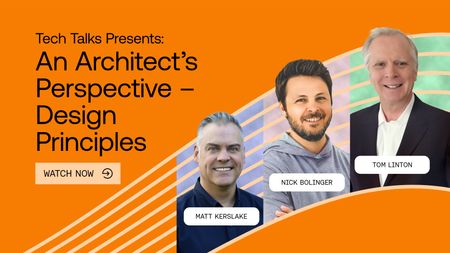
The August edition of Tech Talks, An Architect's Perspective - Design Principles is now available for replay. On this episode, Nick Bolinger joins Tom Linton and Matt Kerslake to discuss the sound design principles that make up the CPM Blueprint and how those concepts can be used for training, reference and the start of a global-friendly design. The link below will expire on 9/18 so watch now! You can always watch this episode and all Tech Talks on Navigator as part of your Passport subscription. https://thoughtindustries-1.wistia.com/a/uwemw9pm43z15cu198Views1like0Comments