Recent Content

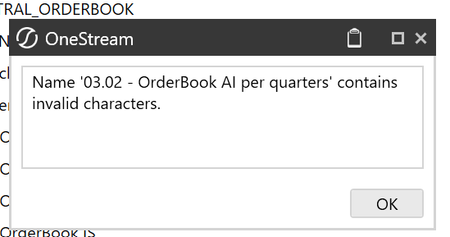
Form Template Naming Restrictions
Hello, Since when are Form templates no longer allowed to include a dot (.) or a hyphen (-)? We built our naming convention using dots, and it is now unusable under these restrictions. Please confirm when this change was introduced and what alternative naming format you recommend. Best regards,7Views0likes0Comments
Create dynamic members using api.ReadDynamicDimensionInfo
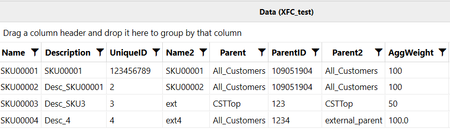
Hi, I'm trying to create dynamic members within a dimension using api.ReadDynamicDimensionInfo. I created a custom table within application database. When the service runs, it creates members under the root member even when I pass the "Parent" member's name. Also, the aggregation weight is being set to 0 even when I've passed numerical values. Table: Dimension Library: I want the members to be created under "All_Customers" Code: It works when I use - CreateAndAddrelationships but not with the api mentioned above. Am I doing something incorrect?17Views0likes1Comment
Impact Calc Status
Hi all, I'm using ImpactCalcStatus to impact an entity based on another entity that has the Sibling consolidation pass set to 2. I can see the status changing during processing, but at the end of the consolidation, it remains CA/CN. Only after running it again does the status change to OK. What am I missing here? api.CalcStatus.ImpactCalcStatus(cubeId, Children.MemberId, Parent.MemberId, consId, scenarioId, timeId); Thanks.9Views0likes0Comments
You’ve Built the Dashboards. Now Get Recognized.
2 MIN READ If you’ve completed the Building Dashboards course, you’ve already done the hard part. You’ve moved beyond standard reporting. You’ve learned how to design dashboards that tell a story. You’ve built views that help stakeholders truly understand what’s happening in OneStream. Now there’s a clear next step. Get Certified. Get Recognized. You’ve already built the skills—certification is how you make them visible. The OneStream Certified Specialist (OCS) - Reports and Dashboards Exam is designed for practitioners who are already doing the work. It validates your ability to translate business questions into dashboards that drive insight and action. If you completed the instructor-led course, you’ve already covered the core concepts the exam is built around: Designing dashboards with purpose—not just visuals Structuring reports to support decision-making Applying best practices that scale across an organization Certification is your opportunity to formalize those skills and showcase them to your team, your leadership, and your organization. Exclusive Offer for Course Graduates To help you take the next step, we’re offering an exclusive certification promotion for Building Dashboards course graduates. You’ve already invested in learning—this is your opportunity to complete the journey at a reduced cost and turn your experience into a recognized credential. Request Your Certification Voucher Because this offer is tied to course completion, the process is simple: Submit a ServiceNow ticket to the Credentialing team Your course completion will be verified You’ll receive a discounted exam voucher to use when you’re ready No promo codes. No guesswork. Just a clear path from learning to certification. This offer is available for a limited time, so if certification is on your roadmap, now is the time to act. Why Certification Matters—Especially Now Dashboards are often the most visible part of a OneStream solution. Executives rely on them. Teams make decisions from them. Expectations are high. Certification signals that you don’t just know how to build dashboards—you understand why they’re built the way they are. It shows that you: Follow proven design standards Build with consistency and intent Can be trusted with high-impact reporting and analytics In many organizations, certified professionals are the ones trusted with the most visible dashboards and the most critical business insights. Certification doesn’t just validate your skills—it elevates your credibility. Ready for What’s Next? If you’ve already completed the Building Dashboards course, you’re closer to certification than you might think. This is your opportunity to take what you’ve learned, formalize it, and put a credential behind your experience. Take the next step today. Request your discounted exam voucher and turn your dashboard expertise into a recognized credential. Submit your request and get certified.16Views0likes0CommentsGenesis - Multiple instances
Hi, I was trying to go back to one of the two Genesis pages (we have two instances in our app) using a button but seems like the following navigation action is not working. XFPage=Dashboard:[container_bag_(App)_(Main)_EU] I've tried using parameters in embedded dashboards to refresh the content and there is no way to go back to the home page. It appears that Genesis assigns the same names for all objects so it's a problem when trying to refer a home page dashboard only related to a specific instance. This is the reason why i renamed the home page Genesis dashboard with a suffix. For now i just opening the dashbaord i want in a new page using OpenInNewXFPage=True, but i prefer to make the back button working.Solved17Views0likes1Comment
Hierarchy Validation tool Security
We have added a power user who has the ability to manage some dimensions, however they cannot access the hierarchy validation tool and receive the error Security Access Error. User XXXX is not authorized to access object 'OneStream Database Server'. I tried changing the access in the workspace but this did not resolve the error. What areas need to be changed to allow access?16Views0likes2CommentsWorkforce Planning Express PV920-SV100 is Live on Solution Exchange!
1 MIN READ The Express Development team is excited to share that Workforce Planning Express (PV920-SV100) was released on March 17! What is Workforce Planning Express? It’s a packaged solution designed to help organizations plan and manage their workforce more easily. It includes leading-practice designs and ready-made configurations so teams can get started quickly. With this solution, you can: Plan position adjustments such as hiring, transfers, and terminations. Manage headcount across the organization. Monitor compensation, benefits, and other workforce-related costs over time. Want to learn more? Read: Review of the release notes and product documentation on the Solution Exchange. If you’re working with customers or prospects Here are a few ways you can guide them to get started: Access the Solution: Workforce Planning Express is available for download on the Solution Exchange. Training Opportunities: End-user training will be available on Navigator in mid-April 2026. Have feedback? If you have feedback or receive it from customers or prospects, please share it with the team via this link so we can continue improving the solution.41Views1like0CommentsPOV Action on OS 9.0
Hi all, I'm experiencing a strange issue on OneStream (rel 9.2.0.18004) that was working as expected under previous release (8.*) In a dashboard I have combos that let me select Scenario and Time, with a "POV Action" that set them back setting - respectively - WFScenario and WFTime parameters. Now, starting from the above mentioned release, whenever I change a combo, the focus moves from the dashboard, opening the selected Workflow. So, the User is experiencing something like: Launch the Dashboard Select Scenario System opens current WorkFlow Open back my dashboard Select Time System opens current Workflow Open back my dashboard Run the action In previous release, the POV Action didn't took the User away from the current dashboard. Have you experienced the same issue ? Is there a workaround to let the user stay in the dashboard ? Thanks in Advance FabioG25Views0likes1CommentONC - IntercompanyDetailAllPlugaccounts - Suppress matches
Hi, We have moved to v9, and the previously used IC matching methods are giving us issues. For this we have a ticket open with support, and they have pointed us towards ONC. We use something very similar to the intercompany all plugs, but then supressing any combinations that are matching. Is there a way to filter the IntercompanyDetailAllPlugAccountsGridView_ONC to suppress the matches? It seems to be working in our development environment, but would be great if we can supress the matches as this is something that will be required. We have tried this: {WS}{GetIntercompanyDetailAllPlugAccountsGridView}{View = |!Members_View_Numeric_ONC!|, SuppressMatches=True} But that does not seem to work. With kind regards, Tim8Views0likes0Comments