The OneStream Community is temporarily frozen until June 29th due to the ongoing maintenance. Please read the blog post here to learn more.
Forum Discussion

NickKroppe OneStream Employee
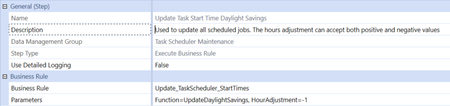
2 years agoOneStream EmployeeSolution to Update Task Scheduler Start Times to Account for Daylight Savings
Hi,
This time of year we have the common maintenance point regarding needing to update task scheduler start times to account for daylight savings. It is expected for the platform to not automatica...

JackLacavaOneStream Employee
2 years agoOneStream EmployeeNice one, Nick!
For the curious, the core of the code looks like this:
Dim dmSchedItem As List(Of DataMgmtScheduleItemEx) = _
	DataMgmtScheduleWcf.GetScheduledJobs(dbConnFW, dbConnApp, False)

For Each schedJob As DataMgmtScheduleItemEx In dmSchedItem

	'adjust the start time based on what the user defines
	schedJob.DataMgmtScheduleItem.StartTime = _
		schedJob.DataMgmtScheduleItem.StartTime.AddHours(Convert.ToDouble(hourAdjustment))

	' Function SaveScheduledJob(dbConnFW As DbConnInfo,dbConnApp As DbConnInfo,isNew As TriStateBool)
	DataMgmtScheduleWcf.SaveScheduledJob( _
		dbConnFW, dbConnApp, schedJob.DataMgmtScheduleItem, TriStateBool.FalseValue)

Next
That surfaces an interesting API to DM jobs that can have interesting applications. Cheers!
Related Content
- 9 months ago
- 2 years ago
- 2 years ago
- 2 years ago